An AI agent can read your files, call tools, browse the web and write commits on your behalf. To do that it needs context: instructions, documents, settings, and often some facts about you. That context makes the agent useful. It also means that anything placed in it can travel wherever the agent sends output, including places you did not intend and never reviewed.
AI agent data leakage is what happens when information inside an agent's context leaves through one of the agent's own outputs: a web request, a commit, a file, a tool call or a log. It usually involves no attacker and no broken password. The agent does exactly what agents do, which is assemble text from what it has been given, and some of that text reaches a third party. The practical consequence is that the useful question is what the agent can see and which outputs are checked by something other than the model, more than whether the vendor is trustworthy.
This guide explains what typically sits in an agent's context, the outbound channels that information can use, why instructions written into a prompt do not reliably stop it, what GDPR says about data minimisation, and which controls work at the program level. It uses one documented case from 2026, in which a coding agent's account email appeared in outgoing web requests, as a dated example. The case is chosen because it is unusually well recorded, and the vendor fixed it quickly. Karma Box, which publishes this guide, sells a workspace that runs AI agents on local hardware. The section describing it is marked, and it is held to the same tests as any other product.
01What AI agent data leakage is, and how it differs from a breach
A data breach usually means someone got in who should not have: a stolen credential, an exposed database, a compromised server. Leakage through an agent works the other way round: nobody breaks in. Information that was legitimately given to the agent goes out through a channel the agent is allowed to use, in a form nobody checked.
This changes where the defence has to sit. Breach prevention focuses on the perimeter: who can log in, which ports are open, which keys are valid. Agent leakage happens inside the perimeter, in normal operation, through actions the agent was granted on purpose. Web search was enabled because the task needed research. Git access was granted because the task was writing code. The leak uses permissions that were correct for the job.
It also changes who notices. A breach often leaves traces that security tools look for, such as unusual logins, mass downloads, or traffic to a known bad address. An agent that puts a piece of personal data into a request header produces traffic that looks like every other request it makes. The first sign may be indirect. In the case described below, the user's first signal was a rise in scam email, and it took a bug report to connect the two.
A third difference is that the information often was never meant to be secret from everyone, only from most people. An email address, a company name, a project codename or an internal URL is fine in the right place. The problem is that an agent does not reliably know which places are right. Data minimisation, discussed later, is the legal name for the remedy: give a system only the personal data its purpose needs, so that what is not there cannot travel.
Many teams treat agent permissions as a list of capabilities: can it browse, can it commit, can it send email. That list matters, and our earlier piece on the private AI capability paradox covers why more capability means more reach. Leakage adds a second list that is easier to forget: what the agent knows while it uses those capabilities.
02What sits in an agent's context
The context of an AI agent is everything the model can read when it decides what to do next. Some of it the user typed. Much of it was assembled by the tool around the model, often called the harness, without the user seeing it. The harness is the program that runs the model, passes it instructions and files, executes its tool calls and returns the results.
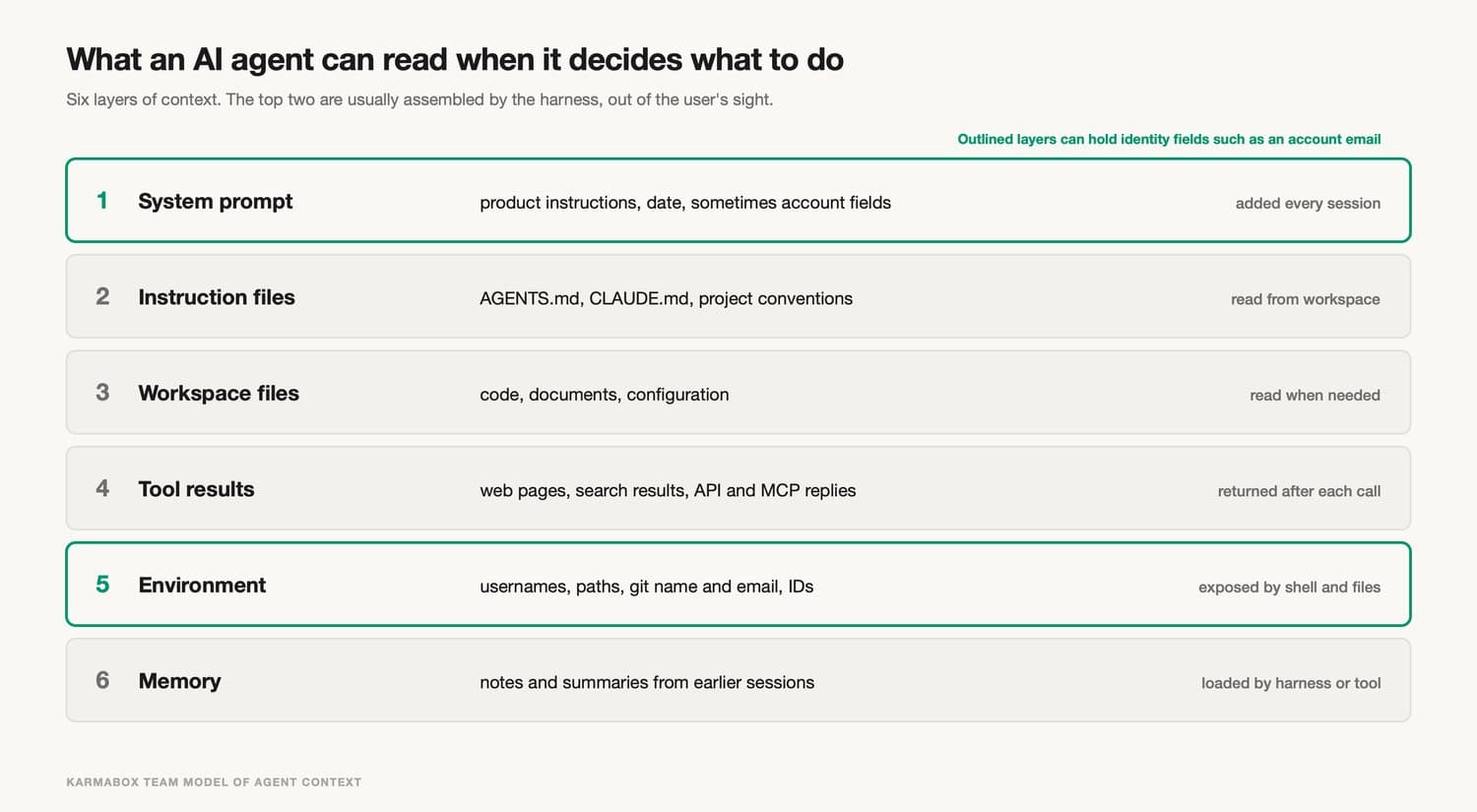
| Layer | Typical contents | How it gets there |
|---|---|---|
| System prompt | Product instructions, current date, sometimes account details | Added by the harness on every session |
| Instruction files | AGENTS.md, CLAUDE.md, project conventions | Read from the workspace or user folder |
| Workspace files | Code, documents, configuration the agent opens | Read when the task needs them |
| Tool results | Web pages, search results, API and MCP responses | Returned after each tool call |
| Environment | Usernames, paths, machine and git settings | Exposed through shell commands and file paths |
| Memory | Notes and summaries from earlier sessions | Loaded by the harness or a memory tool |
Two of these layers are often invisible to the user. The first is the system prompt. In most products it is not shown to the user, and it can change between versions without an announcement. If a harness adds an account field there, the user has no ordinary way of knowing. The second is tool results. Every web page the agent reads and every response from an external tool becomes context too, which is how untrusted text gets a chance to influence what the agent does next.
Memory is a third source that grows over time. An agent that remembers earlier sessions carries forward names, preferences and fragments of past work. That is useful, and it is also a store of material that every later task can draw on. Our piece on agent memory ownership covers who should control that store. Here the concern is narrower: whatever memory holds is available for the agent to emit.
Environment details are the quietest layer. A shell command that prints a path may reveal a username. A git configuration holds a name and an email address. A config file can hold user and machine identifiers. None of these are secrets in the usual sense, and none are normally reviewed before an agent's output leaves the machine.
03How context leaves: the outbound channels
An agent has as many ways out as it has tools. Each tool that sends something to another system is a channel, and each channel has places where text can ride along: a header, a query string, a body, a commit message, a file name.
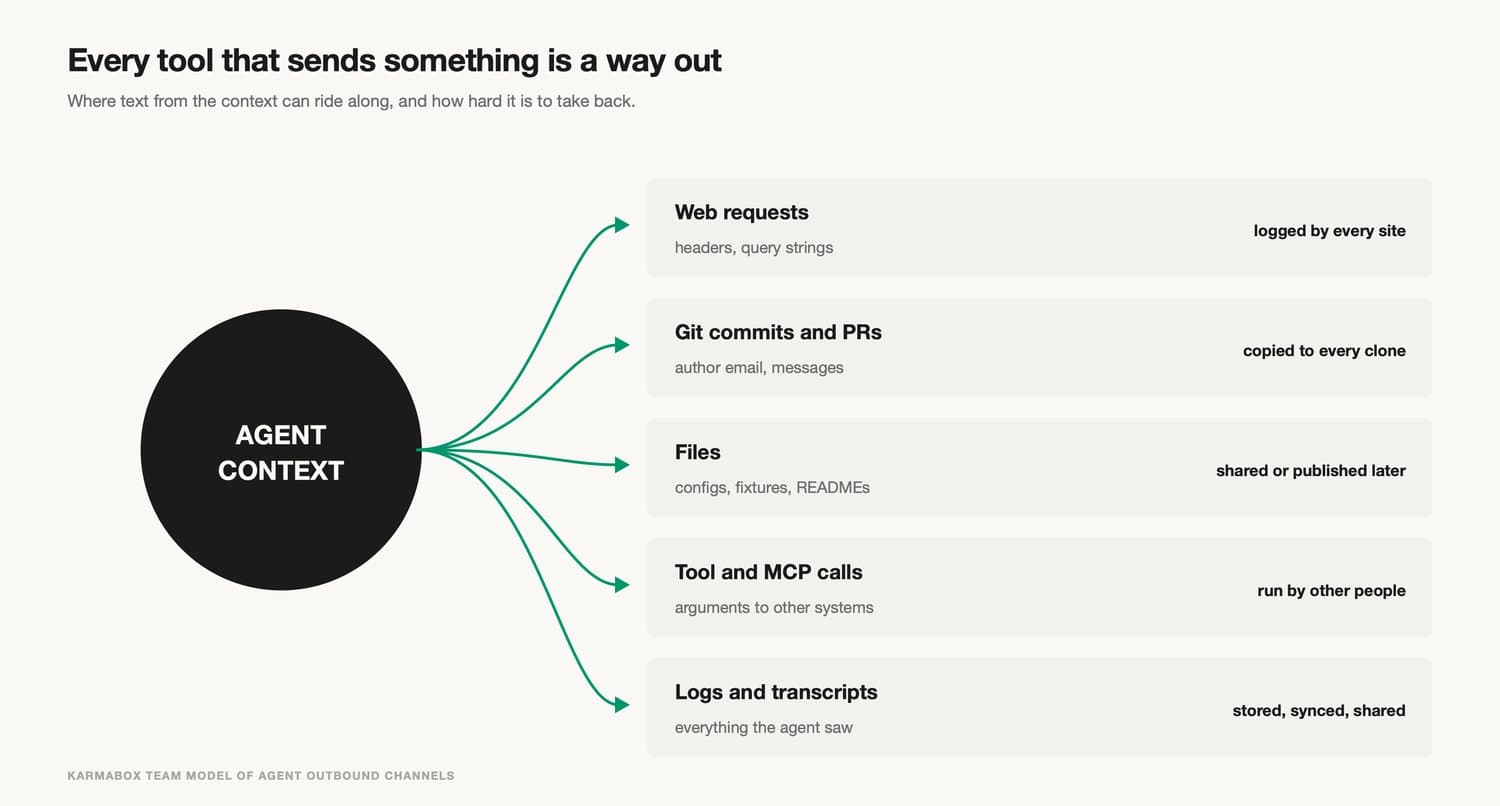
Web requests are the most direct channel. When an agent searches or fetches a page, the request carries headers such as User-Agent, and every site it visits records them. Commits and pull requests are the most durable, because a pushed commit is copied to every clone and is hard to remove from history. Files are the most varied: a generated config, a test fixture or a README can carry a value that was only meant to be read. Calls to other tools, including MCP servers (a common protocol for connecting agents to external tools), send arguments to systems run by other people. Logs and transcripts are the slowest channel, since they may be stored, synced or shared long after the task ends.
What makes these channels hard to police is that the agent writes their contents. A human developer who sets a User-Agent header picks a value once and reuses it. A model generates the value each time, from whatever context it has. The same agent can send a clean header in one session and a header with an email address in the next, depending on what it was given and what it inferred.
Example: an account email in outgoing requests (July to November 2026)
On 25 July 2026, a user opened issue #81138 on the public GitHub repository for Claude Code, Anthropic's command-line coding agent. The report said that Claude Code read the account email from the user's local configuration and placed it in the model's system prompt on every session, as a line stating the user's email address. The reporter found it by examining the shipped code. According to the report, the behaviour was not documented, had no setting to turn it off, and the only documented privacy option, a demo mode, hid the address from the screen but did not remove it from the model's context.
The report then described two consequences the user had seen. In one, the model wrote the address into its own reply without being asked. In the other, it passed the private address to git on ten commits, overriding a no-reply identity that was already configured, and the push was stopped only because GitHub's push protection rejected it. The reporter summarised the problem in one line: "Anything in the model's context is material it can emit." The issue collected comments from other users through October and was still open when this guide was written.
On 5 November 2026, a second issue, #107757, reported the same address appearing somewhere else. The user wrote that Claude Code had put their email in the User-Agent header of web requests made during searches, that they now received dozens of scam emails a day, and that they were moving their company to a different tool. A Hacker News discussion of the report reached 450 points and 157 comments that day. One commenter described the header as having the form of a session name followed by the user's address in angle brackets.
Anthropic responded on the issue the same day. A contributor wrote that a built-in module called cc-plugin-privacy, which "deterministically" blocks this behaviour, had been added in version 2.1.317 and later, that it is enabled by default, and that it can be turned off through the plugins menu. The contributor said they would try to publish the module's source.
The discussion also contained useful disagreement. One commenter argued that the cause was the model itself building a request with the address it found in context, and the harness failing to stop it, rather than a value hard-coded into the search tool. They pointed out that the fix was a deterministic block in the harness, which fits that reading. Another commenter doubted that the scam emails were connected to the header at all, noting that addresses are commonly scraped from other sources. Both points matter. The first explains why the fix worked, and the second is a reminder that a single user's inbox is weak evidence about cause, even when the mechanism is real.
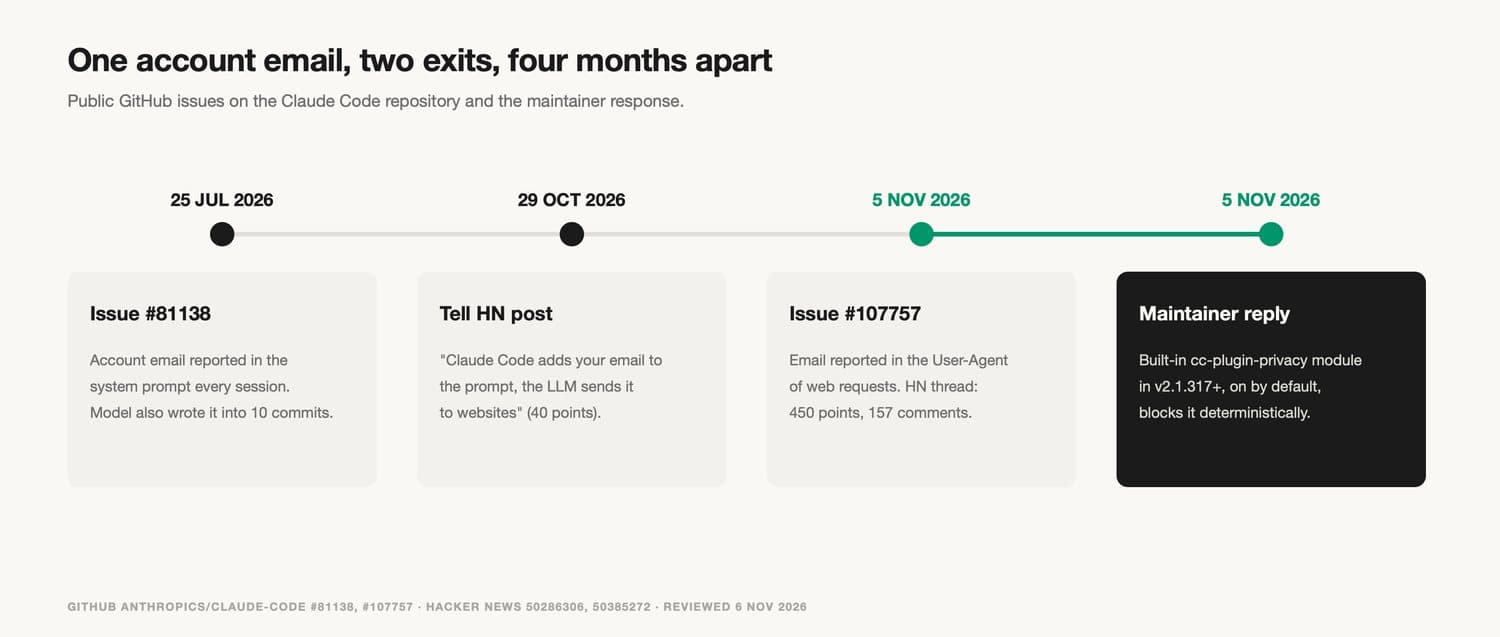
Taken together, the two issues show the pattern this guide is about. The address entered context through the harness. It left through two different outputs, commits and web requests, months apart. Neither exit required an attacker, and the vendor fixed it in the harness itself.
04Why a rule in the prompt does not stop leakage
The most common first reaction to a case like this is to add an instruction: never include my email in requests, never commit with my personal address. Instructions help. They do not close the channel, for three reasons that the July report also made.
The first is the difference between presence and use. An instruction governs how the model should use what it has. It does nothing about what the model has. While the address sits in context, every future output is a chance for it to appear, and the instruction has to win every time. The reporter's phrase was that such an instruction "governs use, not presence, and depends on model compliance."
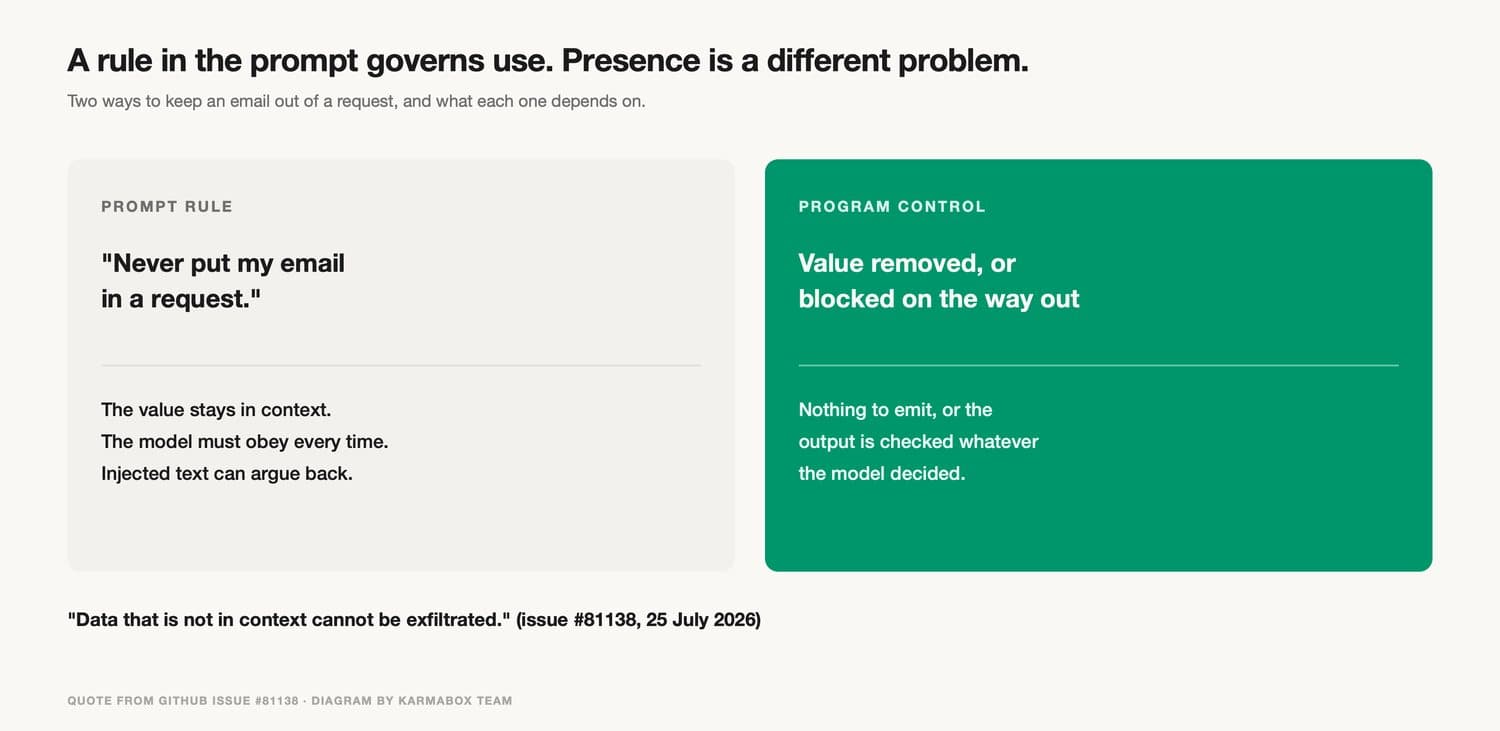
The second is that models are not deterministic. The same model, given the same instruction, can follow it in one session and drift in another, especially in long sessions with many files and tool results competing for attention. That is acceptable for writing style. It is a weak basis for privacy, where one failure is enough.
The third is prompt injection: text from an untrusted source that tries to steer the agent. Every web page the agent reads, every README in a dependency, every issue comment and every tool result is input. Any of them can contain instructions aimed at the model, such as asking it to include some detail in a request to a particular address. An instruction from the user competes with instructions from strangers, inside the same context. The July report put the logical end of this argument plainly: data that is not in context cannot be exfiltrated.
None of this means prompts are useless for safety. They shape behaviour in the common case and make mistakes rarer. A control that depends on the model's cooperation will fail some of the time. A control in the program inspects or blocks output whatever the model decided, so within its scope it holds every time, and that is the standard privacy needs.
05What GDPR expects: data minimisation and protection by design
European data protection law has two principles that apply directly to agent context. They were written long before AI agents, and they fit the problem well.
Article 5(1)(c) of the GDPR sets the principle of data minimisation: personal data shall be "adequate, relevant and limited to what is necessary in relation to the purposes for which they are processed." An email address used to sign in is necessary for authentication. Whether it is necessary inside the model's context, where no feature reads it, is a different question, and the July report argued it was not.
Article 25 turns the principle into an engineering duty. The controller must implement technical and organisational measures "designed to implement data-protection principles, such as data minimisation, in an effective manner." Paragraph 2 adds a default: "by default, only personal data which are necessary for each specific purpose of the processing are processed," and that obligation "applies to the amount of personal data collected, the extent of their processing, the period of their storage and their accessibility." It also says that, by default, personal data should not be "made accessible without the individual's intervention to an indefinite number of natural persons."
| Provision | What it says | What it means for agent context |
|---|---|---|
| GDPR Art. 5(1)(c) | Personal data limited to what is necessary for the purpose | Keep identity fields out of context unless a task needs them |
| GDPR Art. 25(1) | Measures designed to implement principles such as minimisation effectively | Controls in the program, since a prompt instruction depends on the model |
| GDPR Art. 25(2) | By default, only necessary data; covers amount, extent, storage and accessibility | Default-off for identity in context; limits on what tools can send |
| GDPR Art. 25(2), last sentence | Not accessible by default to an indefinite number of people without the person's intervention | Web requests reach an open set of sites; review before personal data goes there |
GDPR has two limits here. GDPR applies to personal data processed by controllers and processors within its scope, and whether a given tool, company or use falls inside it is a legal question. This guide is a technical reference, not legal advice, and it makes no claim about whether any named vendor complied with the regulation. The second limit is practical. The law says what should be true by default. It does not say how a harness should build its context. The rest of this guide is about mechanisms.
For a company using agents at work, the employee's work address is personal data too. A team that connects agents to company accounts inherits the same questions about what goes into context and what leaves it, and should ask them of every tool. Our piece on how agents are getting company identities covers the identity side; this one covers what that identity can leak.
06Controls that work at the program level
The controls that hold up share one property: they do not depend on the model choosing to behave. They decide what the model can see, or they check what leaves before it leaves.
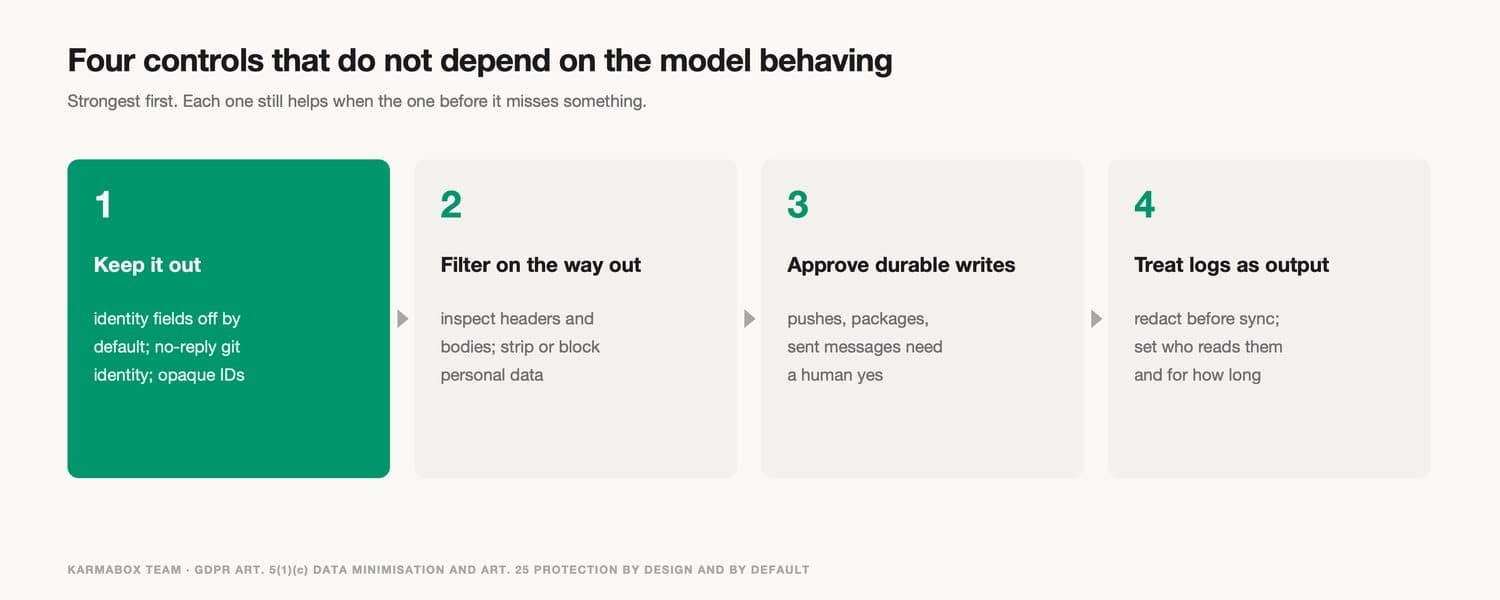
The strongest control is keeping the data out. If a harness does not place an account email in the system prompt, no instruction, injection or drift can make the model emit it. This is the minimisation principle applied at the source. It should be the default for identity fields, with a clear setting for the rare task that needs them. It also extends to the environment. A git identity can use a no-reply address. Paths can avoid personal names. Configuration files can hold opaque identifiers instead of addresses.
When judging a privacy setting, check which layer it acts on. The demo mode in the July report is an example: it hid the address from the screen and the status output, while the address stayed in the model's context, and the model's replies printed to the same terminal that was being recorded or streamed. A setting that changes only the display protects people watching the screen. Protecting third-party sites and repositories needs a change at the context or outbound layer. For any privacy mode, a fair question to the vendor is whether the value is still in the model's context once the mode is on.
The second control is an outbound filter. Requests the agent makes can pass through a layer that inspects headers and bodies before they leave the machine and either removes patterns that look like personal data or blocks the request. The fix described above works this way, according to the vendor's description. A filter is only as good as its patterns, so it complements keeping data out rather than replacing it. It does have one advantage: it also catches values that arrived in context from places nobody planned, such as a document the agent read.
The third is approval for durable writes. Some outputs are easy to undo, like a local draft. Others are not, like a pushed commit, a published package or a sent email. Requiring a human to approve those actions, or at least to see a summary of what will be written, restores the reviewer that autonomous workflows remove. In the July report, GitHub's push protection played this role by accident. Teams can set it up on purpose.
The fourth is treating logs and transcripts as outputs. They often contain everything the agent saw. Where they are stored, who can read them and how long they are kept are the same questions this site has covered for AI conversations. Redacting identity fields before logs are synced or shared closes the slowest channel.
Credentials need their own handling, because a key that leaks through any of these channels is expensive in a different way. The API key self-custody checklist covers where keys should live. For agents, keys belong in a store the harness reads when it makes a call. The model should never see them as text.
07How to test your own agent
A test needs no special tools, only one place you control that records what arrives and a short list of things to look for.
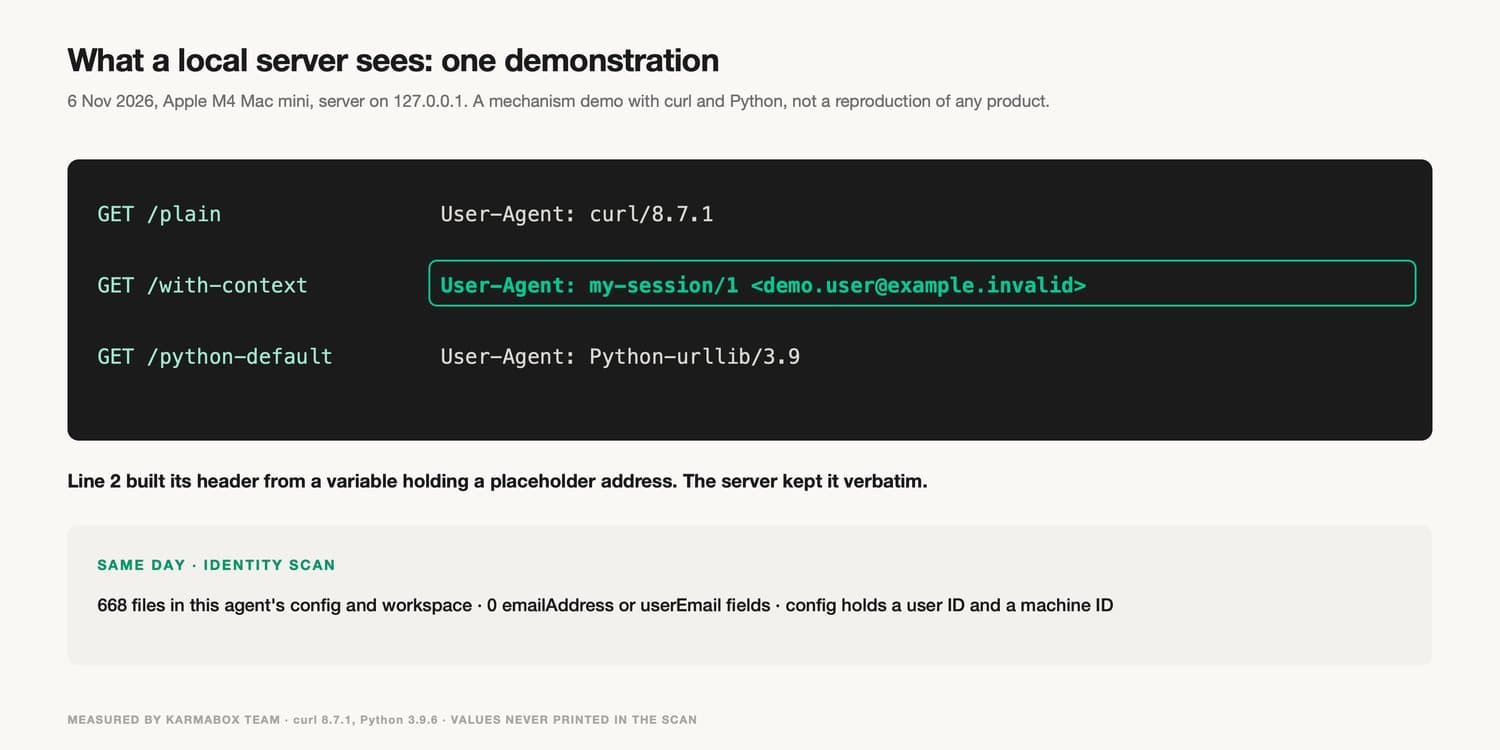
The simplest test is a local web server. Start a small server on 127.0.0.1 that writes every request's headers to a file, then ask the agent to fetch a page from it as part of an ordinary task. Read the log. If anything personal appears in the User-Agent or another header, the channel is open. A Hacker News commenter suggested this approach in the November discussion, and it checks what leaves the machine instead of relying on documentation.
On 6 November 2026, the Karma Box team ran the server half of this test on an Apple M4 Mac mini to show what such a log looks like. This was a demonstration of the mechanism with ordinary command-line tools. It was not a reproduction of the Claude Code behaviour. A plain curl 8.7.1 request arrived with the User-Agent "curl/8.7.1". A second request built its User-Agent from a shell variable holding a placeholder address, [email protected], and the server logged that address verbatim. A default Python 3.9.6 request arrived as "Python-urllib/3.9". The second line is the one that matters: a header carries whatever the program that built it put there, and the receiving server keeps it.
When you read the log, look past the User-Agent. A query string can carry a search term the agent built from a private document. A Referer header can reveal an internal address the agent visited earlier. A request body sent to an API can include whole paragraphs of context. Run the test with a task that touches the kind of data you care about, since an agent working on a toy file has nothing sensitive to send. Repeat it after updates, because the harness and the model can both change between versions without any change on your side.
The second test is a scan for identity fields. Search the agent's configuration and workspace for keys that hold an email or an account name, and for strings shaped like addresses. On the same day, the team scanned the 668 files in the configuration and workspace of the agent used to draft this guide. The scan printed only file names, never values. It found no field named emailAddress or userEmail. The configuration did hold a user identifier and a machine identifier. The only address-shaped string in a text file was a placeholder at example.com in an earlier article, and the other matches were random bytes inside image files. That result says nothing about other products. It shows that the check takes minutes and that its output is specific enough to act on.
The third test is the git identity. Check which name and email the agent's commits will carry, both in the repository and globally, and compare them with what you intended. The July report shows why: the model overrode a correctly configured no-reply identity on the command line. Push protection that rejects commits containing a private address is worth enabling wherever the hosting service offers it.
Finally, read the system prompt if the product lets you. Some tools show it. Others publish it. Where neither is possible, the vendor's documentation of what is added to context is the next best thing, and if there is none, note that too.
08Questions to ask a vendor
A vendor that has thought about the problem can answer these quickly.
Ask what the harness adds to the model's context automatically, and whether account details are part of it. Ask whether that addition can be turned off, and whether turning it off is the default. Ask whether outbound requests pass through a filter, what it checks, and whether its source or rules are published. The November fix was described as deterministic and enabled by default, which is the right shape. Ask whether commits, pushes, published packages and sent messages can require approval. Ask how logs and transcripts are stored and whether identity fields are redacted before they are synced.
The answer to one more question tends to say the most: when you change what goes into context, how will customers find out? The July report was found by reading shipped code. A changelog entry or a documented list of context fields would have made that unnecessary. Teams evaluating several tools can use the same questions for each, and our wider AI vendor sovereignty checklist puts them alongside questions about data residency and exit.
09What these controls do not solve
Keeping identity out of context and filtering outbound traffic address one risk: personal data leaving through the agent's normal outputs. They do not address the others, and it helps to name them separately.
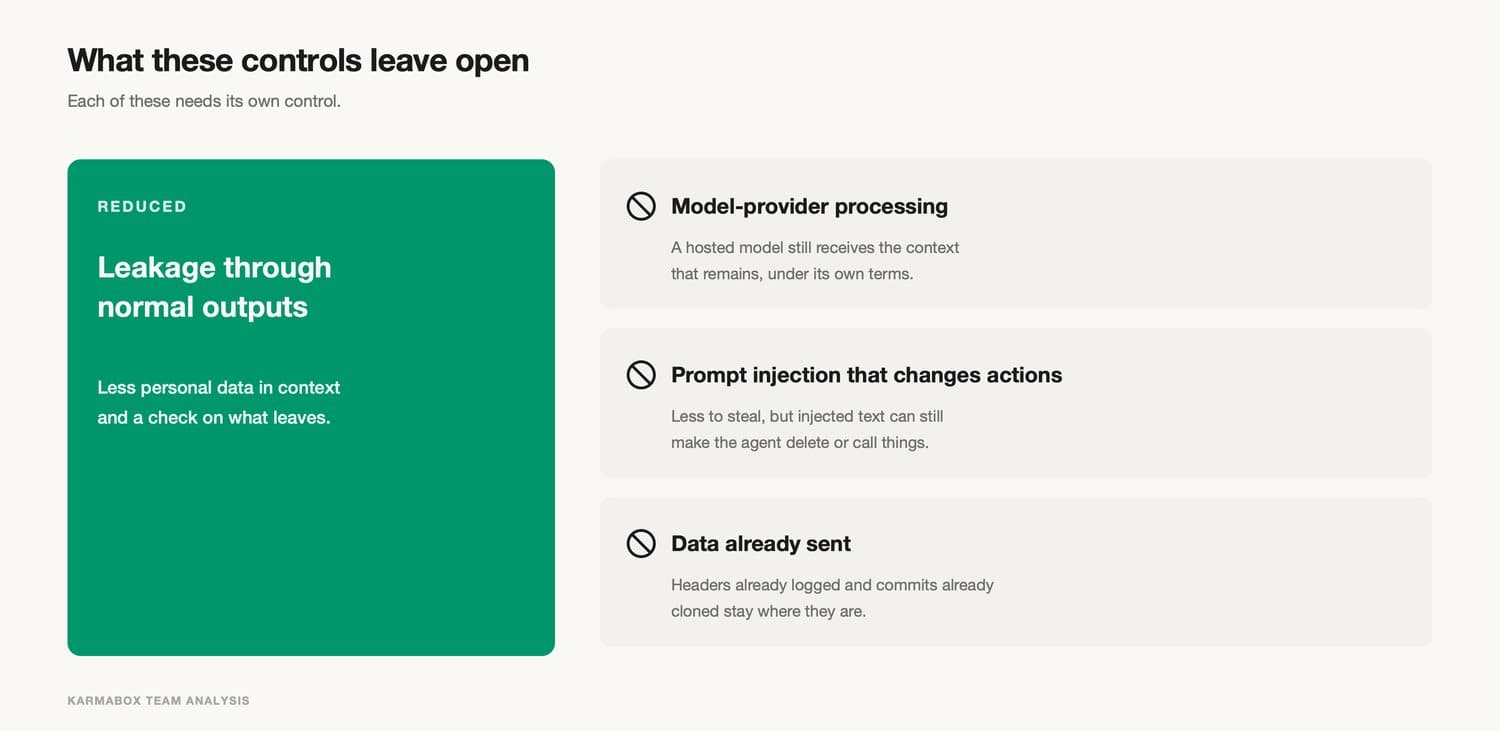
They do not address what the model provider does with the context it receives. If an agent calls a hosted model, the whole context, including any personal data that remained in it, goes to that provider. Its retention and training terms apply. That is a supplier question, and it is the reason some teams run models locally or route sensitive tasks to models they host.
They do not fully address prompt injection. Removing personal data from context means an injected instruction has less to exfiltrate. It does not stop injected text from changing what the agent does, such as deleting a file or calling a tool with harmful arguments. That needs limits on which actions are allowed at all and approval for the consequential ones.
They do not reach data that has already left. A header logged by a thousand sites stays in those logs. A commit that was pushed and cloned stays in the clones. A filter added today protects only the requests made after it.
And they do not remove the need to choose tools carefully. A filter is a list of patterns, and a list can miss things. A new output channel, such as a new tool added to the agent, may not pass through the filter at all. The controls in this guide reduce the chance of a leak. They do not make it impossible.
10What KarmaBox addresses, and what it doesn't (product section)
KarmaBox is a workspace in which avatars (AI agents that each handle a defined kind of work) can run on a device in your own office, as described on the KarmaBox product page. According to that page, each official avatar has its own boundaries, "enforced server-side, not by a prompt", and the platform's access model distinguishes actions that are allowed, actions that require asking, and actions that are denied. The device has 128 GB of unified memory and draws about 170 W. The local AI hardware page compares it with cloud and laptop setups.
The relevant point for this guide is where the boundary sits. A permission enforced by the system is a program-level control in the sense used above. It does not rely on the model choosing to comply. Running the workspace on hardware the team controls also means files, configuration and memory stay on that machine unless a task sends them somewhere. That is the core of what a sovereign AI workspace means in practice. Engineering teams running coding agents can start from the R&D solution page.
The same tests apply to KarmaBox as to any other product. Use the KarmaBox documentation to check what goes into an avatar's context in your configuration, which tools can send data out, and which of those require approval. Then run the local header test and the identity scan described above. KarmaBox also offers cloud options, and avatars that call hosted models send their context to those providers. Multi-model routing can keep sensitive tasks on local models, but that only helps if it is configured to do so. Local hardware also brings its own obligations. Our guide to what happens when a vendor ends a service, AI tool shutdown, covers the exit side of the same choice.
11Frequently asked questions
What is AI agent data leakage?
AI agent data leakage is information in an agent's context leaving through one of the agent's own outputs, such as a web request, a commit, a file, a tool call or a log. It usually involves no attacker. The agent uses permissions it was given on purpose, and some of what it writes reaches a third party.
How did Claude Code send users' email addresses to websites?
According to GitHub issue #81138 from July 2026, Claude Code placed the account email in the model's system prompt. Issue #107757 from November 2026 reported the address appearing in the User-Agent header of web requests. Anthropic said on 5 November 2026 that a built-in module in version 2.1.317 and later blocks this by default. Commenters in the public discussion attributed the leak to the model building the header from context, with the harness not stopping it.
Can an instruction in AGENTS.md or CLAUDE.md prevent an agent from leaking data?
Only partly. An instruction asks the model not to use something it still has. Models do not follow instructions every time, and text from web pages or tool results can try to override them. Removing the data from context, or blocking it in outbound requests, does not depend on the model's cooperation.
What does GDPR say about personal data in an AI agent's context?
GDPR Article 5(1)(c) requires personal data to be limited to what is necessary for the purpose. Article 25 requires measures that implement that principle effectively and, by default, process only the personal data each purpose needs. Whether a particular tool or use is in scope is a legal question for qualified advisers.
How can I check what my AI agent sends out?
Run a small web server on 127.0.0.1 that logs request headers, ask the agent to fetch a page from it during a normal task, and read the log. Also scan the agent's configuration for identity fields, check the git name and email its commits will use, and read the system prompt or its documentation if the product provides either.
Karma Box Team publishes practical guidance on AI sovereignty, workspace control and vendor evaluation. This guide quotes the two public GitHub issues and the vendor's response directly, includes the commenters who disagreed about the cause, separates a local demonstration of the mechanism from any claim about another product, and applies its tests to KarmaBox as well. It does not provide legal advice or assess whether any vendor complied with data protection law. Sources were reviewed on November 6, 2026.