Most AI tools don't end with a bang. They end with an email. A startup gets acquired, the team is folded into a bigger company, and a short note goes out to users: new sign-ups are closed, the cloud service will go read-only on one date, and data will be deleted after another. The note is usually polite. The dates are usually close.
An AI tool shutdown is the period between that announcement and the moment your data is gone, and how a team uses those few weeks decides whether it migrates or loses work. That window tends to be shorter than people expect. It is also less forgiving for AI agent workspaces than for ordinary software, because a lot of what agents rely on (half-finished branches, configuration, integrations, conversation history) never shows up in a standard export.
This guide is for teams that have just received that email, or want to be ready for it. It walks through one real shutdown timeline from November 2026, explains how to read a shutdown notice, sets out what to save first and why, and gives a phase-by-phase plan for the days before deletion. It also covers what European law does and doesn't do when it is the provider, not the customer, who ends the service. If you are choosing a vendor rather than leaving one, our AI vendor sovereignty checklist covers the questions to ask before signing. One disclosure up front: Karma Box, which publishes this guide, sells a workspace that runs on local hardware. The section about it is marked, and it is held to the same tests as everyone else.
01Why AI tools shut down, and why acquisitions are the usual trigger
The AI tools market is crowded and young. Many products were launched in the last two years, often on top of models from a handful of large labs, and many are run by small teams. That combination makes them attractive to buy and expensive to keep running separately. When a larger company acquires one, it usually wants the people and the ideas more than the existing product. The product is either folded into the buyer's own offering or wound down.
For users, the mechanics look similar almost every time. First the door closes to new customers. Then the hosted service is frozen, so existing users can look at their work but can't change it. Then the hosted service is switched off and stored data is deleted. If there is a local or self-hosted version, it is often allowed to keep running for a while, with no promise about how long.
Two things follow from this pattern. The first is that the most dangerous date is often not the deletion date but the read-only date, because that is when unfinished work stops being movable. The second is that the hosted parts of a tool, the ones that felt most convenient, are the first to go. Teams that leaned hardest on the cloud features have the least time.
None of this requires anyone to behave badly. A short wind-down is often a reasonable business decision, and many companies give clear notice. The risk comes from the gap between how long a move takes and how long the notice lasts, and from the fact that most teams have never measured the first number.
02A real example: Conductor's 16-day timeline
On 4 November 2026, TechCrunch reported that Meta had acquired Conductor, a startup whose product let developers run several AI coding agents in parallel, each in its own isolated workspace [4]. The agents themselves came from outside labs such as Anthropic and OpenAI. Conductor's job was to organise them, and its hosted cloud offered isolated machines, webhooks and an API for sessions and workspaces. The company had launched its core product the previous summer.
Conductor's own announcement, quoted word for word by users in the Hacker News discussion that day, set out three dates. On Wednesday 4 November, new users could no longer sign up or download the app. On Friday 13 November, Conductor Cloud would go read-only. On Friday 20 November, Conductor Cloud would shut down and the company would begin deleting cloud user data. "Please export your data before this date," it said. The local app would "continue working as normal for now" and start winding down in early 2027 [5].
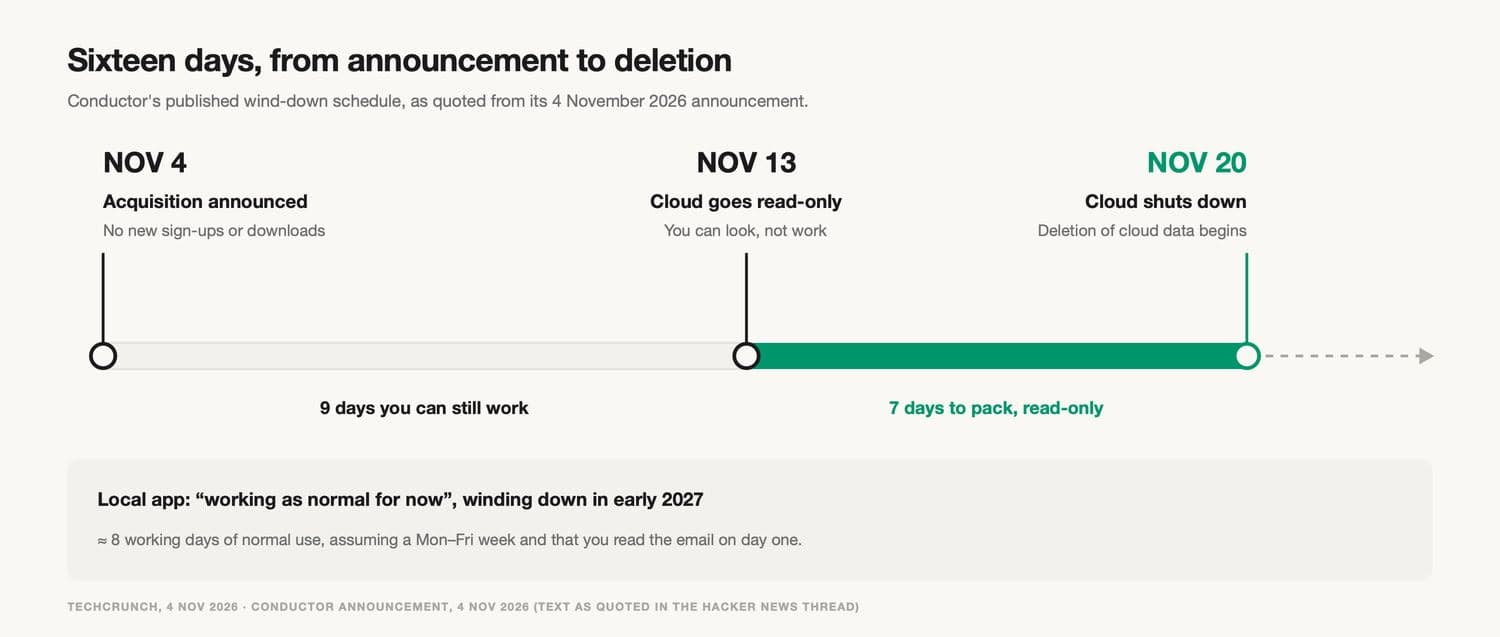
Conductor's published schedule: announcement on 4 November, read-only on 13 November, cloud shutdown and start of data deletion on 20 November 2026.
Count it out and there are sixteen days from announcement to the start of deletion. Only nine of them allow normal work. Assuming a Monday-to-Friday week and that someone read the email on day one, that is about eight working days to finish what is in progress, move it somewhere safe and get a replacement running.
The user reaction is worth reading closely, because it shows what people actually needed. The top comment in the thread said: "The timeline to migrate off Conductor Cloud feels very aggressive. What tooling are other folks moving to?" Another user listed what they would miss: cloud webhooks, a workspace and session API, and isolated virtual machines. They asked for something that could match Conductor Cloud, "not just Conductor Local". A third had decided to go "all in" on the cloud setup the day before the announcement and was now arranging a refund. Within hours, founders of competing tools were posting offers in the thread, one of them promising to import Conductor worktrees as they were [5].
These are individual comments, not survey data. Still, the pattern is clear. Almost none of what people worried about was "data" in the privacy-policy sense. It was working state and plumbing. This guide takes that as its starting point. And to be fair to Conductor: sixteen days with explicit dates and an export instruction is clearer notice than many shutdowns give.
03How to read a shutdown notice
Shutdown announcements are written to reassure, which means the useful information is often in the last few lines. Read the whole thing, then translate each phrase into a date and an action. In Conductor's case, one Hacker News commenter quoted two lines from the announcement side by side, "If you liked Conductor, you're gonna love what's coming" and the date on which deletion would begin, and added: "Oh yeah, gonna love that!" Another compared the layout to earlier acquisitions where the shutdown sat at the bottom of the post. That is normal. It just means the second half deserves more attention than the first.
| Phrase you'll see | What it usually means | What to do |
|---|---|---|
| "New users can no longer sign up or download the app" | You can't reinstall later on a new machine | Save the installer and licence now if you rely on a local version |
| "Will go read-only" | You can view work but not push, edit or run it | Treat this as your real deadline for unfinished work |
| "Will shut down" | Hosted features stop, including webhooks and scheduled jobs | List every automation that depends on the service |
| "We will begin deleting data" | Deletion starts; it may take time but you can't rely on that | Have verified copies before this date, not on it |
| "Will continue working as normal for now" | No end date yet, but an end is coming | Use the time to move, not to settle in |
| "Something new is coming" | A different product, possibly with different terms | Don't plan on it until it exists |
Two lines matter more than they look. "No new downloads" quietly affects existing users: if a laptop dies next month, you may not be able to install the local app again. And "read-only" is not a softer version of "shut down". For anyone with work in progress, it is the deadline.
It also helps to write down what the notice doesn't say. Does it mention an export tool, and what that tool includes? Does it say what happens to backups? Does it confirm when deletion is complete? Missing answers are questions to send to the provider in writing, early, while someone there is still answering.
04Why "export your data" covers less of an agent workspace than you think
An AI agent workspace is the environment where agents read files, run tools, keep notes and produce work for a team. It isn't one dataset. It is a stack of layers, and an export button reaches the top of that stack far more reliably than the bottom.
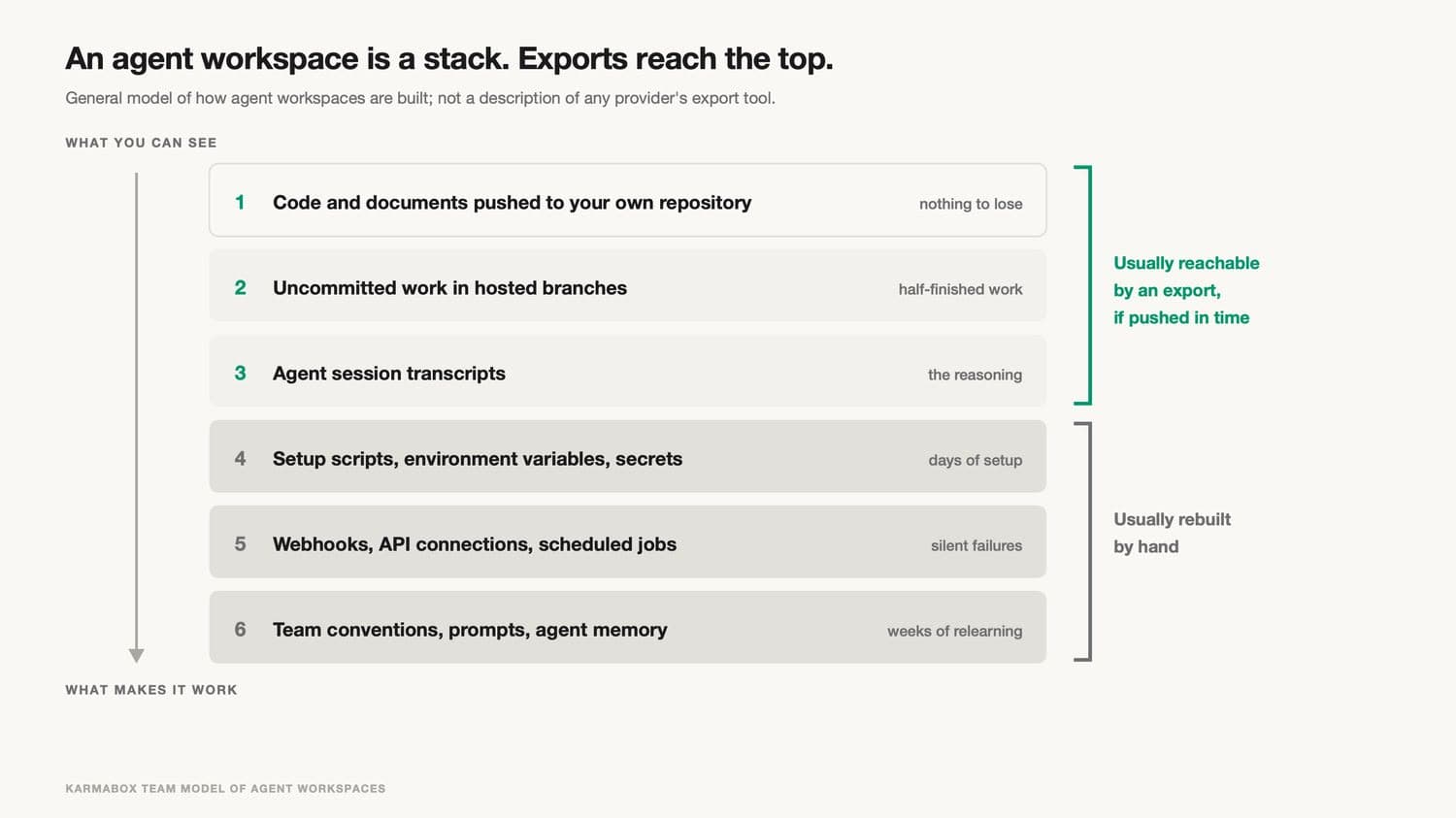
Six layers of an AI agent workspace, from pushed code at the top to team conventions and agent memory at the bottom. Exports usually reach the top three; the bottom three are usually rebuilt by hand.
At the top sits work already pushed to a repository or drive you own. That was never at risk. Below it are branches with uncommitted changes, which live only in the hosted workspace until someone pushes them. Then come session transcripts, the record of what each agent was asked and why it changed what it changed. Lower still are setup scripts, environment variables, model settings and permission rules, which almost never appear in an export and shouldn't include secrets anyway. Then the webhooks, scheduled jobs and API connections that tie the tool to everything else. And at the bottom are the habits a team builds up: prompts that work, review routines, and the agent memory that keeps agents consistent from one day to the next.
The deeper a layer sits, the more it matters to daily work and the less likely an export is to carry it. That is exactly the shape of the Conductor thread. The things users asked about were mostly in the bottom half of the stack.
Transcripts deserve a special mention because they are so easy to undervalue. Six months from now someone will ask why an agent wrote a particular function, and the only answer will be in a conversation. If that conversation lives only in a deleted cloud account, or survives as a 40,000-line log with no link to the code it produced, the answer is effectively gone. It is worth knowing where your AI conversations are actually stored long before anyone sends a notice.
05What to save first
When time is short, the right order is not "most important first". It is "first to become unrecoverable first". Some layers stop being movable at the read-only date. Others survive until deletion. A few never disappear at all. Working through them in that order saves the most with the least effort.
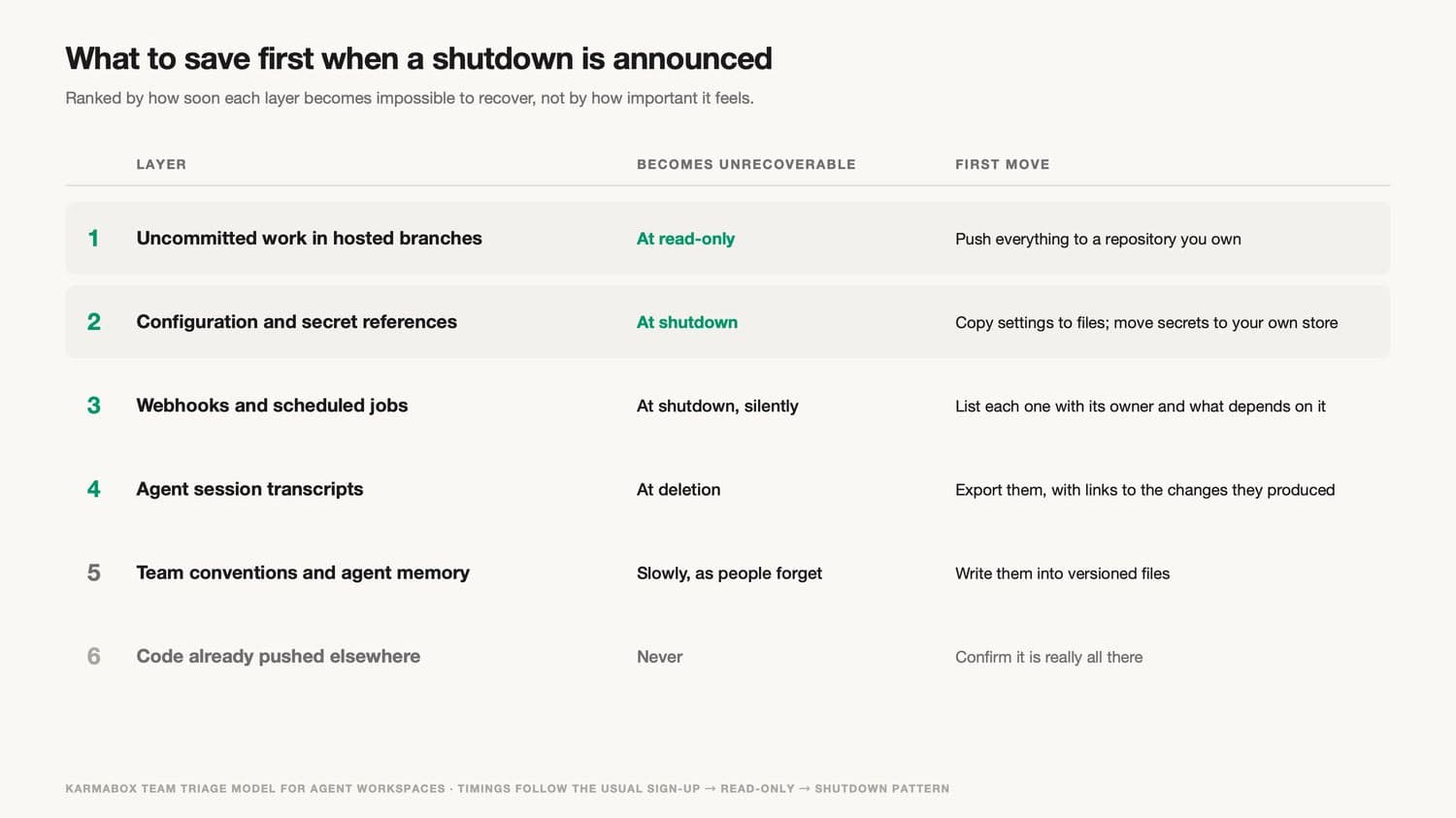
What to save first, ranked by when each layer becomes unrecoverable: uncommitted work at read-only; configuration and integrations at shutdown; transcripts at deletion; conventions slowly; pushed code never.
Uncommitted work comes first, because it is frozen at the read-only date and every day of delay shrinks the window. Push every open branch, even the messy ones. Tidy them up later, somewhere you control.
Configuration and secret references come next. Copy settings, environment variables and permission rules into plain files. Move credentials into a store your team controls, and rotate any key that the outgoing service held. Our API key self-custody checklist covers how to do that without creating a new leak on the way out.
Integrations are third, and the main job is to make a list. For every webhook, scheduled job and API connection, write down what it does, who owns it and which system breaks if it stops. When the service shuts down, these won't fail loudly. A nightly job just won't run, and someone will notice days later that a report never arrived.
Transcripts can usually be exported during the read-only window, since viewing is still allowed. Export them with whatever links back to the related changes the tool provides. Team conventions are last only because they decay slowly. Write them down anyway, ideally in versioned files, so the next tool you use inherits them on day one.
06How to estimate how many days you actually need
Before planning anything, it helps to know whether the notice you were given is enough. Most teams skip this step because the answer feels obvious, and most teams guess low. The parts that take longest are the ones nobody counts.
Start by counting rather than guessing. How many branches or workspaces have unpushed changes right now? How many webhooks, scheduled jobs and API connections point at the service? How many people configured something in it, and are they all available this month? How many separate projects or clients does the workspace touch? These numbers usually come out higher than expected, and each one turns into work.
Then estimate per layer, not for the whole move. Pushing branches is quick if the work is clean and slow if it isn't. Rebuilding configuration depends almost entirely on whether anyone wrote it down. Integrations depend on how many there are and whether the systems on the other end need someone else's permission to change. Re-testing depends on how long one real end-to-end task takes in your setting. Write a rough figure next to each, along with who will do it.
Add the figures up, and add time for the things that always come up: an access request that waits a day, a colleague on leave, a format the new tool doesn't read. Then compare the total with the days before the read-only date, not the deletion date. If the total is bigger, you know now, while there is still time to cut scope, ask the provider for an extension in writing, or bring in help. If it is smaller, you have room to do the move carefully.
The estimate doesn't need to be precise to be useful. A rough number on day one is worth far more than an exact one on day fifteen.
07A phase-by-phase response plan
Most shutdown notices give three dates: the announcement, the switch to read-only and the shutdown. The plan below hangs off those dates rather than off a fixed number of days, so it works whether you get sixteen days or sixty.
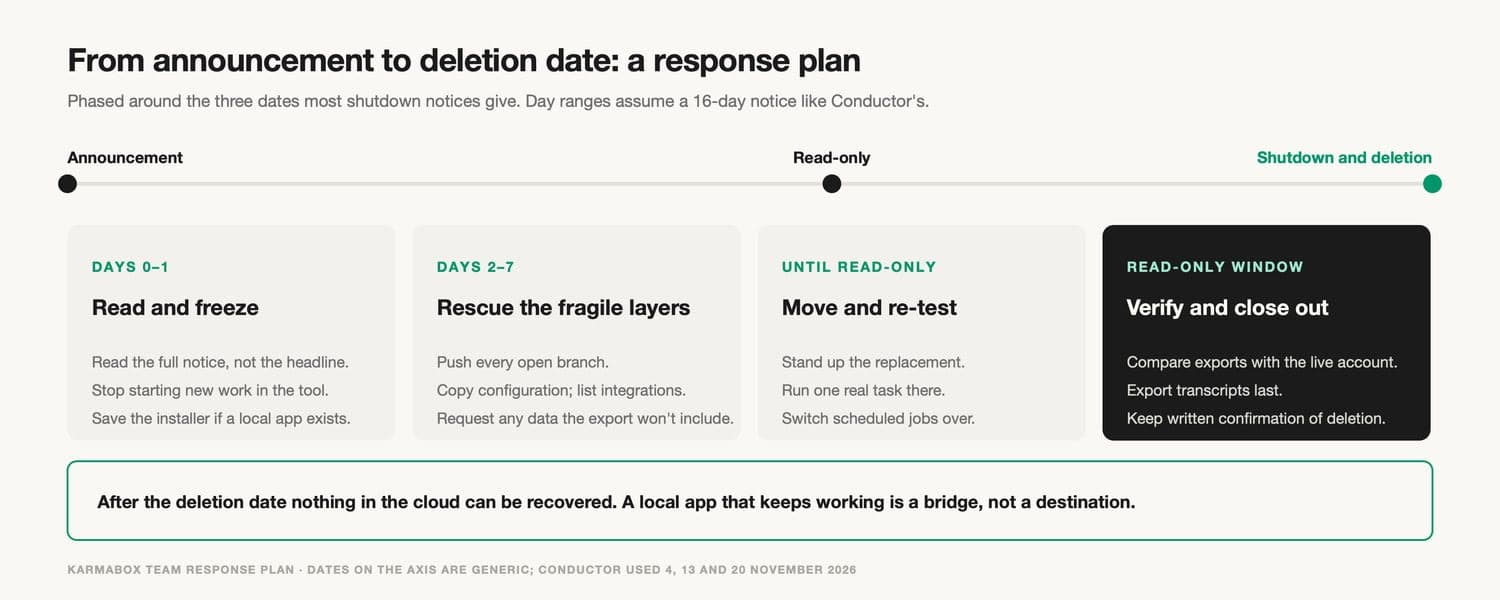
A response plan in four phases: read and freeze on days 0–1; rescue the fragile layers on days 2–7; move and re-test before read-only; verify and close out during the read-only window.
Days 0–1: read and freeze. Read the full notice and turn each sentence into a date and an action. Stop starting new work in the tool, because anything begun now is something else to move. If there is a local app, save the installer while you still can. Tell the people who configured the workspace that their memory is about to be needed.
Days 2–7: rescue the fragile layers. Push every branch. Copy configuration into files. Build the integration list. If you need something the export doesn't include, ask for it in writing now. Under GDPR, a provider has up to one month to answer a request for personal data, extendable in some cases, which can easily be longer than the notice you were given [1]. Asking on day two instead of day twelve makes a real difference.
Before read-only: move and re-test. Stand up the replacement and run one real task there from start to finish, the kind of thing an agent does for you every day. A file count that matches tells you data arrived. A finished task tells you work can continue. Switch scheduled jobs and webhooks over to the new environment, then watch for a day to make sure they fire.
During read-only: verify and close out. Compare what you exported with what is still visible in the live account. Export transcripts and anything else that can still be viewed. Ask the provider to confirm when deletion is complete, and keep that confirmation with your records. If your organisation has retention obligations, decide now what must be kept and where.
After the deletion date, there is nothing left to recover in the cloud. If a local version keeps running, use the extra time to finish moving rather than to rebuild your workflow around something that is also scheduled to end.
08After the deletion date
Once deletion starts, most of what is left is paperwork, but it matters. Keep the provider's confirmation that deletion is complete, along with the date. If you rely on the deletion for your own obligations (for example, a client contract that says their files must not stay with third parties), that confirmation is your evidence.
It is also worth asking what "deleted" covers. Backups, logs and copies held by the provider's own suppliers may follow a different schedule from the live service. A good provider will tell you. If the answer matters to you, ask in writing before the deletion date, while there is still a support team to reply.
Finally, check your own side. Archives you exported may contain personal data or client material that now needs the same care the provider used to take. Decide where they live, who can open them and when they will be deleted in turn.
09Telling your team, clients and auditors
A shutdown is also a communication job, and it is easy to forget while everyone is busy moving files.
Inside the team, name one person who owns the move and one list everyone works from. Without that, two people will rebuild the same integration and nobody will rebuild another. Tell anyone who configured part of the workspace that their time will be needed in the first week, not the last.
If agent work feeds anything you deliver to clients, think about them early. A client may need to know that a tool processing their material is changing, especially if your contract with them names the tools or the places where their data is kept. Telling them before the move looks far better than explaining afterwards.
If you have auditors, a compliance function or regulators to answer to, record what you did and when: what was exported, where it went, what was deleted and on whose confirmation. A short written log made during the move is much easier than reconstructing events later.
10What the law covers when the provider ends the service
Two pieces of European law come up whenever data portability is discussed. Both help. Neither was written for the situation in which a provider decides to close. The details below come from the published texts, reviewed on 5 November 2026. They describe what the rules say, not whether any particular service is covered.
Article 20 of the GDPR gives a person the right to receive personal data they provided to a controller "in a structured, commonly used and machine-readable format", where processing is based on consent or a contract and is automated. Article 12(3) requires the controller to respond without undue delay and within one month, extendable by two further months where necessary [1]. For an individual's conversations and uploaded files, that is a real right. But the timeline was not designed for a sixteen-day shutdown, and the right doesn't extend to a company's agent configuration, integrations or working state.
The EU Data Act, in application since 12 September 2025 [3], goes further for business customers of data processing services. Its Article 25 requires switching terms in a written contract: a notice period of no more than two months, a transitional period of up to 30 calendar days during which the provider keeps the service running and helps, and at least 30 days afterwards to retrieve data. Article 29 limits switching charges to cost until 12 January 2027 and bans them after that [2].
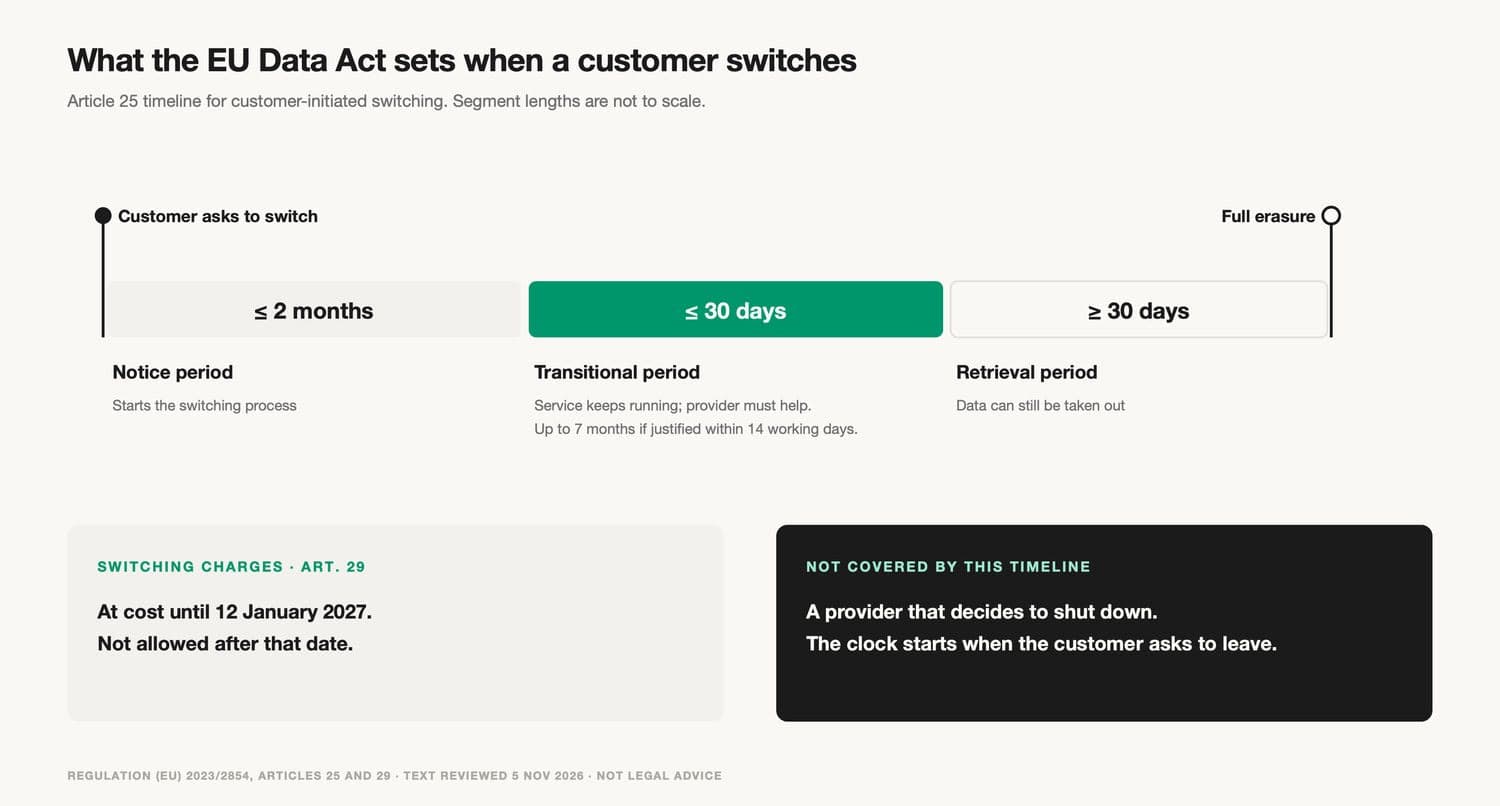
The EU Data Act switching timeline: notice of up to two months, a transitional period of up to 30 days, at least 30 days to retrieve data, then erasure. Provider-initiated shutdowns are not covered by this timeline.
The catch is in who starts the clock. That whole timeline begins when the customer asks to switch. It doesn't set a minimum notice period for a provider that decides to wind a service down, and Article 31 relaxes several obligations for services custom-built for one customer and for non-production versions, which is where a lot of AI pilots sit [2]. So the honest position is that the law gives business customers useful leverage when they choose to leave, and much less when the decision is made for them.
In practice, that means your own contract matters more than the regulation in a shutdown. Check what it says about termination by the provider, data return and deletion, and keep a copy somewhere other than the provider's portal. Where the interpretation matters, get qualified legal advice; this is a technical guide, not a legal opinion, and it makes no claim about whether any law applies to Conductor or any other named company.
11Using the local-app grace period well
Many shutdowns leave a local or self-hosted version running for a while, as Conductor did. That extra time is valuable, but it is easy to misuse.
Treat it as a bridge. Pin the version you have and keep its installer, since new downloads may already be closed. Expect no new features and, eventually, no security fixes. Don't connect new integrations to it, and don't let new team members learn their habits on it. Every week spent building on a tool with an announced end date is a week of work you'll have to move again later.
Use the time instead to do the move properly: test the replacement on real projects, write down the conventions that made the old setup work, and give the people who configured it time to document what they know. This is software-continuity risk, and it is separate from data. Having every file on your own disk doesn't keep a product alive.
12Choosing where to move without repeating the problem
A shutdown is a bad moment to choose a new tool, because there is pressure to accept the first reasonable offer. Competing vendors know this, which is why offers appear in discussion threads within hours. Some are genuinely useful. A promise to import your worktrees "as is" may save days. Test it on one real project before moving everything, and check which of the six layers actually came across.
Buyers are already putting this kind of question into contracts, now that sovereign AI procurement has become a line item of its own. Ask a narrower version of the questions you'd ask any vendor, focused on the layers that just hurt you. Where will configuration live, and can you keep it in your own repository? Can scheduled jobs and webhooks be exported or defined in code? Where are transcripts and memory stored, and in what format? If the new tool also ended in sixteen days, how much of this would you lose again? The AI vendor sovereignty checklist has the full set of questions and a scoring method if you have time for a proper review.
Two structural choices reduce the damage next time. One is keeping as much of the workspace as possible in files your team owns, so any tool is a front end rather than the place your work lives. The other is avoiding dependence on a single model provider; multi-model routing makes it easier to swap the model underneath an agent without rebuilding everything around it. Neither costs much to set up. Both are much harder to add during a shutdown.
13Mistakes that cost teams the most during a shutdown
The most common mistake is working back from the deletion date. It is the date in the headline, so it becomes the date in everyone's head. For unfinished work, the read-only date is the one that counts, and teams that plan around the later date usually discover this when a push fails.
The second is exporting only what the export button offers and assuming that is everything. It is a reasonable assumption for a document tool. For an agent workspace it misses configuration, integrations and the links between conversations and changes, which are exactly the parts that take longest to rebuild.
The third is trusting an import promise without trying it. Competing tools often offer to bring your projects over unchanged, and some do it well. But "imported" can mean the files arrived while the permissions, history or automations didn't. One real project, moved and run end to end, tells you more than any feature list.
The fourth is moving to a tool with the same structure. If the new service also keeps configuration, memory and scheduled jobs only inside its own interface, the team has bought a few more months and the same problem. The move is the cheapest moment to put those layers into files you control, because you are rebuilding them anyway.
The fifth is forgetting the credentials. API keys that the old service held stay valid until someone revokes them, whether or not the service still exists. Rotating them is a small job that is easy to drop at the end of a stressful fortnight.
The last is deleting your own archives too early, or keeping them forever without deciding who looks after them. Exports made in a hurry often contain more than anyone intended. Give them an owner and a retention date before the team moves on.
14Rehearse the move before the next notice
The best time to find out how long a move takes is when nobody is forcing you to make one. An exit drill is a small, deliberate rehearsal: inventory the layers, export each one, restore them somewhere that isn't the provider, compare, run a real task, and write down what didn't come across. For a small workspace it takes an afternoon.
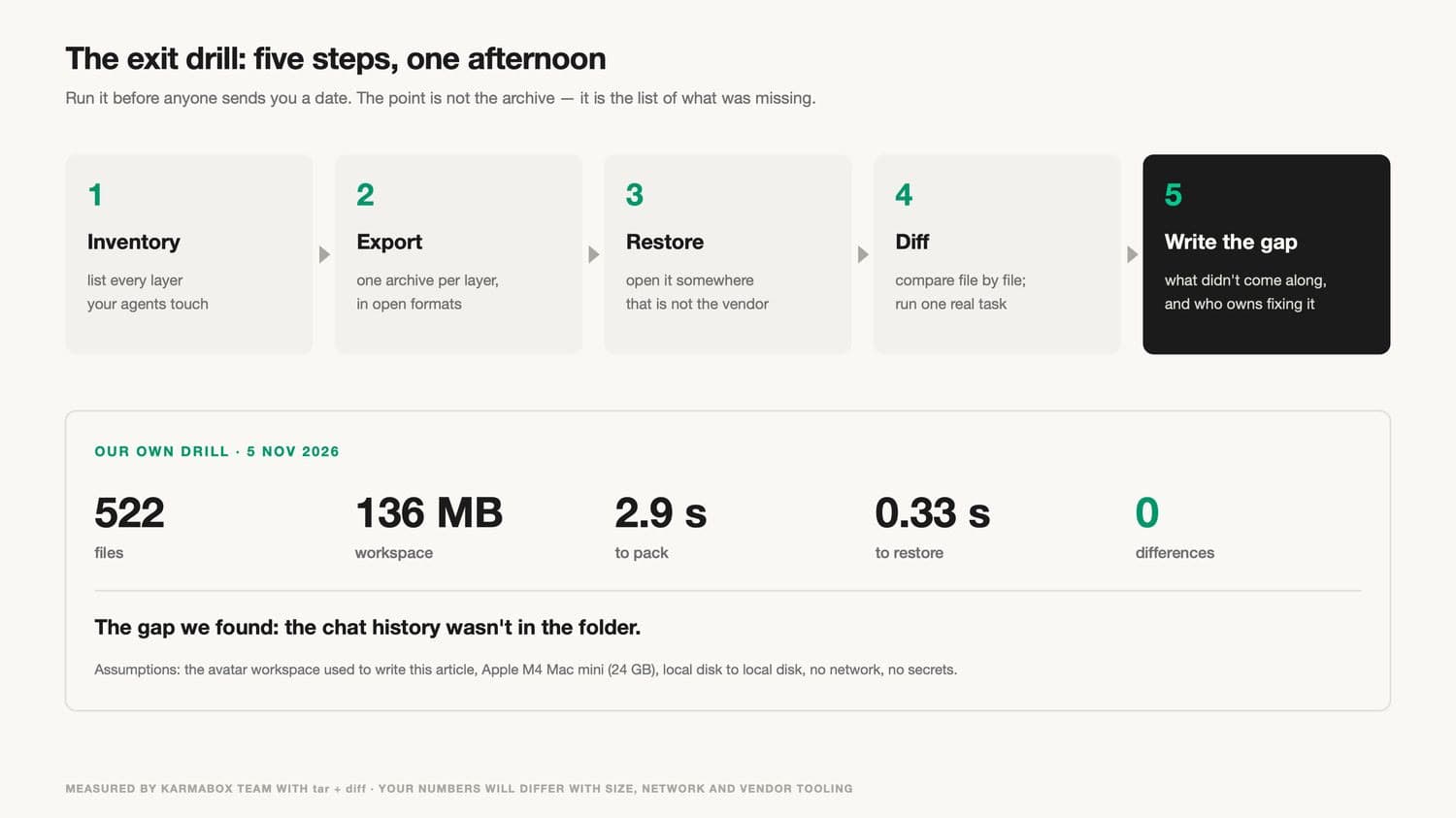
The exit drill in five steps — inventory, export, restore, compare, record the gap — with results from one drill on 5 November 2026.
On 5 November 2026, while writing this guide, we ran the drill on the AI avatar workspace used to draft it. The machine was an Apple M4 Mac mini with 24 GB of memory, copying from local disk to local disk with no network transfer and no secrets included. The workspace held 522 files, about 136 MB. Packing took 2.9 seconds, restoring took 0.33 seconds, and a file-by-file comparison found no differences. The more useful result was a gap. Part of the conversation history behind that workspace had run on a cloud engine and was not in the folder at all. The files moved perfectly, and the reasoning behind some of them did not.
Your numbers will differ with size, hardware, network and tooling. What carries over is the lesson. The data was easy. The gap was in context nobody had thought of as data, which is exactly the layer a shutdown tends to take with it. Teams that want to reduce their cloud dependence step by step can start with a drill like this one.
15What KarmaBox addresses, and what it doesn't (product section)
KarmaBox is a workspace in which avatars (AI agents that each handle a defined kind of work) can run on a device in your own office, as described on the KarmaBox product page. The hardware has 128 GB of unified memory and draws about 170 W, so it fits under a desk. When files, configuration and memory sit on a machine the team controls, no outside announcement can set a read-only date or a deletion date for them. That is the core of what a sovereign AI workspace means in practice.
Hold KarmaBox to the same standard as any other supplier. KarmaBox also offers cloud options, and like any company it could change direction or ownership. Use the KarmaBox documentation to check which layers live on the device in your configuration, which call outside services, and how each can be exported. Then run the drill on it.
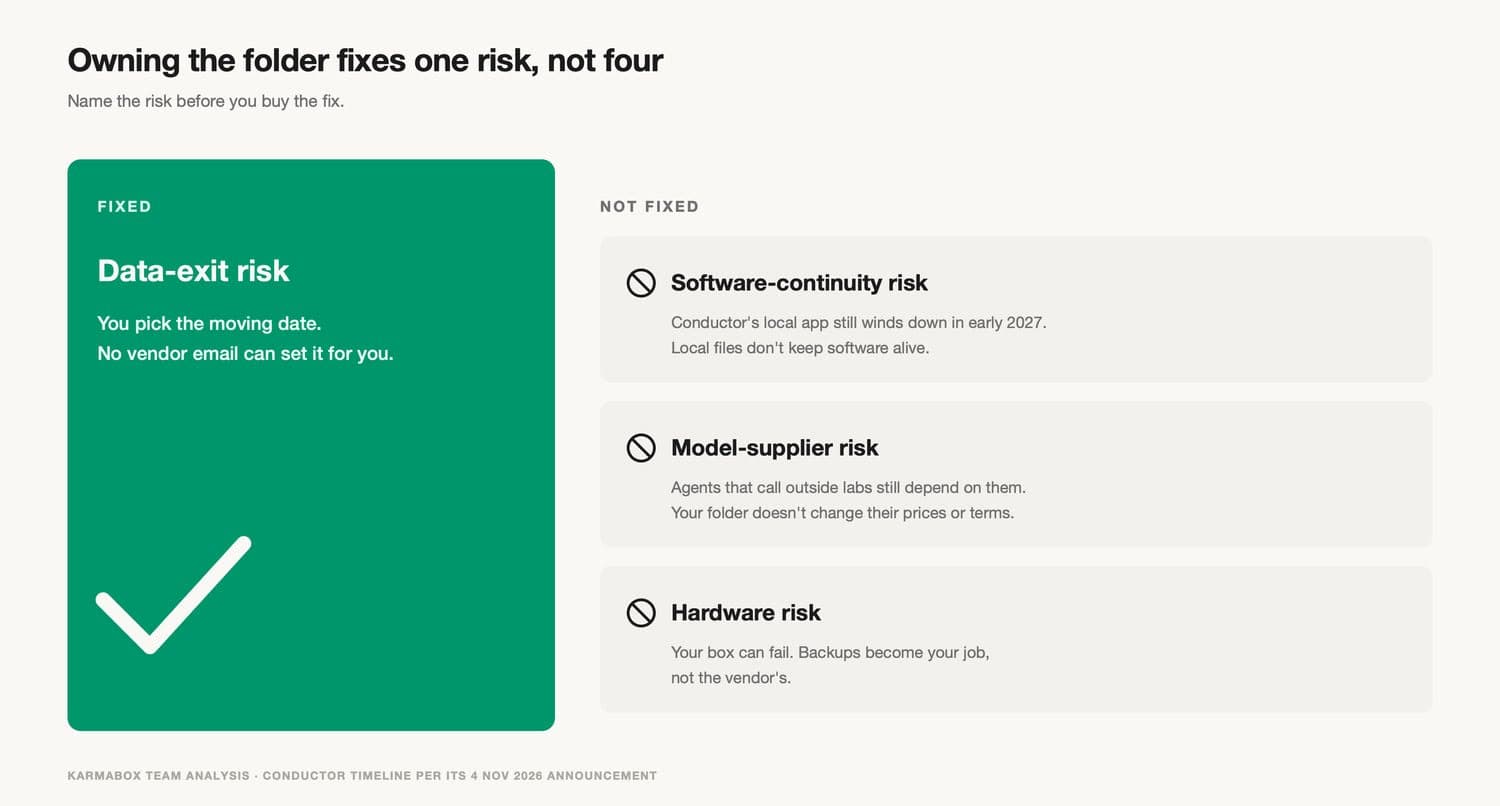
Holding the workspace locally fixes data-exit risk. It does not fix software-continuity, model-supplier or hardware risk.
Running the workspace locally addresses data-exit risk. It doesn't address software-continuity risk, since any software can stop being maintained. It doesn't address model-supplier risk either, because avatars that call outside models still depend on those providers' prices and terms. And it adds hardware risk: machines fail, and backups become your team's job. These are four different risks, and a claim about any product, ours included, is only useful when it says which one it covers.
16Frequently asked questions
What happens to my data when an AI startup is acquired?
It depends on the buyer's plans, but the common pattern is that sign-ups close, the hosted service goes read-only, and then it shuts down and stored data is deleted. A local version may keep working for a while. Read the full announcement for the exact dates and treat the read-only date, not the deletion date, as the deadline for unfinished work.
How much notice do AI tools usually give before shutting down?
There is no standard. Notice periods are set by the provider and by your contract, and can be short. Conductor's November 2026 shutdown gave sixteen days from announcement to the start of deletion, with nine days of normal use. Plan as if you'll get weeks, not months.
What should I export first when an AI tool shuts down?
Save layers in the order they become unrecoverable. Push uncommitted work before the read-only date. Then copy configuration and move secrets into your own store, list every webhook and scheduled job, export session transcripts, and write down team conventions. Code already pushed to your own repository is safe.
Does the EU Data Act protect me if a provider shuts down its service?
Only partly. The Data Act's switching timeline in Article 25 starts when a customer asks to switch. It doesn't set a minimum notice period for a provider that decides to close. Your own contract's termination and data-return terms usually matter more in a shutdown. GDPR Article 20 covers an individual's personal data but allows up to a month to respond.
Is it safe to keep using the local version after a shutdown announcement?
For a while, as a bridge. Keep the installer, pin the version and expect no new features or eventual security fixes. Use the time to move to a maintained replacement rather than to build new work on a tool that has an announced end.
17About the author
Karma Box Team publishes practical guidance on AI sovereignty, workspace control and vendor evaluation. This guide separates what published legal texts require from our own operational recommendations, uses one dated shutdown as an illustration rather than a judgment of any company, quotes users' public comments as individual views rather than survey data, reports our own drill with the conditions it ran under, and applies its criteria to KarmaBox as well. It doesn't provide legal advice or assess whether any law applies to a named provider. Sources were reviewed on November 5, 2026.