An AI coding agent can turn a plain-language request into a working script in minutes. For an analyst, an operations lead or a trader, that can mean a report that used to take an afternoon now takes a coffee break. It can also mean a program nobody reviewed, running with that person's access, on the same machine that holds client files. Both outcomes come from the same tool, and a company that hands the tool out has to decide which of them it is prepared to live with.
AI coding agents for non-engineers are agents that write and run code on behalf of people whose job is not software, such as finance, sales, legal or operations staff. The decision a company faces is rarely a simple yes or no. It is a set of narrower choices: who can run an agent at all, what the agent can reach while it runs, and what happens when something it wrote starts being used by other people. Companies that make those three choices explicitly tend to keep most of the benefit. Companies that leave them implicit often end up withdrawing access after something goes wrong.
This guide explains how coding agents differ from chat assistants, what changes when the user is not an engineer, what financial regulators and security standards already say, how to set access in tiers, and how to move a useful personal script into a properly owned tool. It uses Goldman Sachs's decision in October 2026 to limit Claude Code to engineers as a dated example. It is the best documented case so far, and other firms could reasonably choose differently.
01What makes a coding agent different from a chat assistant
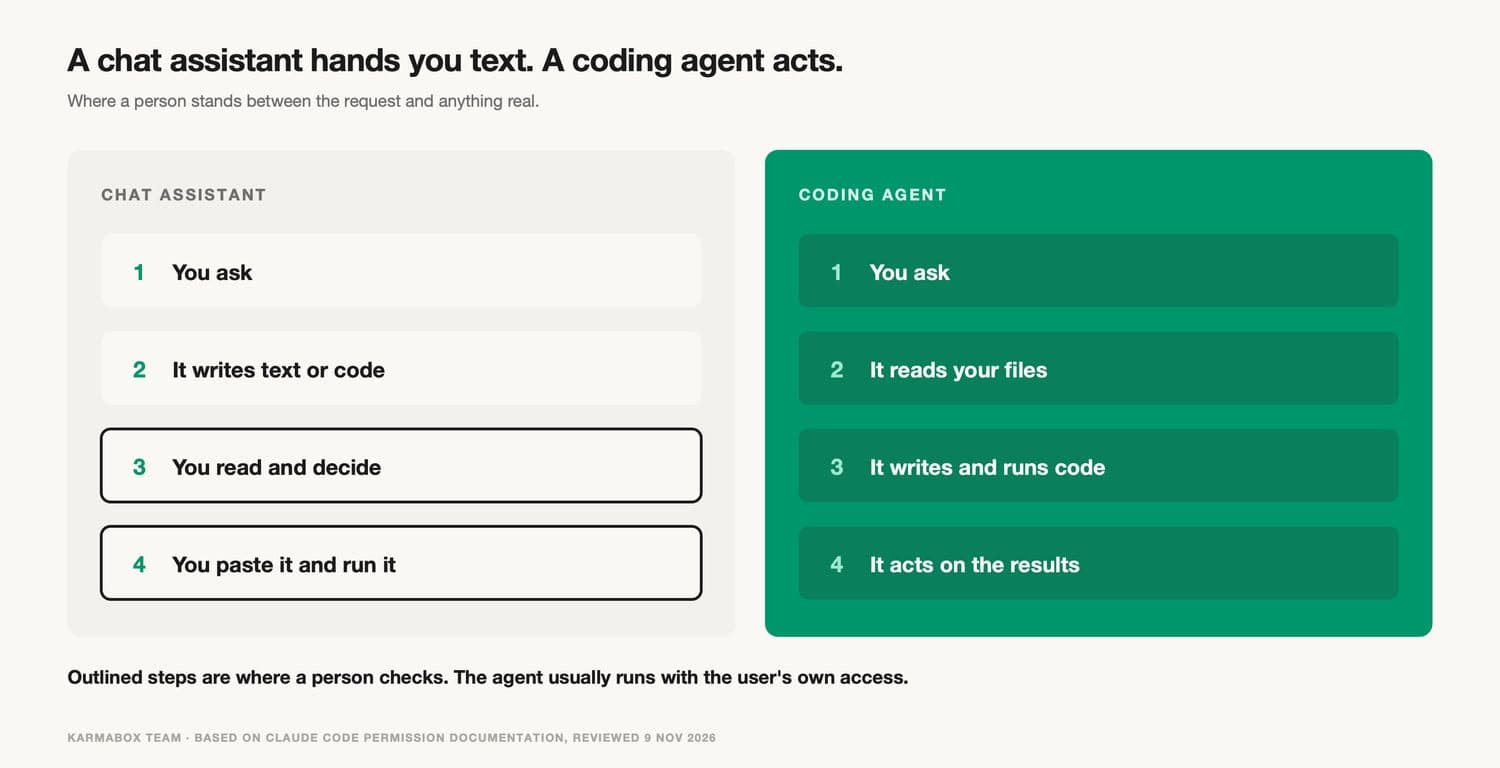
A chat assistant produces text. A person reads it, decides whether it is right, and copies what they want somewhere else. Even when the text is code, a human has to paste it into a file and run it, which means a human is present at the moment the code first touches anything real.
A coding agent removes that moment. It reads files in a folder, writes new ones, runs shell commands, installs packages, calls web pages and other tools, and looks at the results to decide what to do next. Claude Code, Codex, Cursor's agent mode and GitHub Copilot's agent features all work this way, with different defaults. The agent usually runs with the same operating-system access as the person who started it. If that person can open the client folder, so can the agent. If that person's laptop can reach the trading network, so can anything the agent writes.
The vendors know this, and the products carry permission systems to manage it. Claude Code's documentation, for example, lists several permission modes. In the default mode the agent asks before using each tool the first time. In plan mode it can read and explore but does not edit source files. A mode called auto runs without routine prompts, with a background classifier checking actions such as shell commands and network requests against the user's request. A mode called bypassPermissions skips prompts almost entirely, and the documentation says to use it only "in isolated environments like containers or VMs where Claude Code can't cause damage."
One sentence in the same documentation matters more than any of the modes for this guide: "Permission rules are enforced by Claude Code, not by the model." Instructions written into a prompt or a project file shape what the agent tries to do. They do not change what the tool allows. A company that wants a limit to hold has to put it in the tool's settings, or below the tool, in the operating system and network, rather than in a note asking the agent to behave.
The documentation is also candid about where those settings stop. Deny rules for reading files apply to the agent's own file tools and to common shell commands that name a file. They do not apply to "a Python or Node script that opens files itself." For a limit that holds against every process, the documentation points to its sandbox, which works at the operating-system level. That detail turns out to be central for non-engineers, because the scripts they ask for are exactly the kind of program that opens files itself.
02What changes when the user is not an engineer
An engineer using a coding agent at a well-run company sits inside a set of habits and systems built for code. Changes go into version control. Another engineer reviews them. Automated tests run. Deployment to anything important goes through a pipeline with its own approvals. None of this is perfect, but it means agent-written code usually meets several checks before it reaches production data.
A non-engineer using the same agent usually has none of that around them. The script that watches a client report or rebuilds a pricing table lives in a downloads folder or a personal drive. Nobody else reads it. If it works on Tuesday, it gets used on Wednesday, and by the following month two colleagues may depend on it. The person usually has no pipeline to put the code into, and the agent did not suggest one.
There is also the question of whether anyone understands what the code does in unusual cases. A trader or accountant can judge whether the output looks right on a normal day. They are less likely to know how the script handles a missing price, a holiday calendar or a currency it has never seen. On a trading desk or in a month-end close, those edge cases are where losses come from.
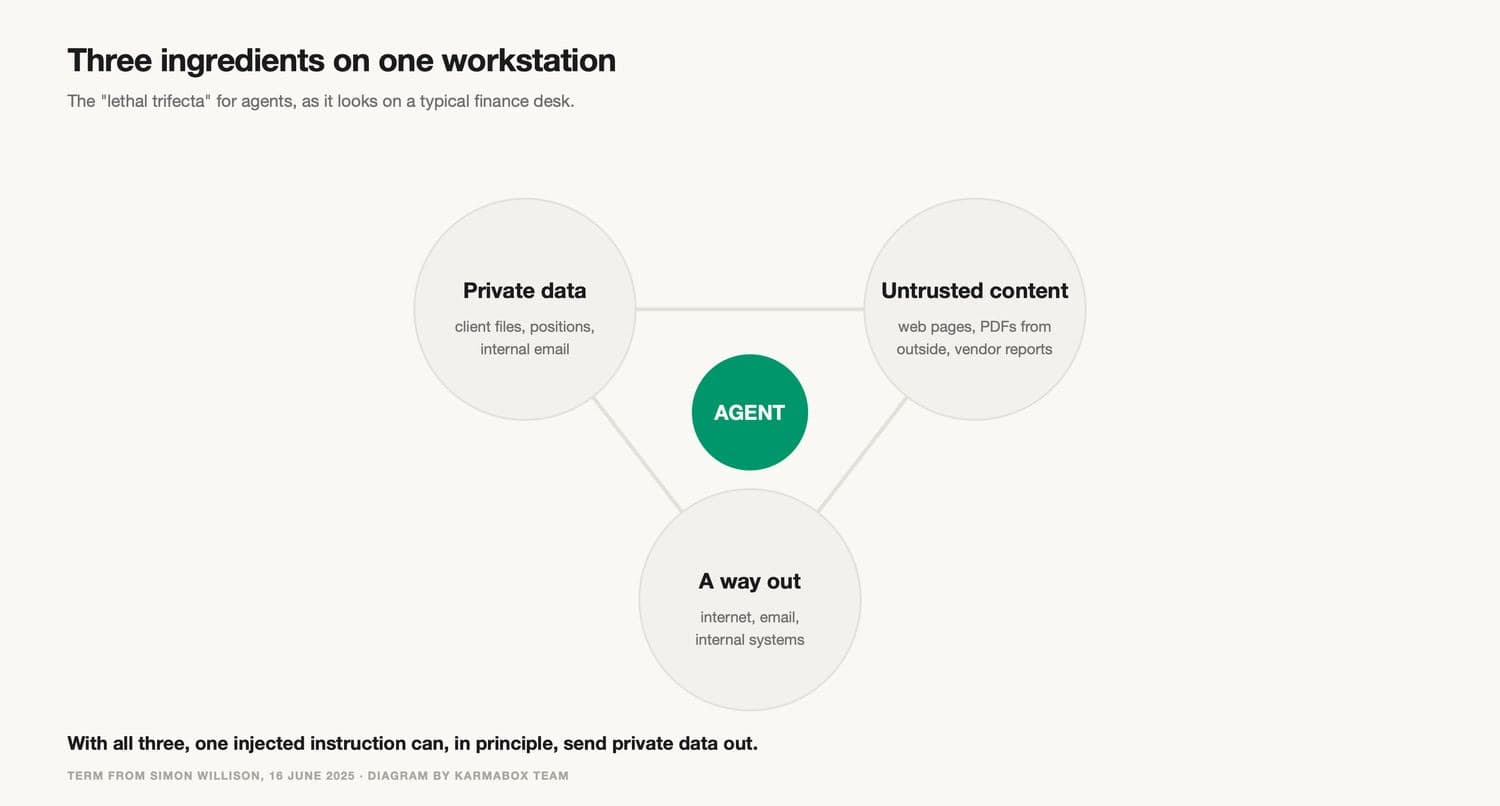
The third change is the machine itself. A finance professional's workstation usually has client data, internal email, internet access and connections to internal systems, all at once. The security researcher Simon Willison has called a related pattern for AI agents the "lethal trifecta": private data, exposure to untrusted content, and the ability to communicate externally. When an agent has all three, a single injected instruction in a web page or a document can, in principle, lead it to send private data out. A developer laptop often has the same three ingredients, of course. The difference is that engineering teams more often run agents in containers or separate environments, and non-engineers rarely know that option exists.
Cost changes as well, though less dramatically. Coding agents are usually billed by usage, and people experimenting with them can run up large bills on tasks that a spreadsheet would have handled. Our guide to how much an AI agent costs walks through the arithmetic. Cost rarely drives a restriction on its own, but it adds weight when productivity is uncertain.
Example: Goldman Sachs limits Claude Code to engineers (October to November 2026)
Bloomberg News reported on November 2, 2026 that Goldman Sachs had limited the use of Anthropic's Claude Code and Microsoft's GitHub coding tools to engineers, according to internal guidance updated in October and seen by Bloomberg. For months before that, the bank had allowed bankers to use the tools for work. The report said the change followed a review of productivity and risk concerns.
According to a person familiar with the matter quoted by Bloomberg, some traders were frustrated. They had used the tools to monitor client trading flows, model market changes and positions, and create written and graphic content. Another person said the directive did not apply to "strats," employees who work across trading, quantitative research and software engineering.
The timing is notable because the bank had promoted the opposite approach a few months earlier. In July, Chief Information Officer Marco Argenti spoke about "vibe coding" by non-technical staff such as traders and bankers, who had built solutions with AI tools and passed them to one of the firm's 12,000 engineers to improve, according to Bloomberg. Earlier in 2026 the bank had also restricted Claude for staff in Hong Kong, which Bloomberg described as a location-specific restriction. Goldman's own internal AI assistant, which combines models from OpenAI, Anthropic and Alphabet, was not reported as affected.
Goldman's spokesperson, Nick Carcaterra, described the change as the end of a trial period: "We make certain AI tools available to our people to determine the best use cases across different parts of the firm. After a period of experimentation where we assess a variety of factors including productivity and risk management, we put them in the hands of those who are best suited to leverage them for the long term."
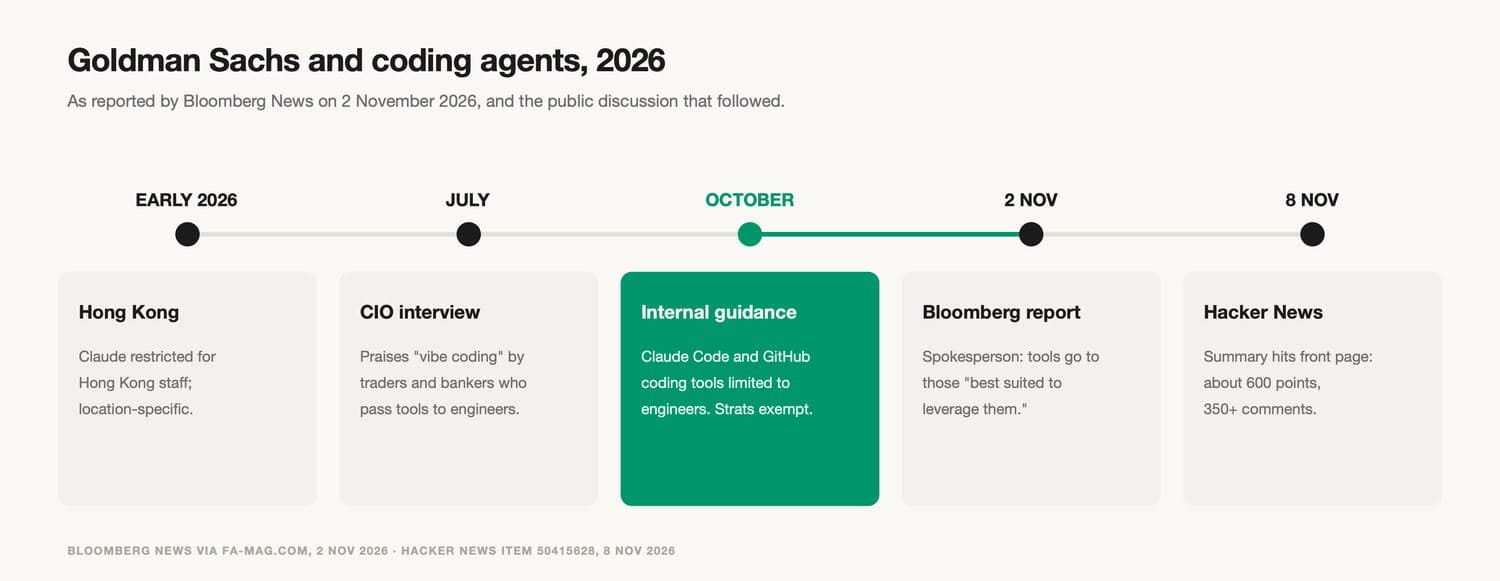
The story spread widely again on November 8, when a summary reached the front page of Hacker News with almost 600 points and more than 350 comments. The comments are useful less as evidence about Goldman than as a sample of how practitioners think about the problem. One commenter who said they had received such tools from business teams wrote that the word "improved" in the CIO's description was "doing some heavy lifting." Another listed what banks have to manage around any application: entitlements, data privacy, data licensing, auditable access and approval chains. A third argued the opposite case, that engineering teams should "design the programming environment for the bankers so they cannot hurt themselves." These are personal views, and they show that the disagreement is about how to give access safely, more than about whether non-engineers can get value.
Two limits apply to this example. Bloomberg's sources did not say which risk mattered most, and Goldman did not publish its review. Anything more specific, including commenters' guesses about an operational incident, is speculation and is not used here. The bank is also a lead underwriter on Anthropic's planned public offering, which is a reminder that a restriction on one group of users says little about a firm's overall view of a vendor.
03What regulators and security standards already say
No regulator has yet published a rule that says which employees may use AI coding agents. Several existing texts still apply, and reading them together gives a reasonable starting frame. The table below summarises four that were checked for this guide.
| Source | What it says | What it means for agent-written tools |
|---|---|---|
| FINRA, 2026 Annual Regulatory Oversight Report, GenAI section | Lists agent risks including autonomy without human validation, acting beyond the user's "actual or intended scope and authority," and difficulty tracing multi-step reasoning | Supervision may need to be "specific to the type and scope of the AI agent," including where to keep a human in the loop |
| OWASP Top 10 for LLM Applications 2025, LLM06 Excessive Agency | Root causes are excessive functionality, excessive permissions and excessive autonomy | Give an agent only the functions, access and independence the task needs, and require approval for high-impact actions |
| Federal Reserve, OCC and FDIC, Revised Guidance on Model Risk Management (SR 26-2, April 17, 2026) | Generative and agentic AI models are outside its scope, but its principles apply to traditional statistical and quantitative models | The agent is out of scope. A position or pricing model the agent writes may well be in scope |
| US Securities Exchange Act, Section 15(g) | Broker-dealers must maintain written policies to prevent misuse of material non-public information | A tool that moves data between groups can cross an information barrier, whoever wrote it |
The FINRA section is the most direct. It defines AI agents as systems "capable of autonomously performing and completing tasks on behalf of a user" and lists, among other risks, data sensitivity: agents "may unintentionally store, explore, disclose or misuse sensitive or proprietary information." It does not prescribe controls, but it suggests firms consider guardrails that "limit or restrict agent behaviors, actions or decisions."
The model risk guidance needs a closer reading. When the US banking agencies replaced SR 11-7 with SR 26-2 in April 2026, they put generative and agentic AI models outside its scope, while saying that a bank's general risk governance should still guide controls for tools the guidance does not cover. The guidance defines a model as "a complex quantitative method, system, or approach that applies statistical, economic, or financial theories to process input data into quantitative estimates," and excludes simple spreadsheet arithmetic and deterministic rule-based software. A script that copies client flows into a summary table is probably not a model in this sense. A script that estimates how positions will move under a market shock probably is. The agent that wrote the second script sits outside the guidance, but the script itself can fall under inventory, validation and "effective challenge" expectations like any other model. Most non-engineers using an agent will not know that, which is one reason a company needs a path that brings such tools to the attention of people who do.
OWASP's framing is useful outside finance too, because its three root causes map neatly onto settings a company can change. Functionality is what tools the agent has. Permissions are what those tools can reach. Autonomy is how much the agent does without asking. Each can be reduced on its own, and the right level for an operations analyst will differ from the right level for a platform engineer.
Section 15(g) applies only to US broker-dealers, and whether a given tool breaches a firm's information barrier policies is a legal and compliance question for qualified advisers. It is included here because it shows a general point. Rules about who may see what information were written for people and systems. They apply to software a person builds with an agent in exactly the same way.
04Three decisions inside "who gets access"
Most companies first ask the question in one piece: should this team have the coding agent or not? That framing tends to produce all-or-nothing answers, which is roughly what happened at Goldman. A more workable approach separates three decisions, each with its own owner.
The first is who may run an agent that executes code at all. This is a decision about roles and training. A person who has never seen a terminal can still benefit from an agent, but they may need a more constrained version of it.
The second is what the agent can reach while it runs. This is a decision about environment. The same person might safely use an agent in a sandbox with a copy of last month's data, and unsafely use it on their main workstation with live client folders and open internet. Most of the risk described above sits here, and it can be changed without taking the tool away.
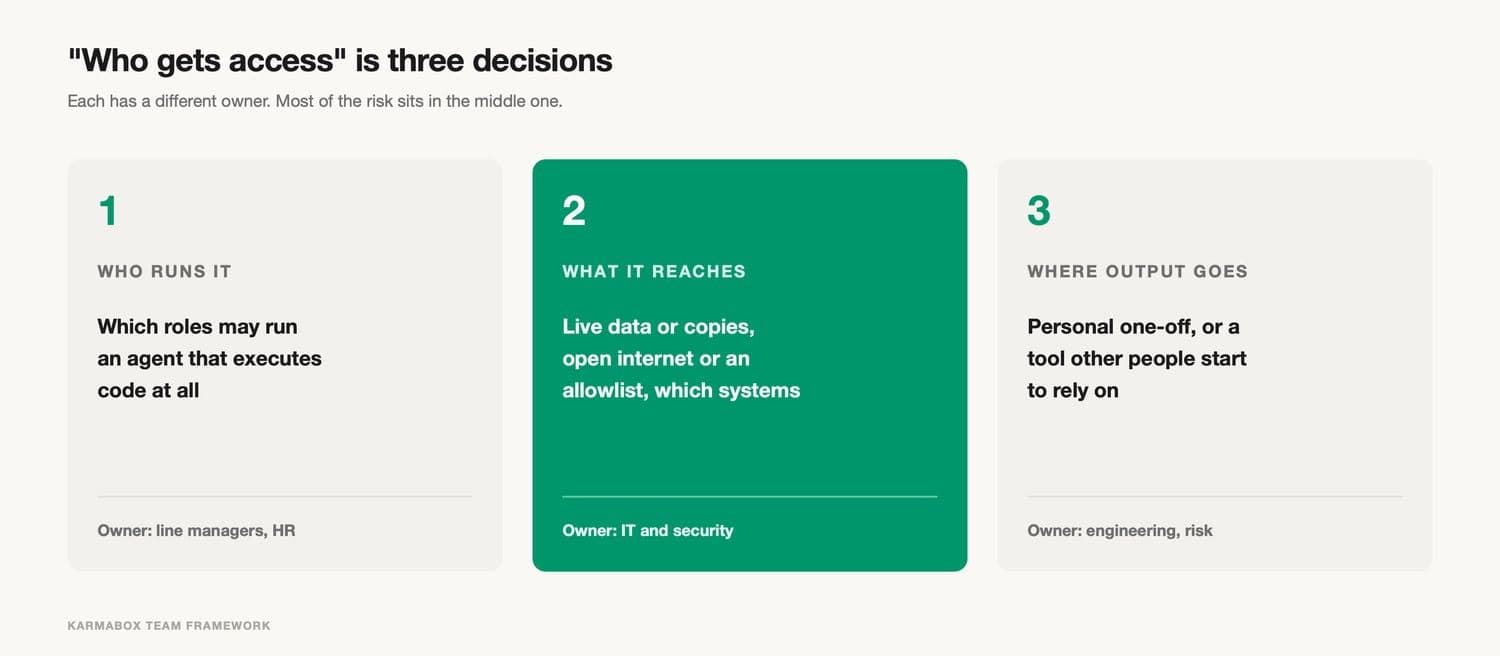
The third is where the output goes. A script that one person runs once to answer a question is a different object from a script ten people use every morning. The first can stay personal. The second needs an owner, a review and a place in whatever inventory the company keeps. Our earlier article on AI agent sprawl covers the inventory problem for agents themselves. The same problem applies, a level down, to the tools those agents produce.
Splitting the decisions also clarifies who is responsible. Line managers and HR know roles. IT and security control environments. Engineering, risk or a model validation team can own the path into shared use. When one team has to answer all three questions at once, it tends to answer conservatively, because it carries all the downside.
05What non-engineers can get from coding agents
It is easy to read a restriction as proof that non-engineers should not use these tools. The reported uses at Goldman suggest the opposite: monitoring client flows, modelling market moves and producing written and visual material are real work, and the people doing them chose the agents because they helped.
Outside finance, the pattern is similar. An operations lead reconciles two exports that never quite match. A legal assistant pulls clause numbers from forty contracts into one table. A marketing analyst turns a messy campaign spreadsheet into a weekly chart. A commenter in the Hacker News discussion described a doctor in their family using Claude Code for tasks "adjacent to but not actually generating code that will be used by others," such as a packing-list tool and family address book management. In each case the person knows the problem far better than any engineer who might be asked to build the tool, and the agent removes the wait for engineering time.
There is a second benefit that is easier to miss. A prototype built by the person closest to the problem is a precise specification. Even if engineering rebuilds it from scratch, the working version shows what the user actually needs, which is often different from what they would have written in a ticket. Argenti's July description of business staff passing their tools to engineers to improve is, in effect, this idea. The weak point is the handover, which the promotion path section below addresses.
The benefits depend heavily on the type of task. One-off analysis on data the person is already entitled to see carries little risk. A personal tool that only reads and only produces files for the user is a modest step up. The risk rises sharply when a tool starts acting on other systems or serving other people.
06Where the risk concentrates
The risk from non-engineers using coding agents is uneven. Most uses are harmless. A small number carry most of the exposure, and they tend to share a few features. They can usually be spotted early.
The first feature is shared use. A script stops being a personal convenience when someone else relies on its output. At that point an error is no longer caught by the person who wrote it, because the people using it do not know how it works. Shared tools are also the ones that live longest, often well beyond the employment of the person who created them.
The second is contact with regulated or sensitive data: client records, trade data, personal information, deal information that sits behind an information barrier. An agent that can read these and also reach the internet is the trifecta case. Our guide to AI agent data leakage covers the outbound channels in detail, from web requests to commits and logs.
The third is action. A script that reads and summarises is very different from one that sends email, books an entry, places an order, changes a record in a shared system or deletes files. FINRA's concern about agents acting "beyond the user's actual or intended scope and authority" is sharpest here. If a person has authority to send orders, a script they run inherits that authority unless something stops it.
The fourth is credentials. Agents that call internal systems need keys or tokens, and non-engineers often handle these in ways that would worry a security team, such as pasting them into a prompt or saving them in a plain file next to the script. The AI API key self-custody checklist covers who should hold which keys.
A fifth feature is worth naming because it hides inside harmless-looking tools: quantitative judgement. A script that estimates, forecasts or prices something embeds assumptions. If those assumptions are wrong, the output can look entirely plausible. In banking that is what model risk guidance exists for. In other industries there may be no formal process, but the same problem applies.
07How to tier access by role
A tiered model lets a company say yes to most uses while keeping the risky combinations behind review. The tiers below are one practical arrangement. The exact boundaries will differ by company, and each tier should be described in terms of settings and environments as well as job titles.
| Tier | Typical users | What the agent can do | Where it runs |
|---|---|---|---|
| 0. Assist | Anyone | Answers, drafts and suggests code; nothing executes on the user's machine | Approved chat assistant or internal AI platform |
| 1. Sandbox | Trained business users | Writes and runs code against copies or extracts; no network, or an allowlist only | Container, virtual machine or managed workspace with OS-level isolation |
| 2. Workspace | Power users with a named engineering sponsor | Runs on live, read-only data; writes and network calls need approval each time | Managed settings that the user cannot override |
| 3. Engineering | Engineers and quant developers | Full tool use inside the normal review and deployment pipeline | Developer environment with version control, review and tests |
Tier 0 already covers a large share of the value for many people. A good assistant can write a formula, explain a script someone else wrote or draft a query that an engineer then runs. Goldman's internal assistant, which stayed available, is roughly this tier.
Tier 1 is where most non-engineers who want an agent should start. The key feature is that the environment, not the agent's settings, sets the limit. Claude Code's own documentation recommends OS-level sandboxing for limits that must hold against every process, which matters because the scripts an agent writes for a business user are ordinary programs that can open any file the environment lets them see. If the sandbox only contains a copy of the data, the worst a script can do is damage the copy.
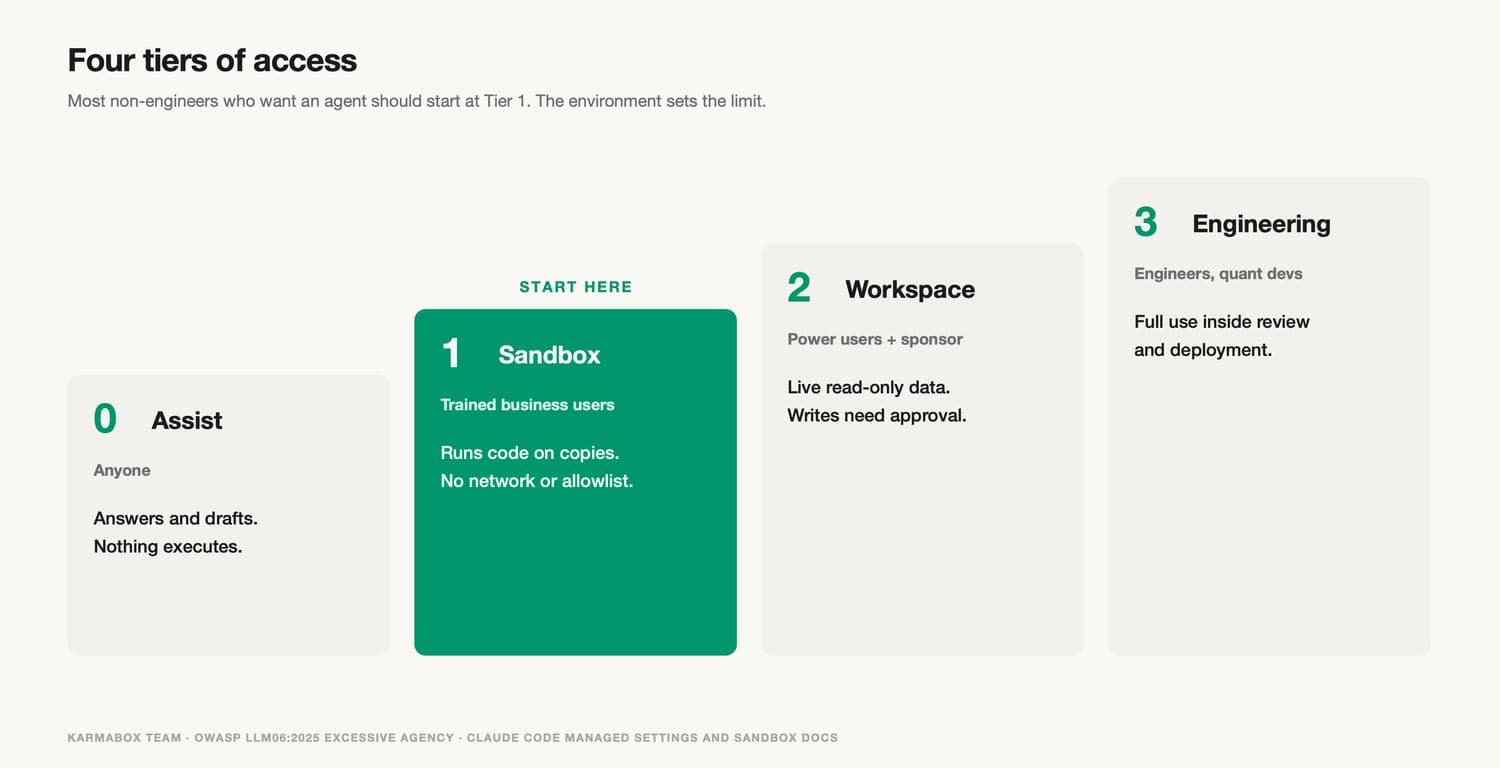
Tier 2 is for people whose tools have proven useful and who need live data. Here the settings themselves start to matter, and they should be set centrally. Claude Code supports managed settings that users cannot override. A deny rule in managed settings cannot be lifted by a user-level allow rule, and administrators can disable the auto and bypassPermissions modes entirely. Other agents have comparable controls, and checking for them is a reasonable part of any AI procurement standard. A named engineering sponsor gives the user someone to ask and gives the company someone who knows what is running.
Tier 3 is the existing engineering environment. The point of listing it is to make clear that engineers' agent-written code also goes through review. It would be a mistake to treat "engineers only" as if it solved the problem. Engineers also ship agent-written code they have not fully read, and they also run agents with broad access on machines that hold sensitive data.
Moving between tiers should be a deliberate event with a short record: who asked, for which tool, which data, and who approved. Our earlier piece on the private AI capability paradox argues that "who approved what" is one of the few things a stronger model cannot improve. Tier changes are a good place to start recording it.
A note on vendor direction. In a public discussion on November 7, 2026 about secrets exposed in committed Claude Code settings files, a member of the Claude Code team wrote that "permission rules are old hat" and that everyone "should be using auto mode instead." The reasoning given in the same thread was that people asked to approve many commands get tired and approve ones they should not, and that an automated check performs better in practice. That argument is reasonable, and it was made about developers. For the tiers above, the useful distinction is that a classifier's judgement and a centrally enforced deny rule are different kinds of control. A company can use both, and for Tier 1 and Tier 2 it will usually want the deny rule set where users cannot change it. The same team member also pointed to an open-source sandbox and noted that any sandbox "needs holes punched" to be useful, which is a fair reminder that environments have limits too.
08How to move a personal script into a shared tool
The handover from business user to engineering is where the Goldman arrangement appears to have struggled, and it is where most companies have no process at all. A simple promotion path makes the handover explicit.
It starts with a light inventory. Users at Tier 1 and above register any tool they run more than a few times, with one line on what it does, which data it reads and whether anyone else uses it. This should take two minutes, or people will not do it. The inventory is not a gate. It exists so that the company can see which tools are becoming important.
The next step is a trigger. A tool moves to review when any of the risk features above appears: a second regular user, contact with sensitive data, any action on another system, stored credentials, or a quantitative estimate that informs a decision. Reaching a trigger does not mean the tool is bad. It means the tool now needs an owner who can read it.
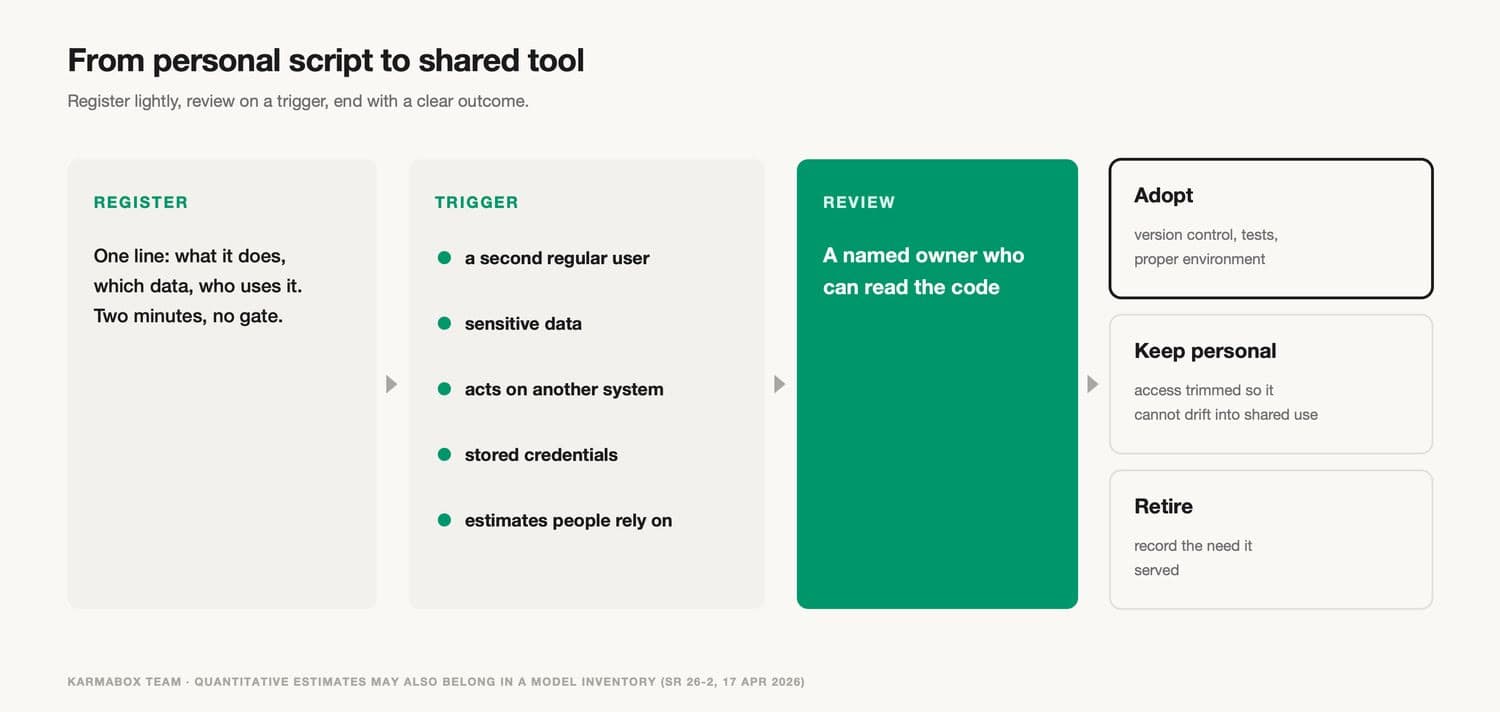
Review should end in one of three outcomes. The tool is adopted, which means a named engineer or team takes ownership, puts it in version control, adds tests and runs it in a proper environment. Or it stays personal, with its access trimmed so it cannot drift into shared use. Or it is retired, with a note on what need it served so that need can be met another way. The State of AI write-up of the Goldman story suggested that when a tool is withdrawn, it is worth recording what people used it for, and that is good practice whichever way a decision goes.
For banks and other firms with model risk processes, the review step should include a simple question: does this tool produce quantitative estimates that someone relies on? If yes, it belongs in the model inventory, regardless of whether a person or an agent wrote it.
The promotion path also gives engineering a manageable intake. One HN commenter who had been on the receiving end of business-built tools said they were more likely to be "thrown into the dark recesses of the backlog" than improved. An inventory with clear triggers means engineering sees a short list of tools that need attention, with context, instead of a stream of unexplained requests.
09Worked example: a fictional firm sets up tiers
The following example is fictional. The firm, numbers and outcomes are illustrative assumptions, used to show how the pieces fit together.
A fictional investment firm has 80 staff: 20 engineers, 15 analysts, 30 people in operations and client service, and 15 in other roles. For six months it has allowed anyone to install a coding agent. Before setting a policy, it asks staff to list the agent-built tools they still use. People report 47 tools.
Of the 47, 31 were used only by the person who built them, for one-off analysis or occasional convenience. Twelve had become shared, mostly reconciliation and reporting scripts in operations. Four of those twelve read client account data and fed reports that go to clients. Two of the analyst tools estimated portfolio sensitivity to rate changes.
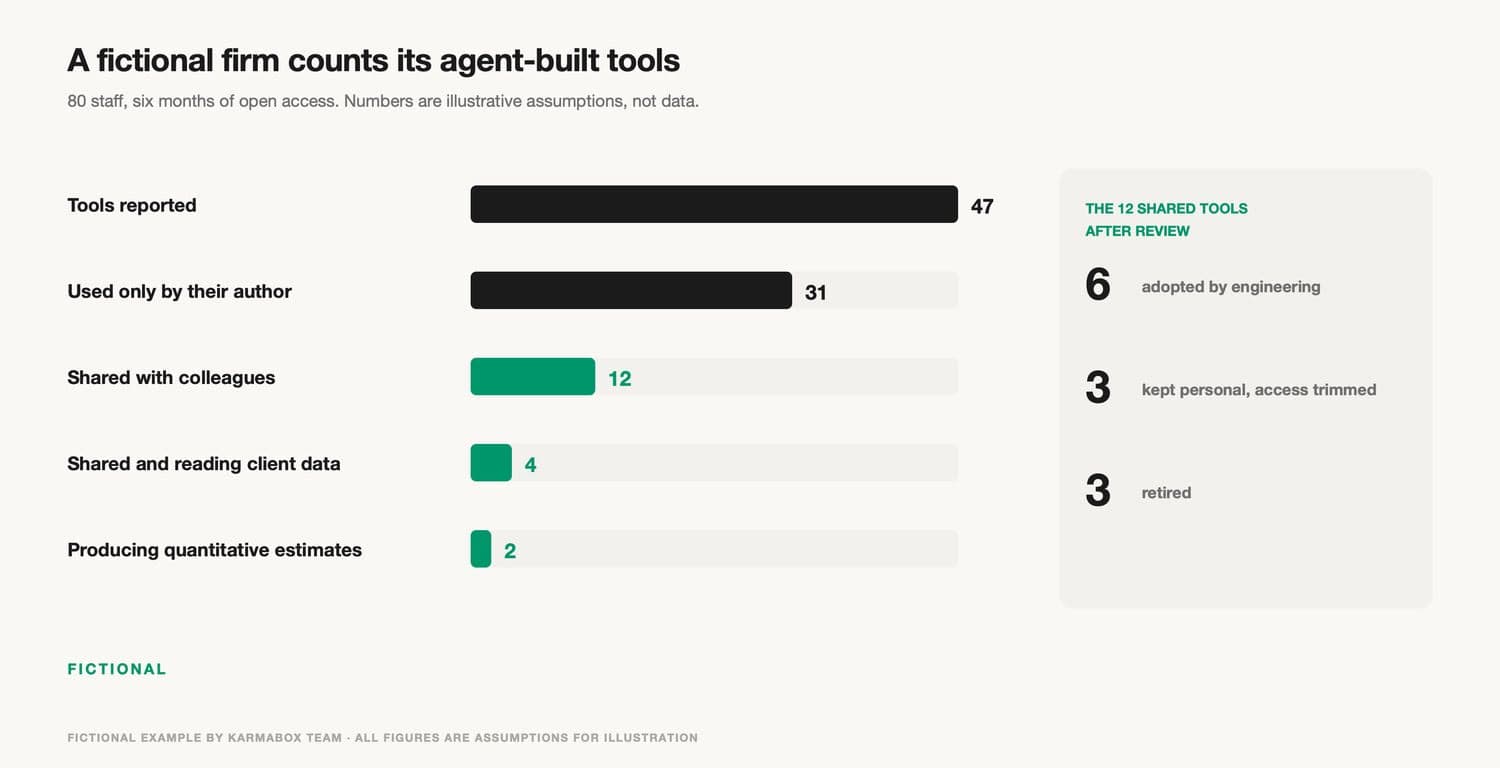
The firm moves all non-engineers to Tier 1 by default, in a managed workspace with nightly copies of the data they need and no outbound internet except an allowlist. Eight power users, mostly in operations, move to Tier 2 with engineering sponsors. The 12 shared tools go through review. Six are adopted by engineering, three stay personal with access trimmed, and three are retired because a vendor report already covers the need. The two sensitivity tools go into the firm's model inventory and get an independent check.
The cost is visible too. Staff lose an afternoon learning the sandbox. Two analysts find Tier 1 too slow for daily work and apply for Tier 2. One retired tool turns out to be used by a client service team nobody had asked, and has to be restored temporarily. None of this is unusual. The firm ends up with fewer surprises and roughly the same amount of useful work, which is about the best a policy of this kind can deliver.
10What a role-based policy does not solve
Tiers and a promotion path address one risk: unreviewed code, written by people who cannot fully check it, running with too much access. They leave other risks open, and it helps to name them.
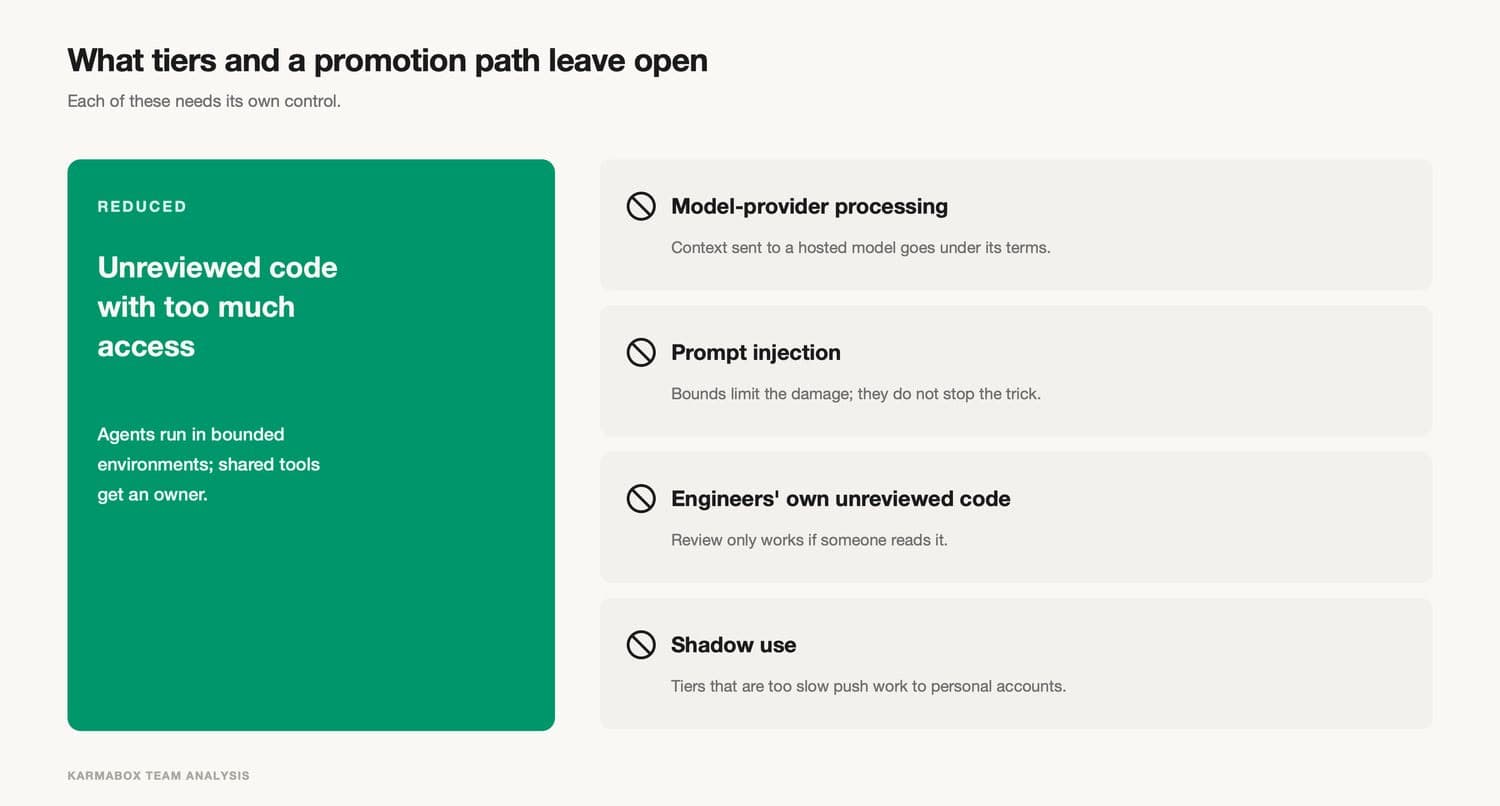
They do not address what happens to data sent to a hosted model. If the agent calls a cloud model, everything in its context goes to that provider under its own terms, whatever tier the user is in. That is a supplier and architecture question. Some firms route sensitive work to models they host for this reason.
They do not stop prompt injection. A sandbox limits what an injected instruction can reach, and approval steps limit what it can do, but a document or web page can still mislead the agent inside those limits.
They do not make engineers' code safe. Tier 3 relies on review and testing, which only work if reviewers actually read what the agent wrote. That is a growing problem as agents produce more code than people can comfortably check.
And they do not prevent shadow use. If the approved tiers are too slow or too restrictive, people will use personal accounts and personal devices. A policy that pushes useful work out of sight has made the risk harder to see without making it smaller. Our article on agent swarms and enterprise security makes a related point: security and productivity draw on the same permissions, and locking everything down tends to lose both.
11What KarmaBox addresses, and what it doesn't (product section)
KarmaBox is a workspace in which avatars (AI agents that each handle a defined kind of work) can run on a device in your own office, as described on the KarmaBox product page. According to that page, each official avatar has its own boundaries, "enforced server-side, not by a prompt." The device has 128 GB of unified memory and draws about 170 W.
KarmaBox is the product of the team that publishes this guide, so this section applies the same questions to it. Measured against those questions, the relevant features are the ones that move limits out of the model and into the system. Avatars with fixed boundaries are closer to Tier 1 and Tier 2 than to a general-purpose coding agent on a personal laptop, because the boundary is set by whoever configures the workspace, not by the person typing the request. Running on a device the firm controls means data can stay on that machine while a business user works with it, which is the property the Tier 1 sandbox is meant to provide. For finance teams, the finance solution page describes how one firm decided which tasks stay local and where approvals sit. Smaller companies can start from the solutions for business page, and the sovereign AI workspace explainer covers the general idea.
The same questions apply to KarmaBox as to any other product. Use the KarmaBox documentation to check which avatars can run code, what data they can reach, which actions require approval, and whether those settings can be changed by the end user. KarmaBox does not replace a company's own decisions about roles, and it is not a code review pipeline: tools built inside it still need an owner and the promotion path above if they become shared. KarmaBox also offers cloud options, and avatars that call hosted models send their context to those providers.
12Frequently asked questions
Should non-engineers use AI coding agents at work?
Often yes, with limits. One-off analysis and personal tools on data the person is already entitled to see carry little risk and can save a great deal of time. The risk rises when a tool becomes shared, touches sensitive data, acts on other systems or produces estimates people rely on. A tiered model lets a company allow the first kind of use while reviewing the second.
Why did Goldman Sachs restrict Claude Code to engineers?
According to Bloomberg's November 2, 2026 report, the bank limited Claude Code and GitHub's coding tools to engineers through internal guidance updated in October, after reviewing productivity and risk concerns. Quantitative "strats" were not affected, and the bank's internal AI assistant remained available. Goldman did not publish its review, so more specific reasons are not public.
What is the difference between an AI coding agent and a chat assistant?
A chat assistant returns text that a person reads and copies. A coding agent reads and writes files, runs commands and acts on the results itself, usually with the same access as the user. That is why the agent's environment and settings matter more than its instructions.
How can a company limit what a coding agent can do?
Use settings the tool enforces, set centrally where users cannot override them, and limits below the tool, such as a sandbox, a separate virtual machine or a network allowlist. Claude Code's documentation, for example, states that its permission rules are enforced by the tool rather than the model, and that file deny rules do not cover scripts that open files themselves.
Do model risk rules apply to code written by an AI agent?
For US banks, the revised model risk guidance SR 26-2 places generative and agentic AI models outside its scope, but its principles still apply to traditional quantitative models. If an agent writes a script that produces quantitative estimates people rely on, that script may be a model under the guidance. Whether a specific tool is in scope is a question for the firm's model risk and compliance functions.