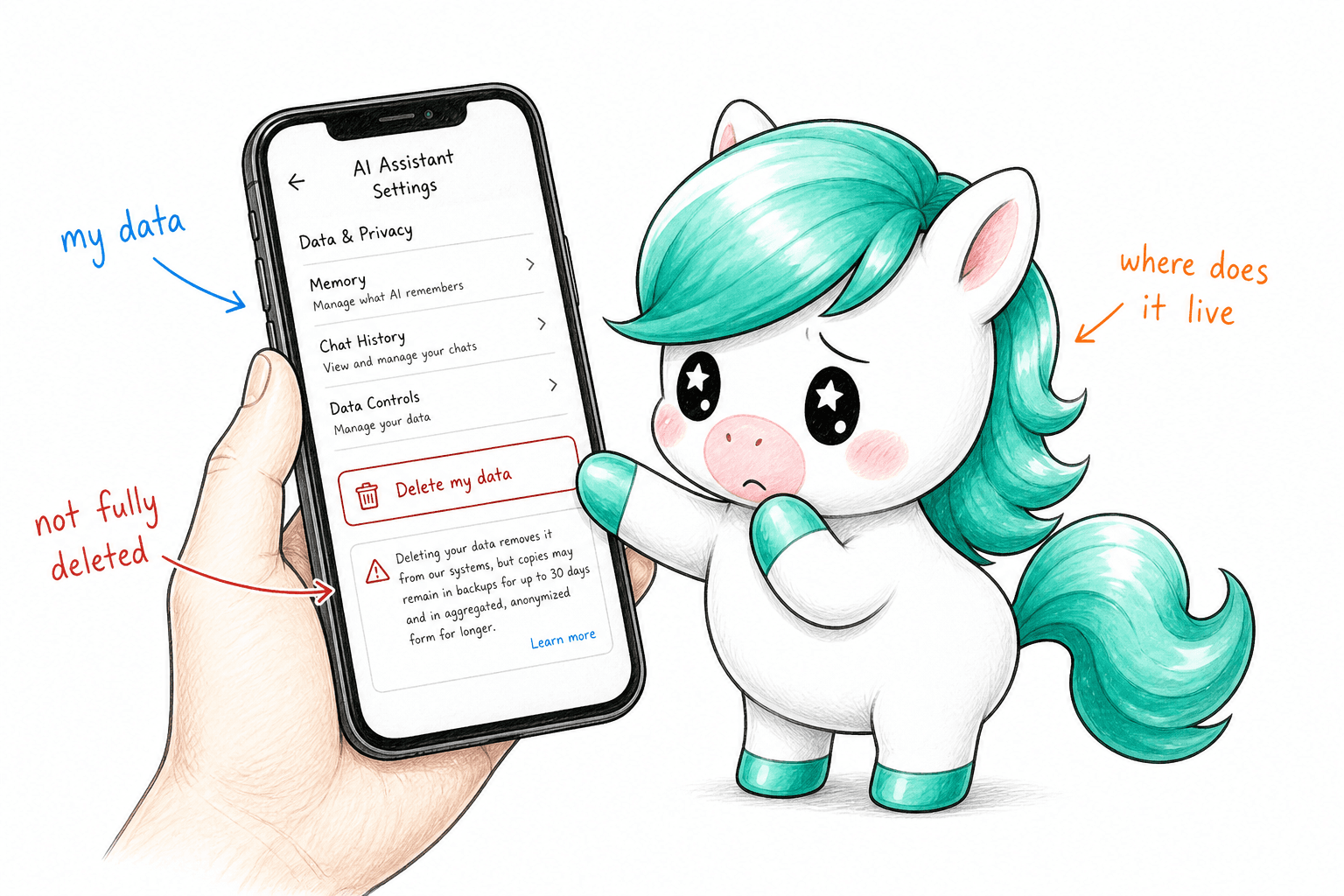
You select a paragraph on your phone, ask an assistant to rewrite it, and receive a polished version seconds later. The phone has an AI chip, the feature is built into the operating system, and the interface never opens a browser. None of those facts, by themselves, establishes where the paragraph was processed. The answer may have come from the phone, a nearby computer, a vendor's servers, or a separate model provider.
On-device AI can reduce disclosure to remote providers when the relevant task genuinely runs locally. It does not automatically mean that prompts, files, diagnostics, saved results, or connected-tool requests remain on the device. Privacy depends on the complete workflow: what leaves, who receives it, what they may do with it, and whether you can control that route. Evaluate the feature and configuration rather than the label on the hardware.
This guide explains how to read device-maker claims, investigate hybrid processing, and design a useful verification test. It separates published documentation, independent research, and evidence that still needs to be collected. One thing to be clear about up front: this article draws on vendor documentation and one clearly dated independent study. It is not a report of our own traffic measurements. The test protocol below is one you can run on your own hardware.
01What on-device AI actually means
In its narrow technical sense, on-device inference means that the model performs the relevant computation on the device. A processor, GPU, or neural accelerator can execute a model without sending that inference request to a remote server. This describes a computing location, not the complete privacy policy of the application. The application may still authenticate an account, check for updates, synchronize history, or invoke online services before or after inference.
Separate inference from storage and orchestration. Inference produces the answer. Storage keeps files, conversation history, and memory. Orchestration selects the model and calls other tools. These functions need not occur in the same place. A locally generated summary might be uploaded by a document application, while a phone interface might send a task to a computer on your own network. Both situations require a more precise description than simply calling the whole experience local.
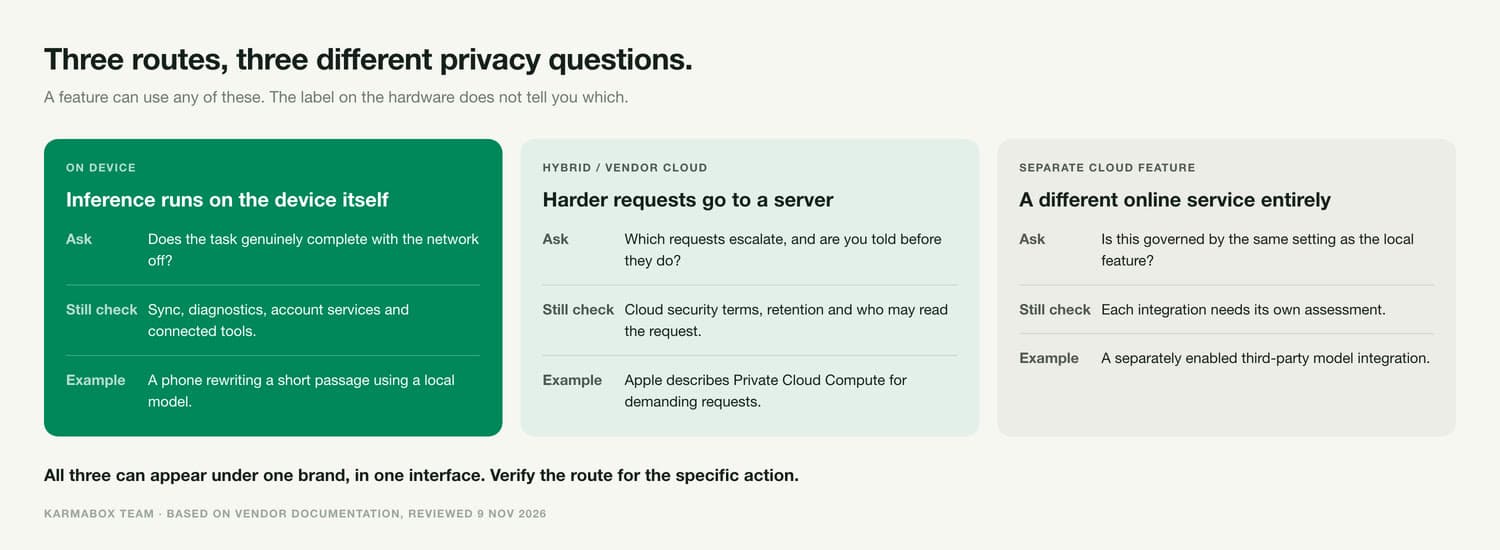
A device boundary is not a network boundary
An office appliance can be local to your organization while remaining remote from your phone. If your phone sends a document to that appliance, the document has left the phone even if it never leaves the office network. That may be an acceptable and useful design. The important questions are who controls the appliance, how the connection is protected, and whether any subsequent service receives the content.
Define the boundary you actually need. A personal journal may require processing on a single device. A team project may permit a managed office server. A public marketing brief may permit an approved cloud provider. The decision should follow the sensitivity and purpose of the information. Otherwise, teams can spend time debating whether a system is "local" while disagreeing about which boundary matters in the first place.
Privacy includes the information left behind
Keeping inference local reduces one route of exposure, but the resulting files still need protection. Consider device access, backups, account recovery, shared folders, and retention. Someone with access to an unlocked computer may be able to read a locally stored conversation. A synchronized folder can create an off-device copy after the AI task finishes. Local computation therefore belongs within a broader security design rather than serving as a substitute for it.
02Hybrid fallbacks and cloud features
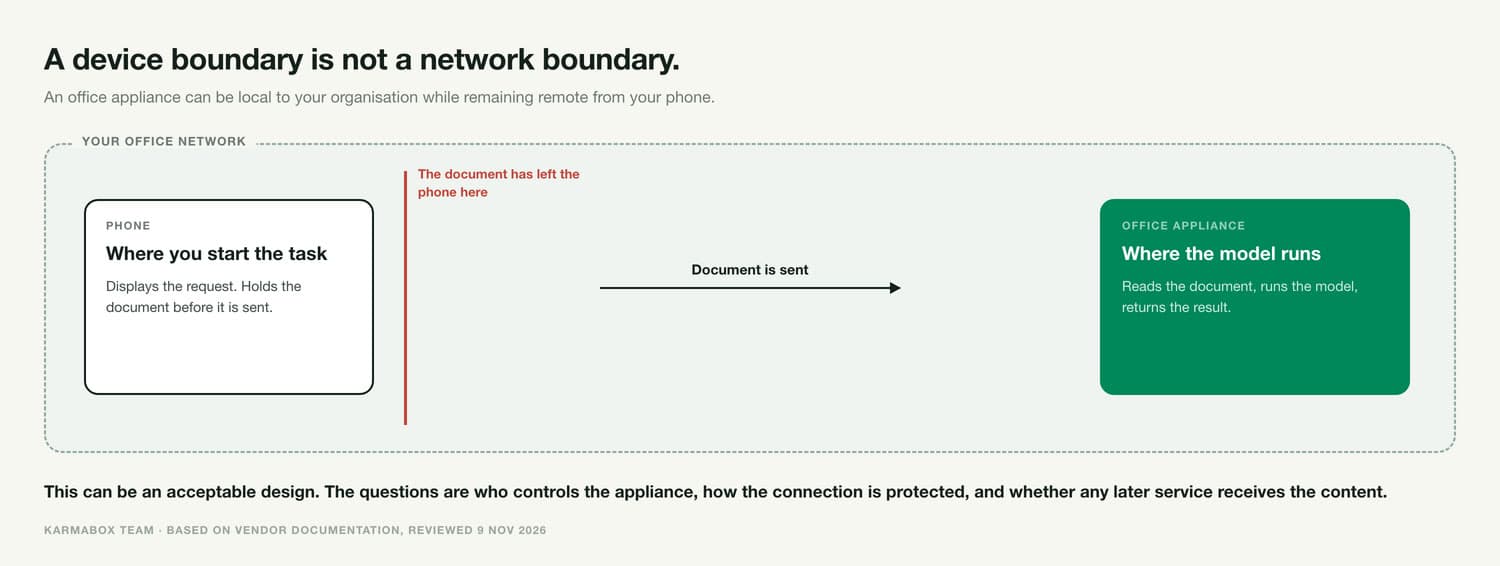
Hybrid AI combines local and remote capabilities. A system might handle a short task locally, route a more demanding request to a server, or offer a separate cloud feature when a local tool cannot complete the job. These are different behaviors. Do not assume that every product silently falls back to the cloud, and do not assume that a local option controls every feature under the same brand. Verify the routing policy for the specific action.
Apple Intelligence distinguishes local and server processing
Apple describes on-device processing alongside Private Cloud Compute for more demanding requests, and provides a way to generate an Apple Intelligence report of requests to that service [1]. Its privacy guidance is useful precisely because it distinguishes those paths. A request sent to Private Cloud Compute is not on-device inference, even when Apple describes the server architecture as privacy preserving.
Apple's Private Cloud Compute security materials explain protections intended to limit use of request data and provide verifiability [2]. Evaluate those protections as a cloud security model, not as proof that no data crosses the device boundary. A separately enabled third-party integration also needs its own assessment. One secure processing route does not automatically establish the terms or behavior of every other route reachable from the same interface.
Samsung exposes an on-device processing control
Samsung's Galaxy AI support documentation describes a "Process data only on device" setting [3]. Its enterprise administration documentation also describes management policies for Galaxy AI processing [4]. These controls are useful starting points, but availability and scope depend on the supported device and software. Test which functions remain available and check separate applications rather than assuming a switch governs all AI traffic on the phone.
A Copilot+ PC contains more than one kind of AI
Microsoft describes Recall snapshots and associated data as locally stored and processed, with controls for saving and excluding content [5]. That is a claim about Recall, not a guarantee that every AI application installed on a Copilot+ PC operates offline. A computer's local AI hardware and a cloud assistant's network behavior are separate questions, even if both appear in the same desktop environment.
The comparison is therefore feature by feature. Write down the task, the input, the claimed processing route, and the evidence supporting that route. A product family can contain genuinely local features, privacy-focused cloud processing, and ordinary online integrations at the same time. This is why a simple ranking of "private devices" can be misleading without identifying which activities and settings were assessed.
03What independent network research can establish
Douglas Leith's 2021 mobile handset traffic study measured communications from tested iOS and Android devices, including background activity [6]. It provides independent evidence that a phone's network behavior extends beyond the app visibly in use. However, it predates current generative AI features and is not an audit of today's Apple Intelligence, Galaxy AI, Recall, or KarmaBox. Its findings must not be presented as measurements of those products.
The methodological lesson is valuable: observe a baseline, define repeatable actions, and distinguish background services from the feature being tested. Independent research can challenge assumptions without answering every product-specific question. We did not find a comparable current independent traffic audit covering all the AI workflows described here. That evidence gap is a reason to publish a careful test protocol, not to substitute an old telemetry study for a new AI privacy experiment.
04How to verify what an AI feature sends out
Verification works best as a sequence of increasingly specific checks. Begin with documentation and configuration, then test offline behavior and collect network observations where authorized. Combine the evidence rather than treating any single indicator as decisive. A successful offline run supports one conclusion about that run; a connection to a server supports a different conclusion. Neither automatically reveals every data field, retention policy, or behavior under future conditions.
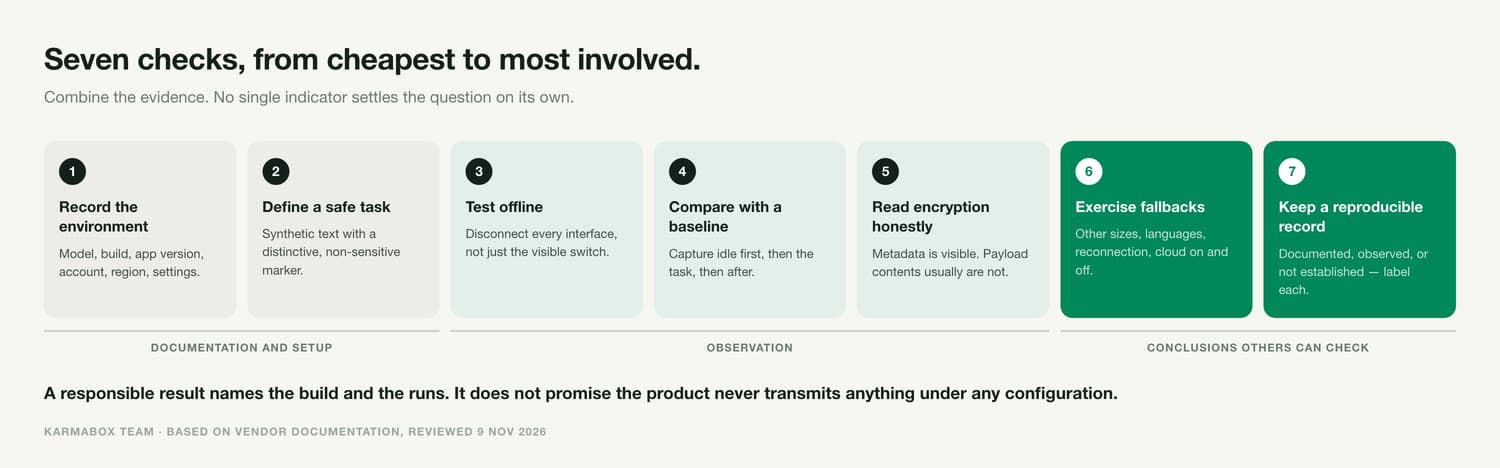
1. Record the exact environment
Record the device model, operating-system build, application version, account type, region, language, model selection, and relevant privacy settings. Note whether the device is managed by an organization. Download required model files and language packs before the inference test, while recording that setup activity separately. Otherwise, a model download can be mistaken for prompt transmission, or a missing download can make a genuinely local capability appear dependent on cloud inference.
2. Define a harmless and repeatable task
Use synthetic text or a document created specifically for testing. Include a distinctive, non-sensitive marker that can help identify the input if content visibility is available. Keep the task constant between runs, and record when it starts and ends. Do not use employee records, customer documents, credentials, or private photos to investigate an unknown route. The goal is to learn how the system behaves without creating a new disclosure problem during the experiment.
3. Test the claimed local mode offline
After setup, disconnect the relevant network paths and repeat the task. Check Wi-Fi, cellular connectivity, Ethernet, tethering, and other active interfaces rather than assuming one visible switch disables everything. Record whether the task completes, fails, or changes its functionality. An offline failure can indicate an authentication or licensing dependency as well as remote inference. Investigate the reason before claiming that the content itself must have been sent to a cloud model.
4. Compare online traffic with an idle baseline
Capture an idle period before running the feature, then capture the task and a reasonable period afterward. Use a controlled network or authorized device tooling that covers the relevant interfaces. Record destinations, connection timing, transferred bytes, and process attribution where available. Repeat the experiment to distinguish a consistent task-related pattern from an unrelated update. A single burst of traffic is a useful clue, but it is not a complete explanation of what the application transmitted.
5. Interpret encrypted traffic honestly
Ordinary packet capture often reveals connection metadata without revealing encrypted request content. A destination may host multiple services, and an upload size does not establish that a complete document was transmitted. Do not report "the prompt was uploaded" unless the evidence supports that specific statement. Likewise, failure to find the test marker inside encrypted packets does not prove that it was absent. State the limits of visibility alongside the observation.
If deeper inspection requires installing certificates or modifying security controls, use an isolated test environment and qualified personnel. Do not weaken protection on a production device simply to make a demonstration easier. Some applications resist interception, and bypassing those protections can alter the system being measured. Prefer documented diagnostics and reproducible observations where possible; describe any experimental modification so a reader understands whether the findings represent ordinary use.
6. Exercise fallback and reconnection conditions
Try more than one input size and supported language, and check what happens when the chosen model is unavailable. Test with cloud permission enabled and disabled where the feature supports that distinction. Observe the device after reconnecting: a task that completed offline might still synchronize a result or send diagnostics later. Document the exact route and permission behavior instead of assuming every successful local test applies to every subsequent request.
7. Keep a result that someone else can reproduce
For each run, save the configuration, task, time window, capture location, observed endpoints, and limitations. Distinguish three statuses: documented by the vendor, observed in testing, and not established. A responsible conclusion might say that no task-correlated outbound connection was observed during specified runs on a named build. It should not expand that observation into an unconditional promise that the product never transmits information under any configuration.
05Where KarmaBox runs what
KarmaBox should be evaluated using the same boundaries as any other AI system. Its hardware product page describes local model execution on an office appliance and distinguishes cloud, computer, and KarmaBox deployment options. That supports a deployment distinction; it does not, by itself, document exactly which computations execute on a phone. A mobile interface must not be described as phone-local inference without feature-specific confirmation.
The same page labels sovereign routing as in development. This article therefore does not present automatic sensitive-data routing as a released guarantee. For any deployment, it is worth asking the vendor for a task-level execution map: for each feature, the phone's role, the selected execution host, external services, stored copies, and whether a cloud route requires permission or can occur automatically. That request applies to us as much as to anyone else.
Until such a map is available, the defensible distinction is between a phone interface, a chosen local execution host, and an optional remote service. These are evaluation categories, not a claim that every KarmaBox feature implements all three in a particular way. Readers can consult the KarmaBox documentation and request confirmation for their intended workflow.
For a broader explanation of control over data, compute, models, and identity, see our guide to sovereign AI for individuals and teams. Apply those dimensions to an actual task rather than treating sovereignty as a universal product adjective. The useful question is whether the deployment gives your team the necessary choices and evidence for the information it intends to process.
06Choose a workflow before choosing a privacy label
Start with one task whose information boundaries are easy to describe. For example, an organization could test a local summary of a synthetic internal document before introducing customer material. Define which destinations are allowed, which output should be retained, and what should happen if the local model cannot complete the task. The expected failure behavior matters: a clear refusal may be preferable to an unapproved external transfer for that particular information category.
Then evaluate usefulness as well as privacy. A system that stays within the required boundary but repeatedly produces unusable results may drive staff toward unofficial tools. Reduce that pressure by defining an approved escalation route for tasks that need stronger capabilities. The policy can permit a different model for public information while requiring a local route for confidential material. What matters is that the distinction is understandable and enforceable.
Recheck after significant changes. A new operating-system release, application update, model choice, account setting, or integration can change the workflow you previously tested. Keep the test record connected to the version it describes. Schedule a focused regression check for critical tasks rather than assuming that an old screenshot of a privacy setting proves the current behavior. Privacy verification is most useful when it remains tied to the system people actually use.
07Turning a privacy claim into an acceptance test
A useful acceptance test names the information boundary before measuring anything. For a confidential document workflow, the requirement might be that document content and derived summaries remain on an approved office host, while software update checks are permitted. For a different workflow, even sending a derived representation may be unacceptable. These are illustrative requirements, not universal standards. Write the requirement precisely enough that the test can distinguish a pass from an unresolved question.
Include indirect representations in the discussion. Systems can work with extracted text, summaries, embeddings, image crops, or metadata rather than the original file. The fact that a full document did not move is not enough to decide whether the approved boundary was respected. Ask which representations the feature creates and which ones leave. Their sensitivity depends on what they reveal and how they can be linked to other information, not merely on whether they are human-readable.
Separate expected infrastructure traffic from task content, but do not dismiss it automatically. An authentication request can be necessary for access, while still revealing an account identifier or service usage. A model update can explain a large download without explaining a simultaneous upload. Classify each observation according to the evidence available. If the purpose or payload cannot be determined, leave it unresolved and ask the vendor for a specific explanation rather than assigning a reassuring label.
A hypothetical phone-to-office workflow
Imagine a team member using a phone to request a summary from a managed office computer. The phone displays the task, the office computer reads the document and runs the model, and the summary returns to the phone. This can preserve an organizational boundary while crossing a device boundary. The example is an architectural illustration, not a description of a tested KarmaBox configuration. Its acceptability depends on the team's documented requirements and the actual implementation.
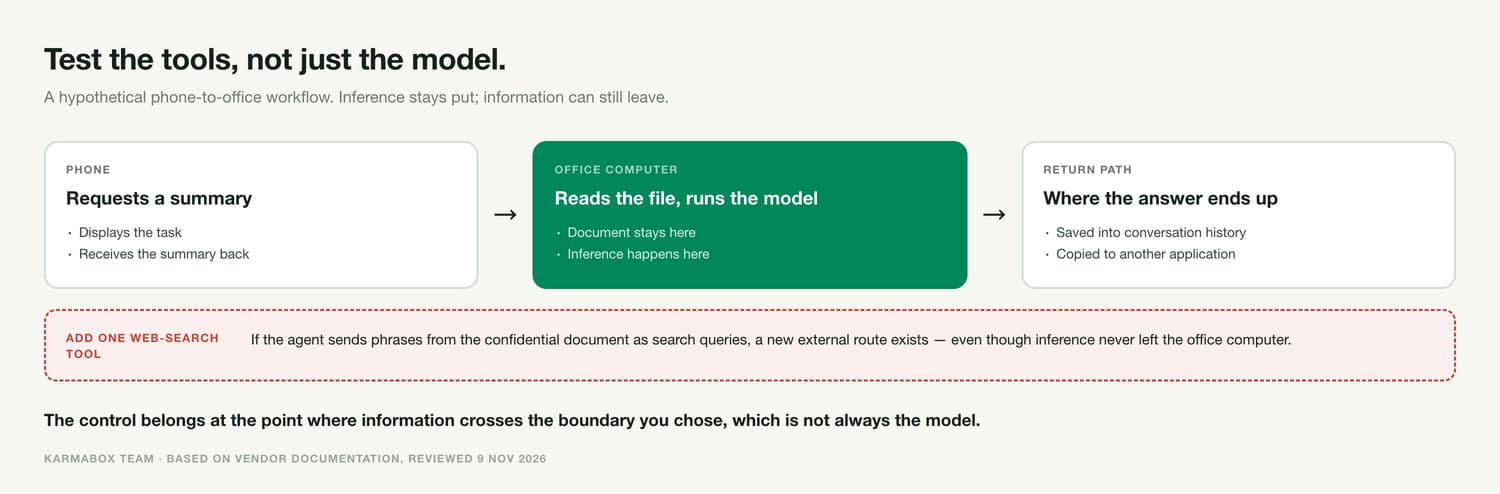
Now add a remote web-search tool. If the agent sends phrases from the confidential document as search queries, the workflow has created a new external route even though model inference remains on the office computer. The test should therefore cover tools as well as the model. An approved design might disable that tool for this information category or require a separately reviewed query. The important control is at the point where information crosses the chosen boundary.
Consider the return path too. A summary displayed on the phone may be saved into conversation history or copied to another application. The original document might remain in the office while its most sensitive conclusions travel elsewhere. Review notifications, exports, sharing features, and synchronization alongside inference. This is why an execution diagram should show inputs, outputs, and stored copies rather than ending at the model's response.
Questions to put to a product team
Ask for the default behavior and the exception behavior separately. Which host is selected for a new user? What changes when a model is unavailable, a request exceeds a limit, or an external integration is enabled? Is the user informed before content is transmitted, and can an administrator prevent that transmission? A demonstration of the preferred route does not answer what happens during an error or an unsupported task, so include those cases in the acceptance criteria.
Request evidence that corresponds to the claim. A feature guide can establish documented intent. A configuration export can show selected settings. A scoped traffic capture can show observed connections. A security assessment can examine implementation protections within its defined scope. None of these automatically replaces the others. Keeping the evidence types separate makes disagreements easier to resolve and prevents a useful but limited document from being treated as a blanket privacy certification.
Finally, decide who owns follow-up. Someone should review new endpoints, approve material routing changes, and keep the deployment description current. Small teams can use a short register rather than a complicated compliance system. Record the approved workflow, last test, known limitations, and person responsible. That turns privacy from a one-time purchasing impression into a practical operating decision that can be revisited as the software changes.
Does on-device AI mean no data leaves my device?
Not necessarily. The inference may run locally while synchronization, diagnostics, account services, or connected tools communicate externally. Verify the complete workflow and the relevant data categories. A local model is evidence about one computation, not a complete description of every application behavior.
Is cloud AI always less private?
Cloud processing introduces another processing location, but privacy also depends on access, retention, security, and contractual controls. Evaluate those details against your requirements. A poorly secured local deployment is not automatically safer than a well-governed remote service.
Does airplane mode prove a feature is private?
It can help test offline capability when all relevant connections are disabled. It does not prove that no data is stored, synchronized later, or sent under another configuration. Record what completed offline and observe reconnection behavior separately.
Can packet capture show exactly what an AI sends?
Not always. Encryption can hide request contents while leaving some connection metadata visible. Report destinations and timing separately from claims about payload contents. A capture without visible prompt text is not proof that the prompt was never transmitted.
Does using KarmaBox on a phone mean the model runs on the phone?
Do not assume that from the interface alone. Confirm the selected execution host and the behavior of the specific feature, as you would with any vendor. Put the question to a specific feature, then ask for the matching type of evidence.
08About the author
The Karma Box Team publishes practical guides to AI control and deployment. This article draws on device-maker documentation and one clearly dated independent network study. Research reviewed November 9, 2026. The test protocol described here is written for readers to run on their own hardware; we have not published it as a measured finding about any product.