An AI meeting assistant can take an hour of talk and hand back a transcript, a summary, and a task list before anyone is back at their desk. It can recognize who said what, pull last quarter's numbers into the discussion, and draft the follow-up email. What it cannot do is tell you, on its own, where the audio went, how long the voiceprints stay, or who else can read the notes.
The useful question is therefore not whether a meeting assistant is accurate. Most of them now are. The question is which machine does the listening, and what happens to everything the listening produces. An AI meeting assistant is software that joins a conversation as a participant: it hears everything said, turns the audio into stored artifacts (transcripts, summaries, decisions, action items, sometimes voiceprints), and, in the newest products, starts acting on those artifacts while the meeting is still running. Each of those artifacts is a separate storage decision, and in most products that decision is made by the vendor, not by the people in the room.
This guide explains what a meeting assistant collects, the three places the processing can run, what the hosted products do well, which questions their retention terms need to answer, the consent rules a recorded room has to satisfy, and a review a team can run before the next quarterly planning call. Product examples, including Anthropic's Claude Meetings, are chosen because they are current and documented, not as a ranking.
What an AI meeting assistant is, and what it is not
The category goes by many names: notetaker, meeting copilot, meeting agent, AI participant. The names matter less than the capability tiers behind them. A transcription tool converts speech to text. A meeting assistant goes further on three fronts, and each front widens the data it touches. Knowing which tier a product sits in is the first step of any evaluation, because each added capability adds a category of stored data.
It identifies people. To label a line "Dana, 14:32," the software has to match a voice to a person. Some products do this per meeting; others build a persistent voiceprint so that Dana never has to introduce herself again. A voiceprint that identifies a person is biometric data in several legal systems, which puts it in a different category from the text of the transcript.
It interprets. A summary is the assistant's judgment about what mattered. Action items carry names and deadlines. A wrong attribution in a transcript is a typo; a wrong attribution in a task list is an assignment someone did not accept. The interpreted layer gets forwarded, searched, and quoted long after the audio is deleted, so where it lives matters more, not less.
It acts. The 2026 generation of products joins the call as a participant, reads the shared screen, queries connected work apps during the conversation, and drafts documents in real time. At that point the meeting assistant is not an accessory to the meeting. It is an AI avatar with a seat at the table, and the question of what it is allowed to touch becomes a permissions question, the same one that applies to any agent with access to company systems.
One useful line to draw early: a meeting assistant's privacy behavior is a property of the whole product, not of the model inside it. The same speech model can sit inside a product that keeps audio for thirty days and one that discards it on hang-up. The label on the box does not decide this. The product's storage design does.
The week the meeting became an AI surface
For a dated picture of where the category is, the second week of November 2026 is enough on its own.
Claude Meetings, announced November 10, 2026
Anthropic announced Claude Meetings, together with Claude Whiteboards and Claude Sheets, on November 10, 2026 (TechCrunch, November 10, 2026). Claude joins a video call as a visible participant. While people talk, it drafts the plan under discussion, maps a timeline on a whiteboard, answers questions in the meeting chat, and retrieves material from connected work apps, such as last year's figures. After the call, the notes, action items, and other produced material are available in claude.ai. The feature launches in beta on Team and Enterprise plans and works with Google Meet at launch.
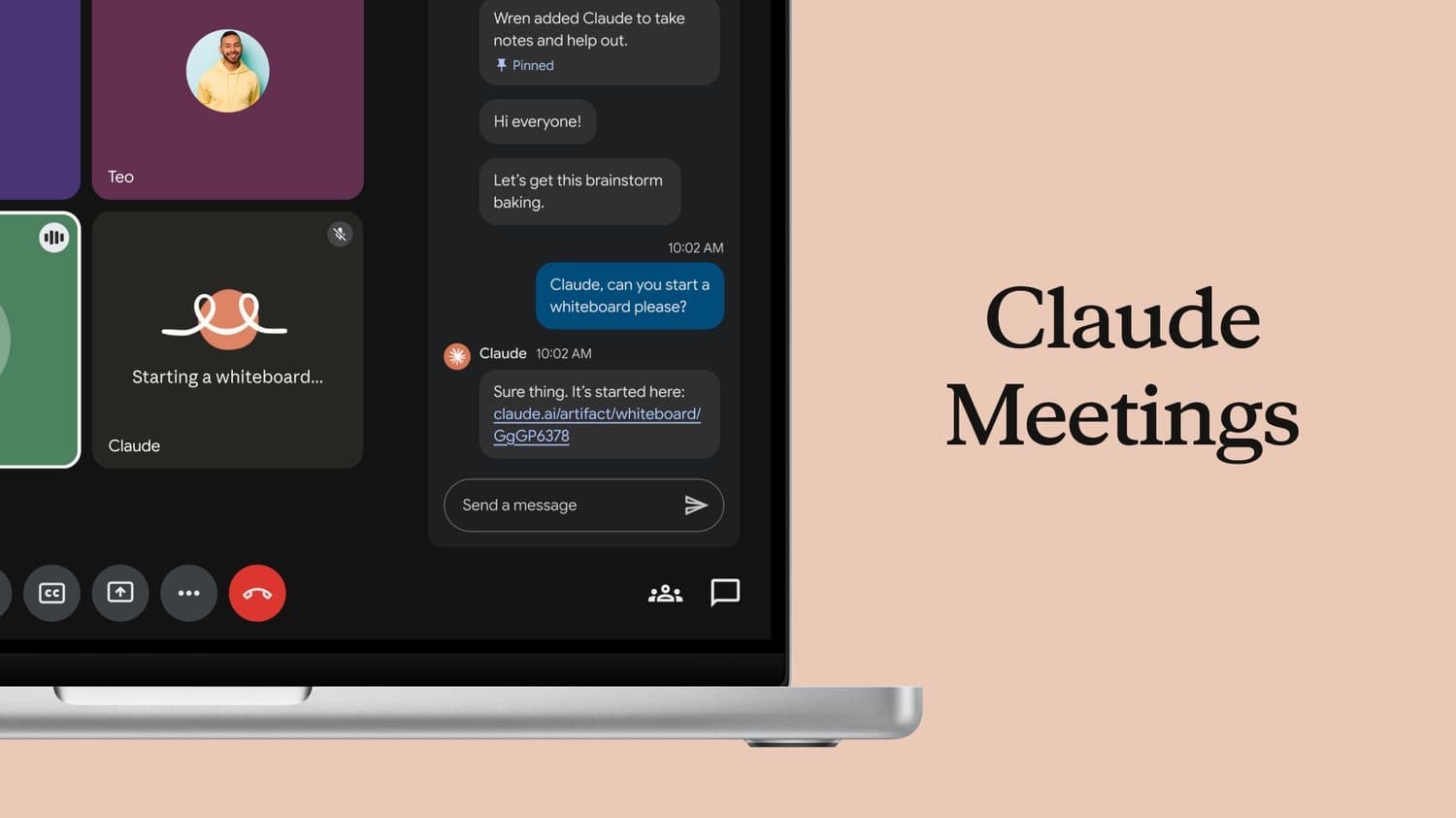
Two design details in the announcement deserve attention, because they show a vendor answering boundary questions in its own way. Claude identifies itself as a participant and posts a notice in the meeting chat, which addresses disclosure. And it will not join calls with external guests unless an admin authorizes it, leaving automatically if an external guest joins, which addresses the consent problem of recording people outside the organization. Both controls sit in the vendor's admin console. The artifacts the meeting produces still live in the vendor's service.
The same week supplied two more data points. Otter.ai announced its largest language expansion to date: multilingual transcription that follows a conversation as speakers switch languages mid-meeting, with support growing to 31 languages in total, 13 of the 27 new ones available immediately (TechCrunch, November 9, 2026). An Otter spokesperson described the goal as letting any company "build a system of record" for spoken decisions. And Anthropic's launch itself came a few weeks after OpenAI shipped its own set of workplace collaboration tools (TechCrunch, November 10, 2026, reporting both).
"System of record" is the honest phrase in that list. The industry is converging on the view that what is said in meetings should become durable, searchable, assignable data. That is useful, and it is also a one-way door. The most candid conversations in a company, on pricing, personnel, and strategy, the things people say out loud precisely because they did not want to write them down, are becoming records, and records have owners, locations, and retention schedules.
What a meeting assistant actually touches
A meeting generates more kinds of data than most people list when they think about recording. An inventory, before any vendor evaluation, is the single most clarifying step.
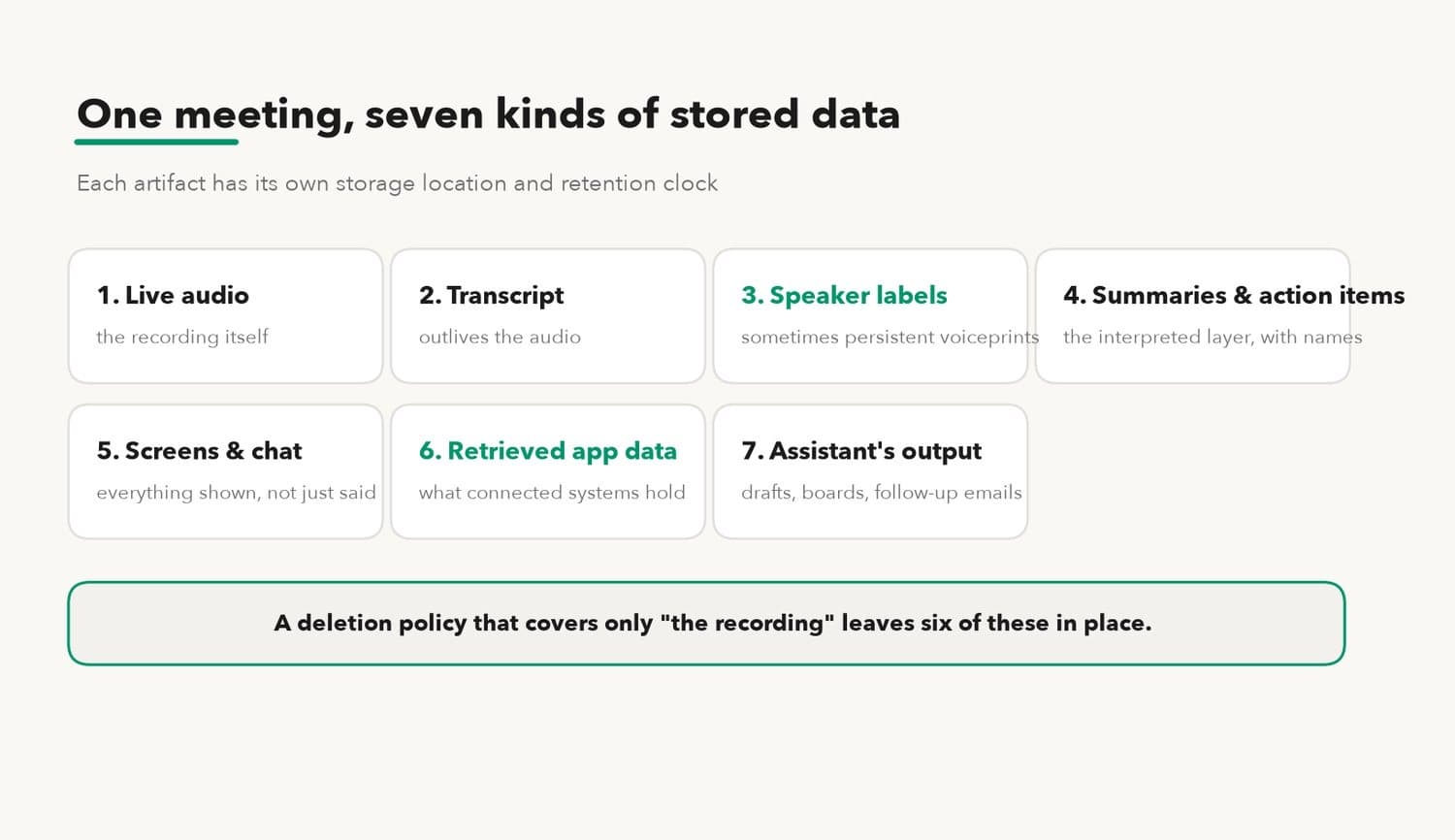
The live audio is the obvious one. Then the transcript, which outlives the audio in nearly every product. Then speaker labels, and behind them possibly persistent voiceprints. Then the interpreted layer: summaries, decisions, action items with names attached. Then whatever the assistant saw beyond audio: shared screens, meeting chat, files dropped into the call. Then the material the assistant pulled in from connected apps during the meeting, which can include data far more sensitive than anything said aloud. And finally the assistant's own output: drafts, boards, spreadsheets, follow-up emails.
Seven artifact types from one call. A deletion policy that covers "the recording" and nothing else leaves six of them in place.
The connected-app layer deserves its own sentence, because it inverts the usual intuition. People reason about recording risk by asking "what might someone say out loud?" But when an assistant answers a question in the meeting by querying the finance system, the meeting record now contains finance data that nobody spoke. The transcript has become a window into what the connected systems hold, scoped only by what the assistant was allowed to query. That is why the assistant's app permissions belong in the meeting policy, not just in the IT console: every grant widens what a meeting can turn into a record.
Where this data can leak is not hypothetical. The paths that apply to any agent with tool access (prompt injection through retrieved content, over-broad connectors, logs that outlive their purpose) apply with full force to an assistant that reads screens and queries internal systems live, and they are catalogued in detail in AI agent data leakage. A meeting adds one more path of its own: participants who never agreed to be enrolled in anything, because they were just invited to a call.
The three places the processing can run
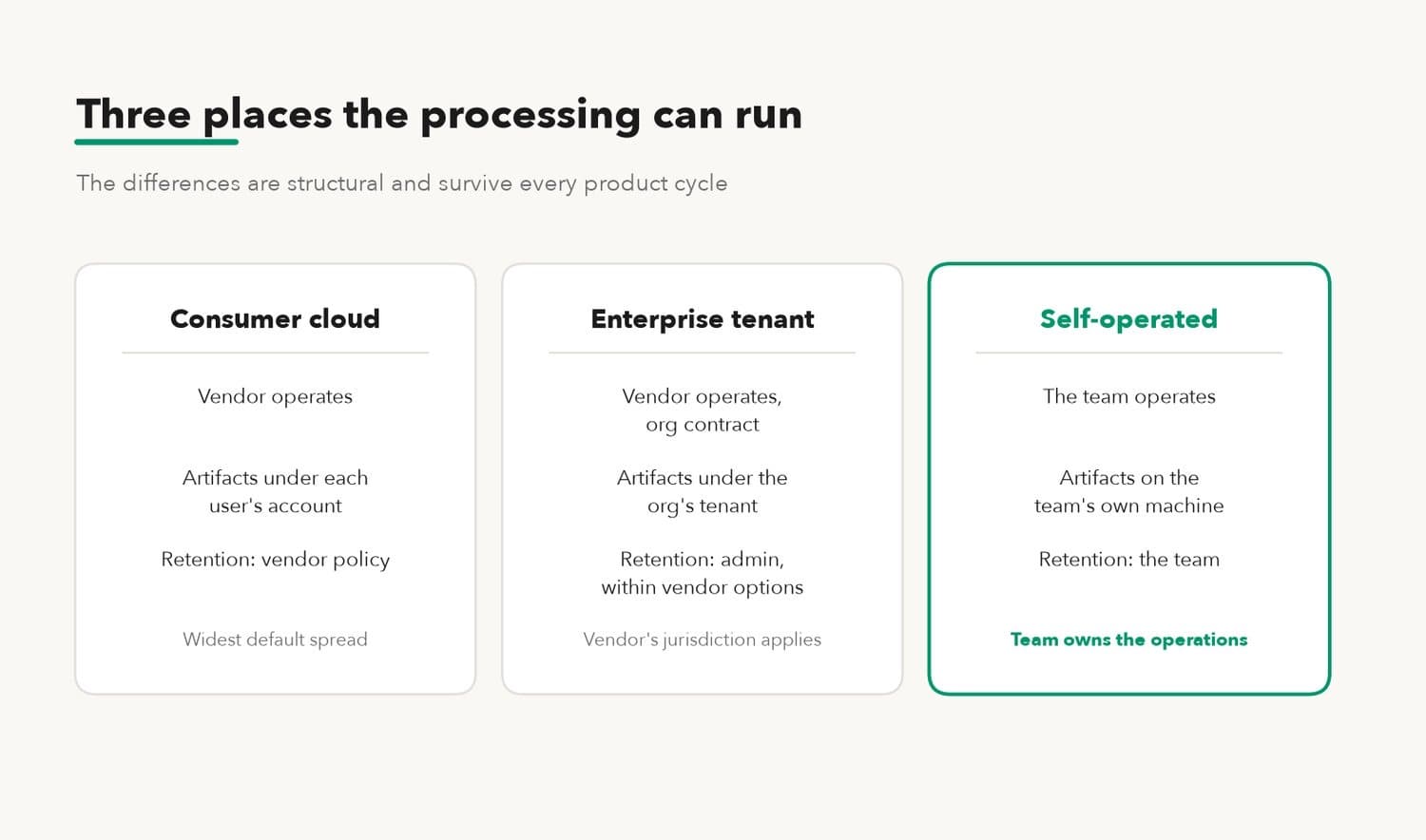
Strip away branding and a meeting assistant processes audio in one of three arrangements. The differences are structural, which is why they survive every product cycle.
| Arrangement | Who operates the machine | Where artifacts live by default | Who sets retention |
|---|---|---|---|
| Consumer cloud service | Vendor | Vendor's service, under each user's account | Vendor policy |
| Enterprise cloud tenant | Vendor, under org contract | Vendor's service, under org tenant | Org admin, within vendor's options |
| Self-operated workspace | The team itself | The team's own machine | The team |
The consumer path is how most people first meet the category: an individual connects a notetaker to their calendar, and every meeting they attend gets processed under their personal account. The other participants inherit that choice. This is worth pausing on, because it is the arrangement with the least governance and the widest default spread. One enthusiastic adopter can enroll an entire company's conversations.
The enterprise path moves the account to the organization and adds admin controls, like Claude Meetings' external-guest rule. Processing and storage still happen in the vendor's service, under the vendor's terms, in the vendor's jurisdiction. The admin chooses among the options the console exposes. Jurisdiction rides along silently: the artifacts sit wherever the vendor's service runs, under the legal process of that place, which is a fact to know rather than a reason to panic. For most routine meetings it changes nothing. For a company whose client contracts promise that material stays in a named country, it is the first question, not the last.
The self-operated path runs the transcription, speaker matching, and summarization on hardware the team controls, so the artifacts exist only where the team decides. The structural trade is that the team also inherits the operations: the hardware, the updates, and the responsibility when something breaks. Whether a product's "local" claim survives contact with reality is a testable question, and the offline test procedure in on-device AI vs cloud AI privacy applies to meeting tools without modification.
What the hosted products do well
A fair evaluation starts with why the hosted path became the default. The reasons are real.
Setup is nothing. A calendar connection and the assistant attends every call, on any device, with no hardware bought and nobody assigned to maintain a machine. For a team without an operations habit, this difference decides the question on its own.
The features arrive on the vendor's schedule and the vendor's compute. Otter's 31-language expansion and Claude's live retrieval from work apps are vendor-side capabilities; a self-operated setup gets equivalent features only when open models and local software catch up, and on the hardware budget the team actually has.
Enterprise consoles have grown real controls. An admin can often restrict which meetings the assistant may join, require disclosure, scope it away from external calls, and set retention windows. Claude Meetings shipping with the external-guest rule on day one shows vendors now treat these controls as table stakes, and an org that configures them carefully gets meaningful governance without operating anything.
And a hosted service carries the operational risk for you, including, it is fair to say, some risks a small team would handle worse. A vendor's security team watches for abuse around the clock. The counterweight is concentration: a provider holding thousands of customers' artifacts is a bigger target than any one customer. On November 9, 2026, the AI infrastructure company Fireworks disclosed that attackers had accessed some customers' model weights, datasets, and billing information (TechCrunch, November 10, 2026). Nothing about that incident involved meetings. Everything about it involved concentration.
The questions the vendor's terms have to answer
Choosing the hosted path means the artifacts live under someone else's policy. These are the questions that policy has to answer, and a team should be able to point at the clause that answers each one.
How long does each artifact live? Not "the recording": each artifact. Audio, transcript, voiceprints, summaries, the assistant's drafts, and the logs. Products commonly have different clocks for each, and the voiceprint clock is the one most often missing from the document.
Does any of it train models? The answer can differ between consumer and enterprise tiers of the same product, and between the transcript and the telemetry around it. The precise question is which artifacts, under which plan, with what opt-out, as of what policy date.
What does deletion delete? When a meeting is removed, do the voiceprints survive? Do the action items already dispatched to other systems survive? A unit-deletion guarantee, where one act removes recording, transcript, notes, and voiceprints together, is rare enough in the hosted world to be a differentiator when it appears.
Who can be compelled to produce it? A transcript held by a vendor can be requested in litigation and in some cases must be preserved under a legal hold, and the practical mechanics of that, who receives the request and what counts as the team's control, are laid out in are AI chat logs discoverable. A meeting assistant multiplies what there is to request: it converts conversations that used to be unrecorded into seven artifact types, each a potential exhibit.
Where do the conversations themselves live, in the plain sense of which company's storage holds them? For chat products that question has a published answer often enough to compare; the general map is in where your AI conversations actually live. For meeting products the answer is usually "the vendor's service," and the real variable is the jurisdiction and the tenant isolation around it.
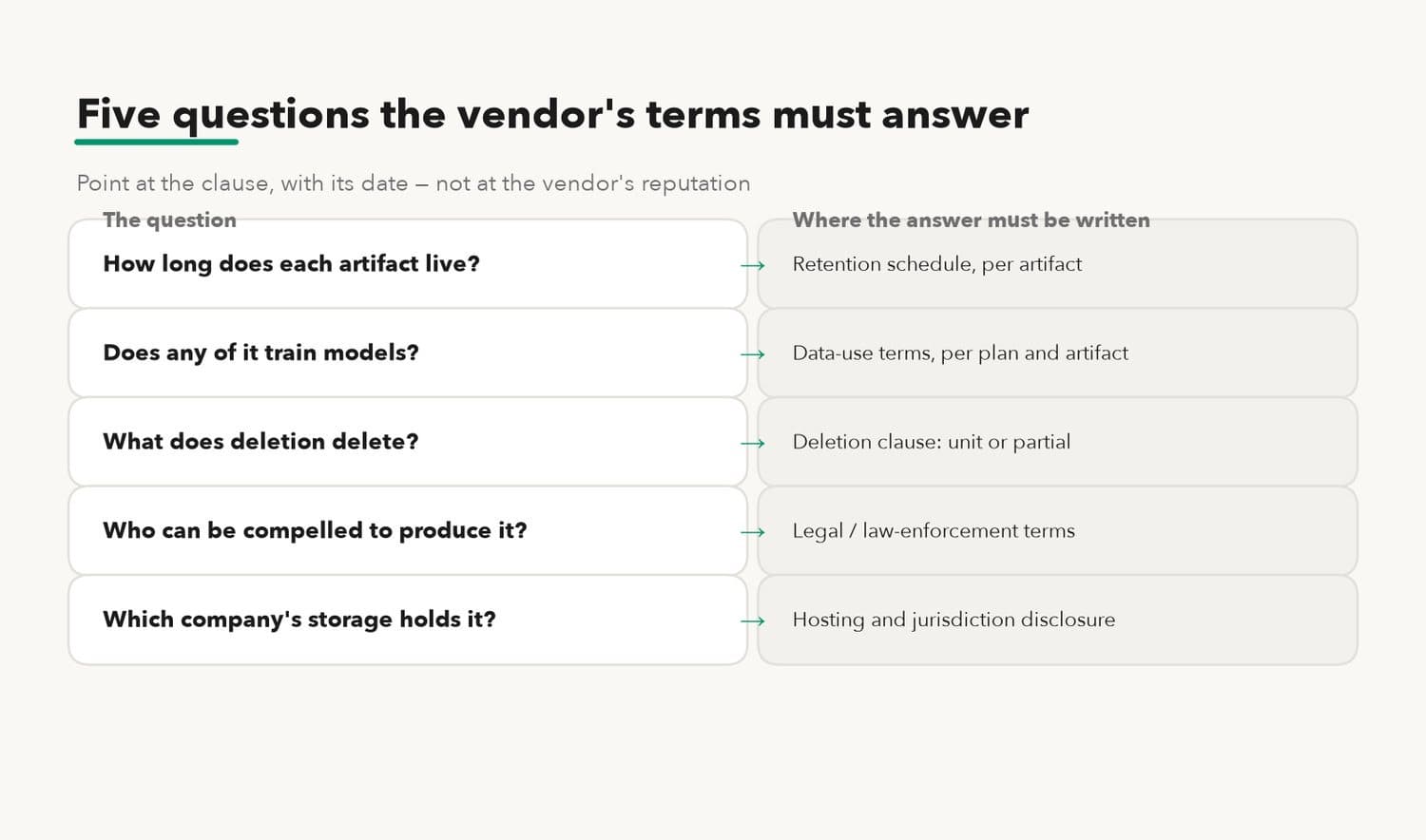
None of these questions accuses a vendor of anything. They are the ordinary consequences of custody. The point of asking is to replace "the vendor is reputable" with "the clause says X, dated Y," which is the only form of answer that survives an incident review.
Where the artifacts go after the call
Even a perfect answer to the retention questions covers only the vendor's copy. Meeting assistants are built to distribute, and distribution is where custody quietly multiplies.
The standard product behavior is a fan-out within minutes of hang-up. The summary goes to every participant by email. Action items push into the task tracker. The notes post to a channel. Sales-oriented tools write call summaries into the CRM against the client's record. Every one of those pushes copies an artifact across a system boundary into a store with its own owner, its own access list, and its own retention clock. The meeting tool's deletion button does not reach any of them.
Email is the clearest case. A summary mailed to eight participants now exists in eight mailboxes, plus whatever those mailboxes back up to, plus anyone a participant forwards it to. Deleting the meeting upstream recalls none of it. This is not a flaw in any product; it is what "send the notes to everyone" means. But it changes the arithmetic of exposure. A team that holds ten assistant-attended meetings a week, each fanning out a summary to eight people, has created roughly 4,000 circulating copies a year (10 × 8 × 50 weeks; illustrative arithmetic, counting only first-hop email copies and ignoring forwards and backups).
Workspace search is the quieter case. Once meeting notes land in a shared workspace, they are usually indexed, and indexed means findable by people who were never in the room. Whether a junior hire searching "pricing" can surface the partners' meeting notes depends entirely on how access control was inherited when the notes were filed. Nobody decides this in the meeting; it was decided by a default, months earlier, when the integration was connected.
The practical conclusion is about ordering. Artifact fan-out happens automatically and immediately, so the boundary has to be set before the meeting happens, not cleaned up after. Choosing which integrations an assistant may push to, and which tiers of meeting may fan out at all, belongs in the same afternoon of decisions as the retention settings. Recalling artifacts after a quarter of fan-out is not a project anyone finishes.
The rules the room has to satisfy
Recording a multi-party conversation is regulated in ways that recording your own notes is not, and a meeting assistant is a recording device however friendly its avatar.
In the United States, call-recording consent is set state by state. Some states accept the consent of one party to the conversation; others, California among them, require the consent of every participant (the distinction usually described as one-party versus all-party consent). A meeting that spans states inherits the stricter rule in practice. An assistant that announces itself in the meeting chat, as Claude Meetings does, is implementing a consent practice, though whether a notice equals consent is a question for counsel, not for a product page.
Voiceprints raise a second, separate layer. Illinois' Biometric Information Privacy Act (2008) treats voiceprints as biometric identifiers requiring written consent before collection, and it grants individuals a private right of action. Under the EU's GDPR, biometric data processed to identify a person falls under Article 9's special categories, with a default prohibition and narrow exceptions. A product that builds persistent voiceprints so participants "never introduce themselves again" is operating in exactly this territory, and the convenience is real, which is why the consent step should be explicit rather than assumed.
In China, the Personal Information Protection Law (effective November 2021) classifies biometric information as sensitive personal information, requiring separate, explicit consent before processing rather than a bundled checkbox. A team building a voiceprint library for meetings cannot route around this requirement with any tool. This paragraph is likewise orientation only; specific applicability is a question for counsel.
External participants concentrate the risk. Employees can be covered by policy; a client, a candidate, or a supplier on the call has agreed to nothing. Claude's design choice, leaving automatically when an external guest joins unless an admin authorized otherwise, is one vendor's answer. A team's own policy needs an answer too, whichever tool it uses: which meetings may be recorded at all, who tells the externals, and what happens to the artifacts of a call that should not have been recorded.
Contracts add a layer that privacy law does not. Many client engagements run under confidentiality agreements written before meeting assistants existed, and a clause restricting disclosure of client material "to third parties" reads differently once a vendor's cloud service is transcribing the workshop. Whether routing a client's spoken words through a notetaking vendor counts as disclosure is a contract-by-contract question. The inexpensive move is to check the NDA before the first recorded client call rather than after, and to put the assistant into the engagement terms explicitly when the client agrees.
The simplest operational fix for disclosure is boring: a standing line in the calendar invite template. "This call is attended by a notetaking assistant; recording and notes are handled under [policy]. Tell us if you object." It costs nothing, creates a record that notice was given, and surfaces objections before the call instead of during it.
The pattern across all of these layers is the same. The rules attach to the room and the people in it, not to the tool. Switching vendors changes nothing about them; only the team's own meeting policy can satisfy them.
How to set a meeting data boundary
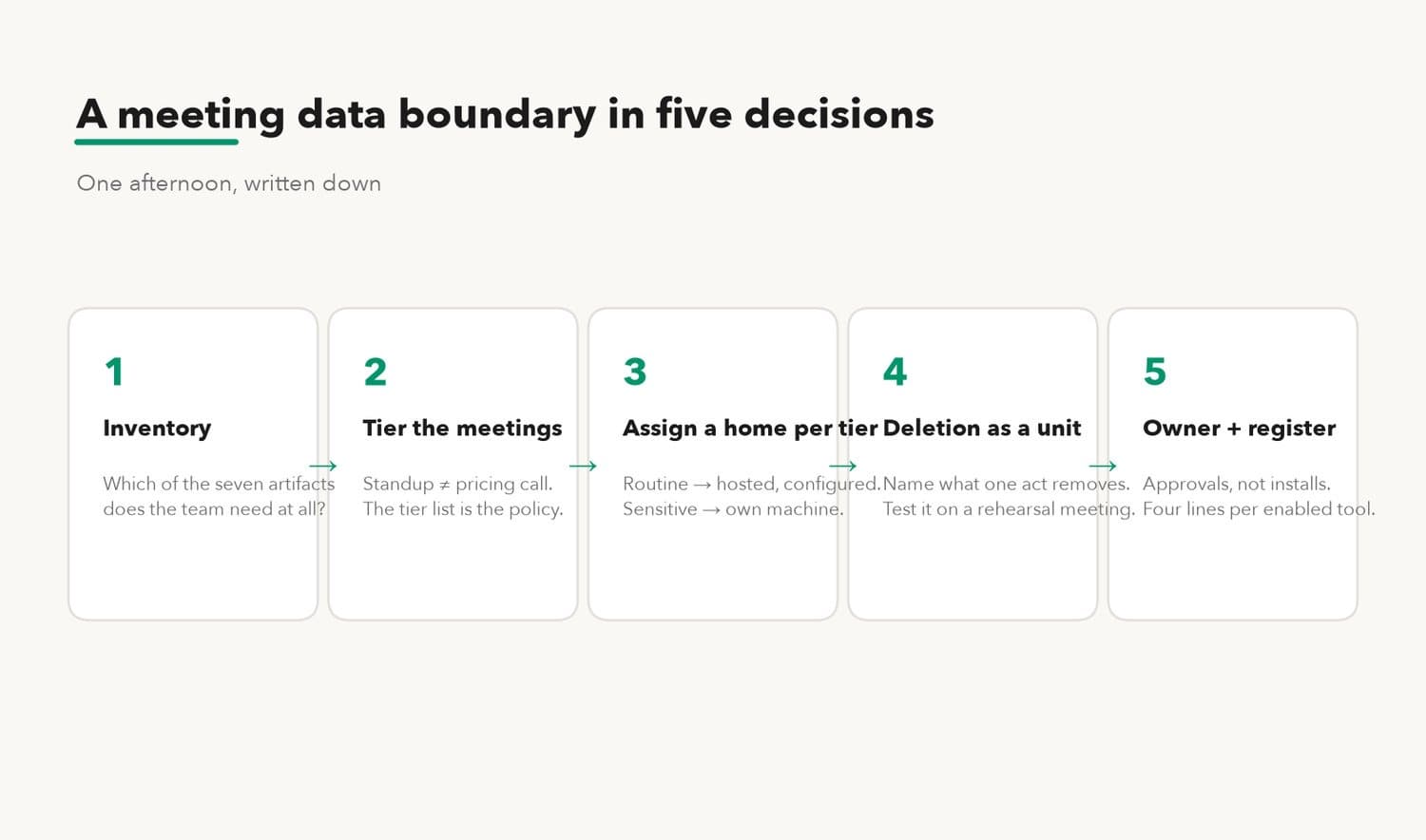
The boundary work is smaller than it sounds. One afternoon of decisions, written down, covers most teams.
Start with the artifact inventory from the section above and mark, for each of the seven types, whether the team needs it at all. Many teams discover they want decisions and action items and have no use for stored audio or persistent voiceprints. Every artifact the team does not keep is a clause it does not have to negotiate and a record nobody can request.
Then sort meetings into tiers, because one rule for all meetings will be wrong for most of them. A standup can tolerate almost any tool. A pricing discussion, a personnel review, a board call, or a client session that touches someone else's confidential material each needs a deliberate decision: assistant allowed or not, and if allowed, which processing arrangement from the table above. The tier list is the policy; everything else is enforcement.
Assign the artifacts a home per tier. The natural split is by sensitivity: routine meetings can go to a hosted service with the admin controls set, and sensitive tiers go to a machine the team operates, where data stays inside the team's own boundary. Writing the split down matters more than where the line lands, because an unwritten line moves under deadline pressure.
Write deletion as a unit. Whatever the storage, the policy should name what one deletion act removes (recording, transcript, notes, voiceprints, dispatched tasks), and someone should test it once by deleting a rehearsal meeting and looking for survivors.
Then run that rehearsal before the first real meeting. A twenty-minute test call with synthetic content, followed by an hour of checking: where did each artifact land, who can open it, did deletion remove them all, and for a product claiming local processing, does the claim survive the offline test. The habit is the same acceptance-test discipline that applies to any privacy claim: find the evidence, test the important limit, write down what you saw.
Two pieces of housekeeping keep the boundary from decaying. Name one owner for the meeting-tool decision, so that adding an assistant to the company's calls is an approval rather than an install. The consumer path spreads precisely because it requires nobody's permission; a named owner and a one-line request ("tool, tiers it may attend, integrations it may push to") closes that gap without ceremony. And keep a short register of what is enabled: which assistant, which tiers, where artifacts live, retention settings, and the date the vendor's terms were last read. Four lines per tool. When a vendor changes its policy or ships a new feature, the register is the difference between re-checking in ten minutes and reconstructing from memory.
What this review does not cover should be said plainly. It addresses custody risk: the risk that meeting artifacts end up somewhere the team did not choose, for longer than it intended, readable by people it never listed. It does not address judgment risk: an assistant that mis-attributes a decision or summarizes a nuance away will do so identically on any machine, and only human review of the notes catches it. And it does not address insider risk: a teammate who forwards the notes was always able to forward their own memory. The boundary limits what exists and where; it cannot limit what people do with what they legitimately have.
A worked example
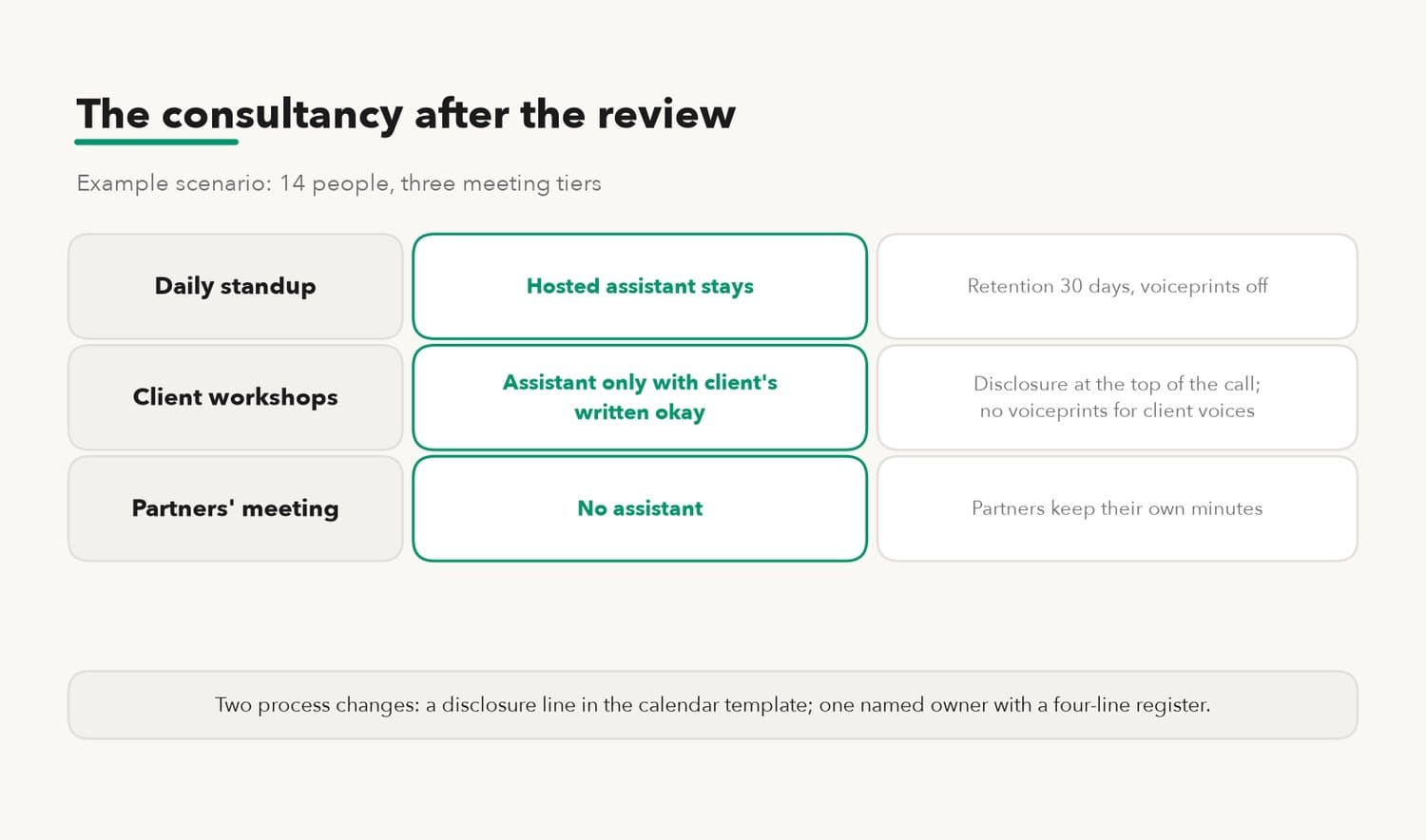
Consider a 14-person consultancy that runs three kinds of calls: a daily standup, weekly client workshops, and a monthly partners' meeting where compensation and client pricing come up. It adopts one hosted notetaker for everything, because the trial was free and the summaries were good.
A boundary review along the lines above would surface four findings:
produces the most sensitive artifacts and has the least need for them. The partners already keep their own minutes. Decision: no assistant in that room.
record external participants who never consented. Decision: assistant only with the client's written okay, disclosure at the top of the call, and no persistent voiceprints for client voices.
are harmless and the action items get used every day. Decision: hosted assistant stays, with retention set to 30 days and voiceprints off in the admin console.
Nobody had tested deletion. The test finds that deleting a meeting removes the recording and transcript, while the summary survives in every participant's workspace. The policy now says summaries of client calls are deleted by hand, with a named owner.
The consultancy also made two small process changes: the calendar template for client calls gained a standing disclosure line, and the office manager became the named owner of meeting-tool approvals, with a four-line register of what is enabled.
Nothing in that outcome required new software. Two tiers kept the hosted tool; one tier banned it. The review cost an afternoon and turned a default into a decision, which is the entire difference between having a boundary and having a vendor.
When the hosted path wins, and when the local path wins
| The hosted assistant is the right call when | The self-operated assistant is the right call when |
|---|---|
| Nobody on the team can own a machine and its updates | The meeting content must not leave the team's custody, as a requirement rather than a preference |
| Meetings are routine and the artifacts are low-stakes | Meetings routinely cover pricing, personnel, legal, or client-confidential material |
| Cross-language or large-scale features matter more than custody | Voiceprints are wanted for convenience but must stay under the team's control |
| An admin will actually configure retention, scope, and disclosure | A deletion guarantee has to be testable on hardware the team can inspect |
| External-party meetings dominate the calendar and vendor controls handle them | Regulators, clients, or contracts ask where recordings physically live |
Most teams land on both: hosted for the routine tiers, self-operated for the sensitive ones. The table is a sorting tool for meetings, not a verdict on products.
How KarmaBox runs a meeting on your own machine
KarmaBox is our product: a platform and network for running your own AI avatars, and the self-operated column above is the half of the table it is built for. For the meeting surface specifically, it already does the things this guide recommends deciding about.
A meeting runs with the avatar sitting in on the call on your own deployed machine: in our published walkthrough of a four-person store meeting, the notes were in the group chat 38 seconds after hang-up, sorted into 6 decisions and 5 to-dos, each tagged with who said it and when (our own figures, from that walkthrough). Voice matching runs on the same machine, where speaker recognition in that session scored confidence between 0.89 and 0.95, and the voiceprints are stored encrypted, without leaving the box.
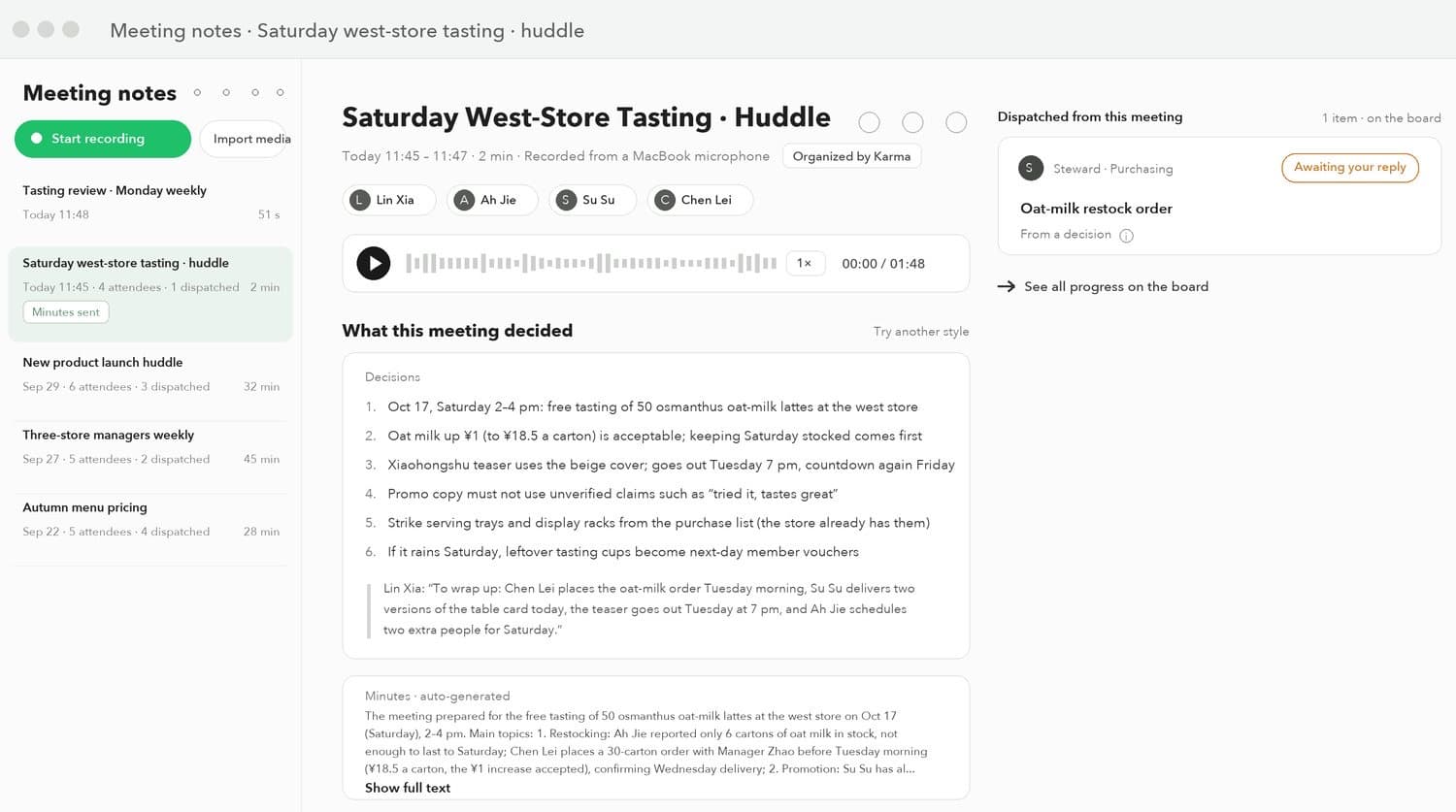
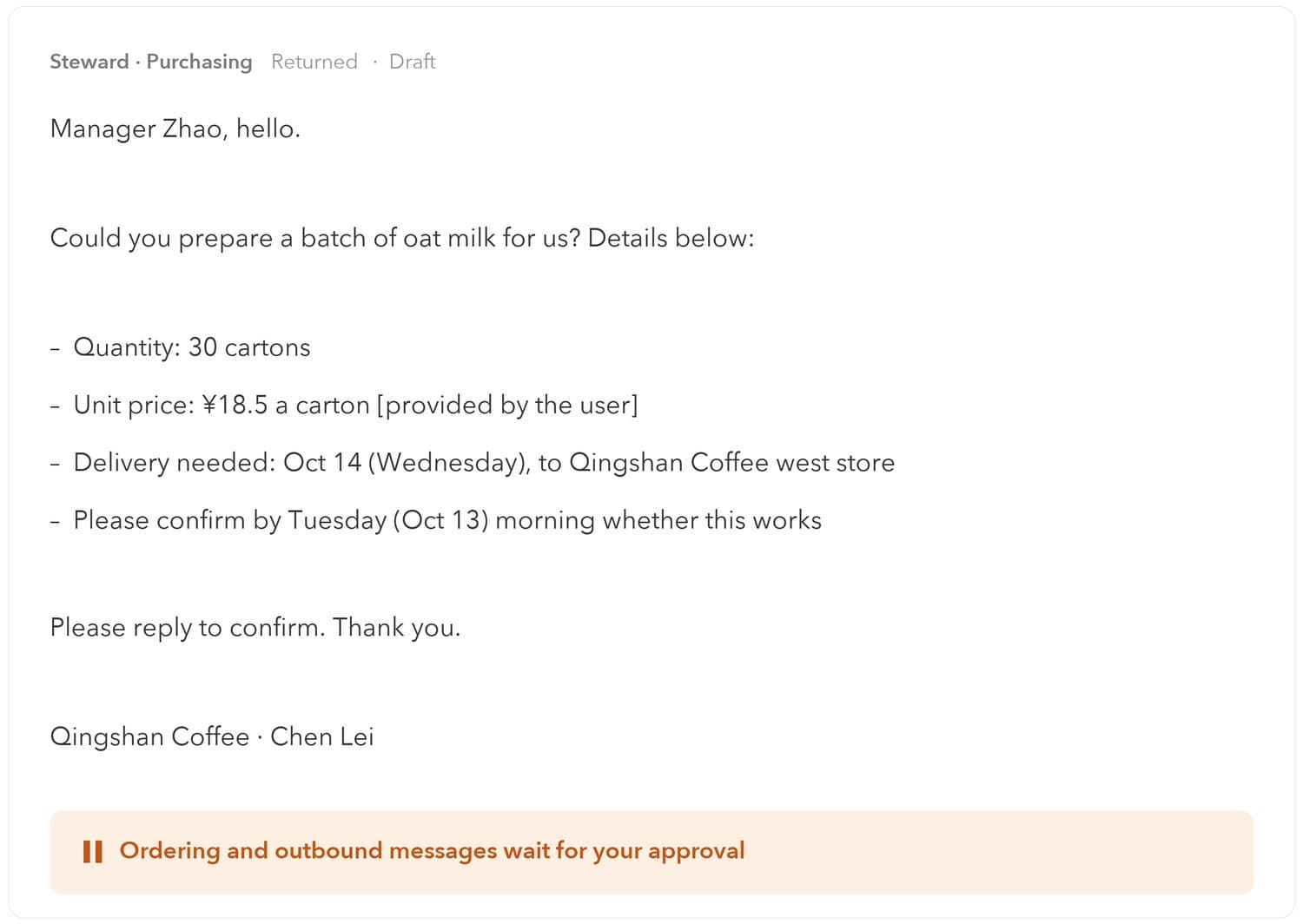
Deletion is the unit kind. Removing a meeting removes the recording, transcript, notes, and voiceprints together, which is the guarantee the review above tells you to test for. Action items dispatch to the avatar that owns the work, such as a purchasing avatar drafting the supplier email from the meeting's numbers, and anything outward-facing, such as sending that email or placing the order, waits for the owner's approval, because an avatar's permissions are set by the owner, with actions judged outside the model. The notes and the voiceprint history are part of the avatar's memory, and that memory belongs to the owner rather than to a model vendor, so a model switch does not reset who the assistant recognizes or what it remembers deciding.
The tier split maps onto configuration rather than onto a second product: sensitive meetings run on the local avatar; a public webinar, where custody does not matter, can go to whatever hosted tool fits. Setup details for the meeting workflow are in the docs.
Frequently asked questions
What does an AI meeting assistant record?
Potentially seven kinds of artifact: live audio, the transcript, speaker labels and sometimes persistent voiceprints, interpreted outputs such as summaries and action items, anything visible in screen shares and meeting chat, material retrieved from connected work apps during the call, and the assistant's own drafts. Each can have its own storage location and retention clock.
Are AI meeting assistants safe for confidential meetings?
They can be, if the processing arrangement matches the meeting's sensitivity. A hosted assistant places artifacts in the vendor's custody under the vendor's terms; a self-operated assistant keeps them on the team's machine. For meetings covering pricing, personnel, or client-confidential material, the dependable approach is either no assistant or one whose storage the team physically controls.
Do meeting participants have to consent to an AI notetaker?
In many places, yes. Several US states require every participant's consent to record a conversation, and persistent voiceprints trigger biometric rules such as Illinois' BIPA (2008) and GDPR Article 9 in the EU. Disclosure at the start of the call is the minimum practice; for external participants, explicit agreement beforehand is the safer one. This is general information rather than legal advice.
Does deleting a meeting recording delete everything the assistant produced?
Often not. Transcripts, summaries, voiceprints, and dispatched action items frequently survive deletion of the recording, because each artifact has its own lifecycle. The test is to delete a rehearsal meeting and check what remains. A unit-deletion guarantee, where one act removes all artifacts together, is the property to look for.
Can an AI meeting assistant run fully locally?
Yes. Transcription, speaker matching, and summarization can all run on hardware the team operates, which keeps every artifact in the team's custody. The trade is operational: the team owns the machine, the updates, and the capacity planning. Whether a given product's local claim is real can be verified with an offline test of the actual workflow.
About the author
The Karma Box Team publishes practical guides on AI sovereignty, workspace control, and vendor evaluation. This article separates documented vendor announcements from our own product's figures, cites each news fact to its outlet and date in the sentence that uses it, and marks the walkthrough numbers as our own published measurements. KarmaBox-related content appears in its own section. The article explains recording and biometric rules for orientation and is not legal advice, and it does not certify any vendor's compliance. News and link targets checked November 11, 2026.