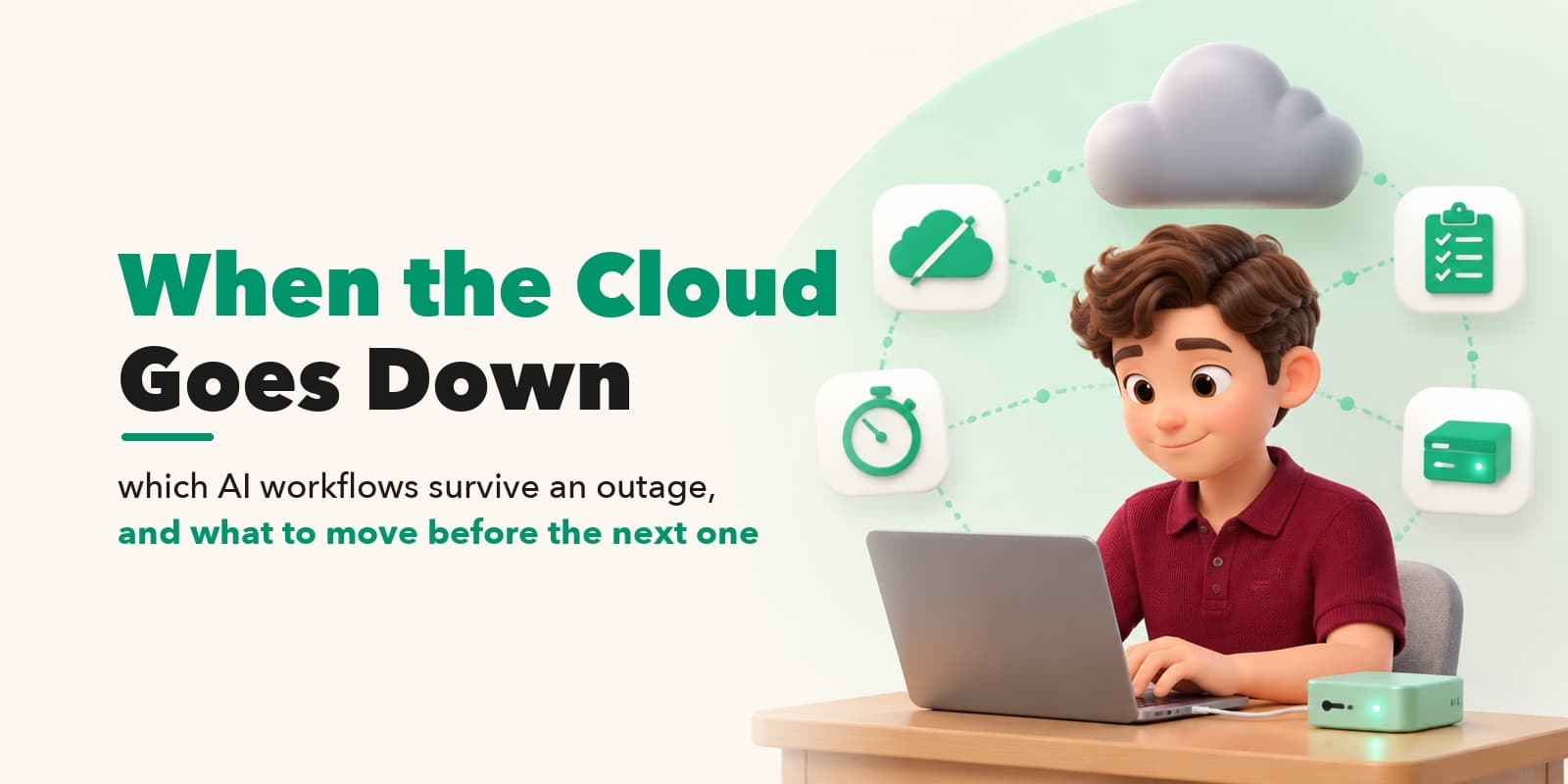
On November 12, 2026, shortly before 1 p.m. Eastern Time, people around the world started losing access to their Outlook mailboxes. Microsoft confirmed the problem within the hour: "a portion of infrastructure is experiencing elevated load across multiple regions," its Microsoft 365 Status account posted, filing the incident as EX1550543. Exchange Online took the worst of it. There were scattered reports against Teams, and Bloomberg's headline that evening added Copilot, the AI assistant Microsoft has spent the past two years wiring into the same suite (Bloomberg, November 12, 2026). The status page at status.cloud.microsoft struggled too: for stretches of the afternoon it returned "502 The service behind this page isn't responding to Azure Front Door." The page whose job was to report the outage was down with it.
A team that runs mail, calendars, meetings, documents, and now its AI assistant through one provider has one dependency. The provider builds real redundancy inside its own walls (multiple regions, alternative pathways), and on Wednesday all of it sat behind the same incident number. One Hacker News commenter, writing from inside the outage, put the customer's side plainly: "the service as a whole is a single point of failure: it either works or it doesn't." That is one user's framing. It was also an accurate description of the afternoon.
AI workflow continuity is the ability of a team's AI-assisted work to keep moving during the hours a cloud service is unreachable. On Wednesday that ability was settled by three questions, none of which can be answered during the outage itself: where does the inference run, where do the files live, and where does the login go. Work whose three answers were "on our side" kept moving. Work whose answers were "the provider's side" waited with everyone else.
Most teams cannot say in advance which answers their own workflows would give. Finding out takes one afternoon with a disconnected laptop, costs nothing, and moves the answers while there is still time to move them. One twelve-person consulting team spent exactly that afternoon in September; on Wednesday, by their own arithmetic, the difference came to about $900 per four hours of outage.
The outage, hour by hour
The timeline below is assembled from Microsoft's own status updates, as reported by The Verge and mirrored by Hacker News users while the status page itself was intermittently unreachable. Recovery was still in progress when sources were last reviewed, at 9:30 a.m. Beijing time on November 13 (01:30 UTC); Microsoft had not yet published a final incident report, so the cause described here is the company's mid-incident assessment, not a settled post-mortem.
| Time (UTC, Nov 12–13) | What Microsoft said or what observers recorded |
|---|---|
| ~17:55 | Reports begin worldwide: Outlook unreachable via web and apps (The Verge) |
| ~18:20 | Microsoft 365 Status: "elevated load across multiple regions"; incident EX1550543 filed |
| afternoon | status.cloud.microsoft intermittently returns 502 from Azure Front Door (HN users' screenshots and quotes) |
| ~23:00 | Some servers returned to service and "remaining stable so far"; traffic shifted to alternative pathways; "no ETA for full restoration" (The Verge, update 23:23) |
| 00:08 | Returned servers "can become unresponsive again once they begin receiving traffic" |
| 01:06 | Cause narrowed: a process establishing secure connections "becomes overwhelmed, causing the servers to stop processing requests" |
| 01:30 | Sources for this timeline last reviewed; full restoration not yet announced |
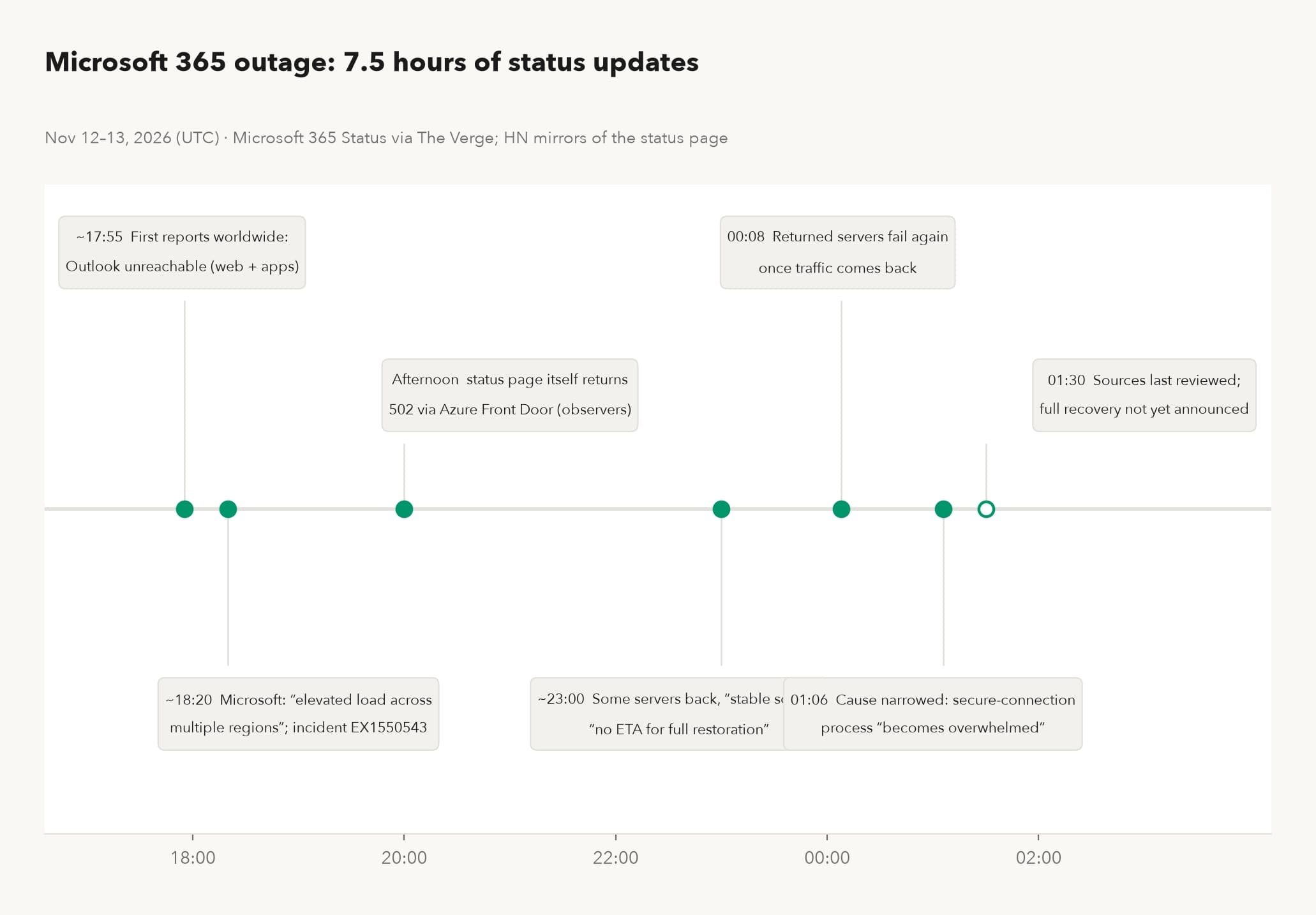
Figure 1. Seven and a half hours of status updates, from first reports to the mid-incident cause. Sources: Microsoft 365 Status via The Verge (updated November 12, 2026) and Hacker News mirrors of the status page.
What this meant on the ground varied by how much of a team's day ran through the suite. One commenter posted a notice from New York City's Department of Education telling school staff that they could neither send nor receive email (a relayed notice, quoted by one person, but consistent with the wider reports). An infrastructure manager claimed the large organization they support "incurred more Exchange downtime today than they had all of last year with their on-prem Exchange servers." That is a personal account, and the comparison can't be verified from outside. It is quoted here because it states the trade cleanly: the cloud's availability is usually better than what a small team can build, and when it fails, it fails for everything at once.
The second half of the timeline hides a detail worth catching. At 23:00 Microsoft said some servers had returned and were "remaining stable so far"; the 00:08 update then admitted those same servers "can become unresponsive again once they begin receiving traffic." A team that scheduled work in between, on the assumption recovery had already happened, got cut off a second time. Service during a recovery window is more fragile than service on an ordinary day, and building that into a team's expectations cuts the second wave of confusion down considerably.
The AI part drew fewer headlines and will matter more each quarter. Copilot sits inside Microsoft 365. When the suite's infrastructure degraded, the assistant degraded with it, and every workflow that leaned on the assistant (drafting, summarizing threads, preparing a meeting) stopped alongside the mailbox it reads from. An AI tool inherits the availability of whatever cloud it lives in. A workday that leans on the tool inherits it too. And the exposure is no longer limited to a person waiting on a draft: scheduled automations and agents caught mid-task during an incident either stall, retry, or act on whatever stale state they can still reach, and only the first of those three is harmless.
November 12 was not an isolated case. The day before, Ubuntu's package infrastructure had its own global outage, with Canonical posting an official incident page. Two days, two unrelated providers, two unrelated causes, and each set of customers learned the same lesson once: however large the cloud you rent, to you it is a single switch.
The redundancy you rent ends at the provider's walls
Multi-region sounds like the answer to outages, and inside one provider it often is. Wednesday showed its limit. The elevated load crossed regions because the thing customers depend on is the service, and the service spans regions. Redundancy inside a provider protects against failures smaller than the provider.
The recovery pattern showed a second mechanism worth knowing. Servers that Microsoft returned to service became unresponsive again "once they begin receiving traffic," by the company's own description. A commenter who says they worked in infrastructure at a large CDN described the general shape (a personal account, but a standard one in the field): after an incident, every client retries at once, automatically and manually, so the moment of recovery carries more load than a normal afternoon. Recovery is a climb against a retry storm, which is one reason "partial recovery" can stretch on for hours.
Then there is monitoring. The status page sat behind the same Azure Front Door as parts of the service it reported on, so at moments during the incident, customers could not even confirm the outage from the official source and fell back to social media and Hacker News. A status check that lives inside the thing it checks will be least available exactly when it is most needed.
This particular hole can be patched this afternoon, before anything else in this story. An independent probe is any check that runs from outside the provider: a cheap virtual machine at a different company requesting your critical endpoints once a minute, a small box in the office doing the same over a phone hotspot, or at minimum a bookmarked list (the provider's status page, a third-party down detector, the provider's status account on social media) kept somewhere people can find it when chat is down. The bookmark version takes ten minutes. During Wednesday's incident the working information sources were Hacker News threads and screenshots of tweets; a team with its own probe knows in one minute what others debate for twenty, and "when did it start for us" becomes a logged fact instead of a memory.
It also helps to put numbers on what the contract already admits. Enterprise cloud agreements commonly promise 99.9 percent uptime. Over a year of 8,760 hours, 99.9 percent still allows about 8.8 hours of downtime (straight arithmetic on the promised percentage, ignoring maintenance carve-outs and how each contract measures an outage). That is roughly one full working day per year, inside the promise. At 99.99 percent the allowance is about 53 minutes, and each extra nine is priced accordingly. The remedy when the promise is missed is typically a service credit, a percentage off that month's bill, and in many agreements the customer has to notice the breach and file the claim within a deadline to receive even that. The credit compensates the subscription. It does not return the afternoon.
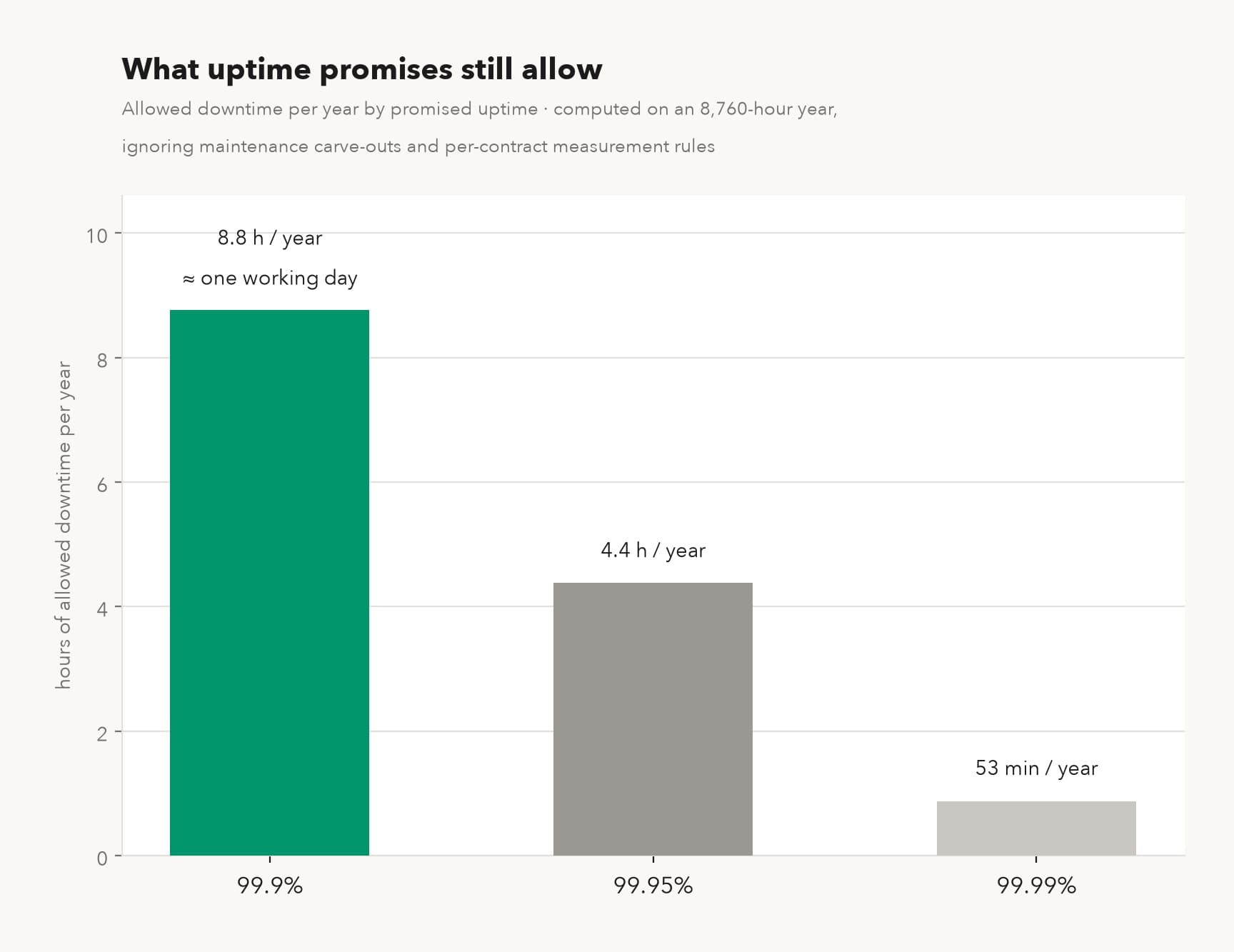
Figure 2. What uptime promises permit: allowed downtime per year at three common service levels (computed on an 8,760-hour year, ignoring maintenance carve-outs and per-contract measurement rules).
Three questions decide what survives
Most teams believe they know what they depend on. The list they would write from memory names the big tiles: mail, chat, the document suite. The dependency that actually stops work on outage day is usually smaller and stranger than any of those. A login that silently routes through the affected provider's identity service. A desktop app, sold as local software, that refuses to open a file it considers unsynced. An assistant that turns out to be a thin window onto a cloud model. Every one of these failures resolves to one of three questions, and each question can be answered on an ordinary Tuesday, one workflow at a time.
None of these three questions is new. What is new is how much weight AI has added to them. Two years ago an outage meant mail and documents stalled for an afternoon. Today, drafting, summarizing, triaging, and transcribing have each quietly grown their own dependency on a cloud model, so an outage now breaks steps embedded in the middle of a dozen workflows at once. Break one link in the middle, and the whole chain stops.
Where does the inference run? Inference is the step where a model actually computes its answer. For most hosted assistants it happens in the vendor's datacenter, so the assistant inherits that datacenter's availability, which is what Copilot demonstrated on Wednesday. The practical news is that this stopped being a binary choice: local models on a capable desktop now handle drafting, summarizing, and first-pass review comfortably, while long-chain reasoning at frontier scale still generally needs the cloud. So the question pays per workflow, never per team. The Thursday report's drafting step can move to a local model this week even if deep research stays where it is.
Finding out what a local model can actually handle today doesn't take a debate. Pick three tasks a cloud assistant genuinely did yesterday (a long email that needed a reply, a meeting summary, a first-pass draft), redo each one on a local model running on an ordinary desktop, and put the two versions side by side. The comparison answers the question itself: some tasks show almost no difference between versions, others show the local version falling noticeably short. The ones with the real gap are the ones that genuinely need the cloud. The rest only feel that way out of habit.
One kind of AI workflow deserves a harder look than the rest: the kind that gates other people's work. A review bot that must approve before code merges, an assistant that routes approvals, a classifier that triages the inbox before humans see it. When a gate like that runs on hosted inference, an outage stops the gate, and then it stops everyone queued behind the gate, which multiplies a single dependency into a department-wide one. On a normal day the gate is invisible. Knowing which of your queues form behind hosted inference is worth the twenty minutes it takes to trace them.
Where do the files live? A draft that exists only in cloud documents is unreachable even when the editor that opens it is sitting on the desk. The same goes for the working set behind any deadline: contracts under review, the invoice queue, the slide deck due at five. A copy that lands on a disk the team controls every night turns "stopped" into "delayed." The copy has to be real, though, and recency is the whole game: a local copy that is three weeks stale announces itself only when someone opens it under pressure, which is the worst possible time to learn the sync job died in October. The practical shape is small: define the active set (this week's deliverables and whatever is under review, never the whole archive), sync it one way to a machine in the office every night, and have someone open a file from it once a month to confirm the copies are current. Credentials are files too, and they fail more expensively: an API key held only in a cloud vault is unreachable at exactly the wrong moment, which is why API key self-custody is its own question with its own checklist.
Where does the login go? Identity is the dependency almost nobody lists. A tool can be local in every way that matters except the sign-in screen, and on outage day the sign-in screen is the way that matters. The check costs a few minutes: sign out of three tools the team uses daily, sign back in, and note whose domain each login page is on. Teams that run this check for the first time tend to find at least one surprise, often the accounting software whose login page turns out to be hosted by someone else entirely. Session lifetimes shape the damage once an outage starts: a machine that was already signed in often keeps working until its session expires, while the colleague who signed out for lunch is locked out for the duration. That is luck, though, and the durable fixes are duller: know which of your tools can work against local data without re-authenticating, and prefer, for deadline work, tools that treat the network as optional rather than as a precondition.
Two habits ride along with the three questions, and both cost nothing. The first concerns work that can wait: waiting work needs a queue, and the queue needs to live somewhere that is not the affected cloud. A plain text file on a local disk does the job; a cloud task board does not, because on outage day it is down with everything else, and the team ends up reconstructing "what were we even doing" from memory. The second concerns work that should stop. Anything that reconciles against live balances, publishes to production, or lets an agent act on external data should pause when the infrastructure under it is half-reachable, because half-reachable infrastructure is how an agent takes half-wrong actions, and errors made against stale data outlast the incident that caused them. Writing the stop list down matters as much as keeping deadline work moving. The expensive mistakes on outage days are often made by someone helpfully pushing on.
| The question | What fails when the answer is "the provider" | A check that takes minutes today |
|---|---|---|
| Where does the inference run? | The assistant stops mid-workflow, along with everything queued behind it | Switch off Wi-Fi and ask the assistant for yesterday's most routine draft |
| Where do the files live? | The editor opens; the draft it needs does not | Pause sync and open today's three working documents from the local disk |
| Where does the login go? | "Local" tools stop at the sign-in screen | Sign out of three daily tools and back in; note whose domain each login page is on |
One twelve-person consultancy counted its own week against these questions in September. Of its 23 recurring tasks, 17 touched the office suite somewhere, 14 touched a cloud identity login, 9 touched a hosted AI service, and 2 ran start to finish on machines the team controls. (One task can touch several dependencies at once; most do.)
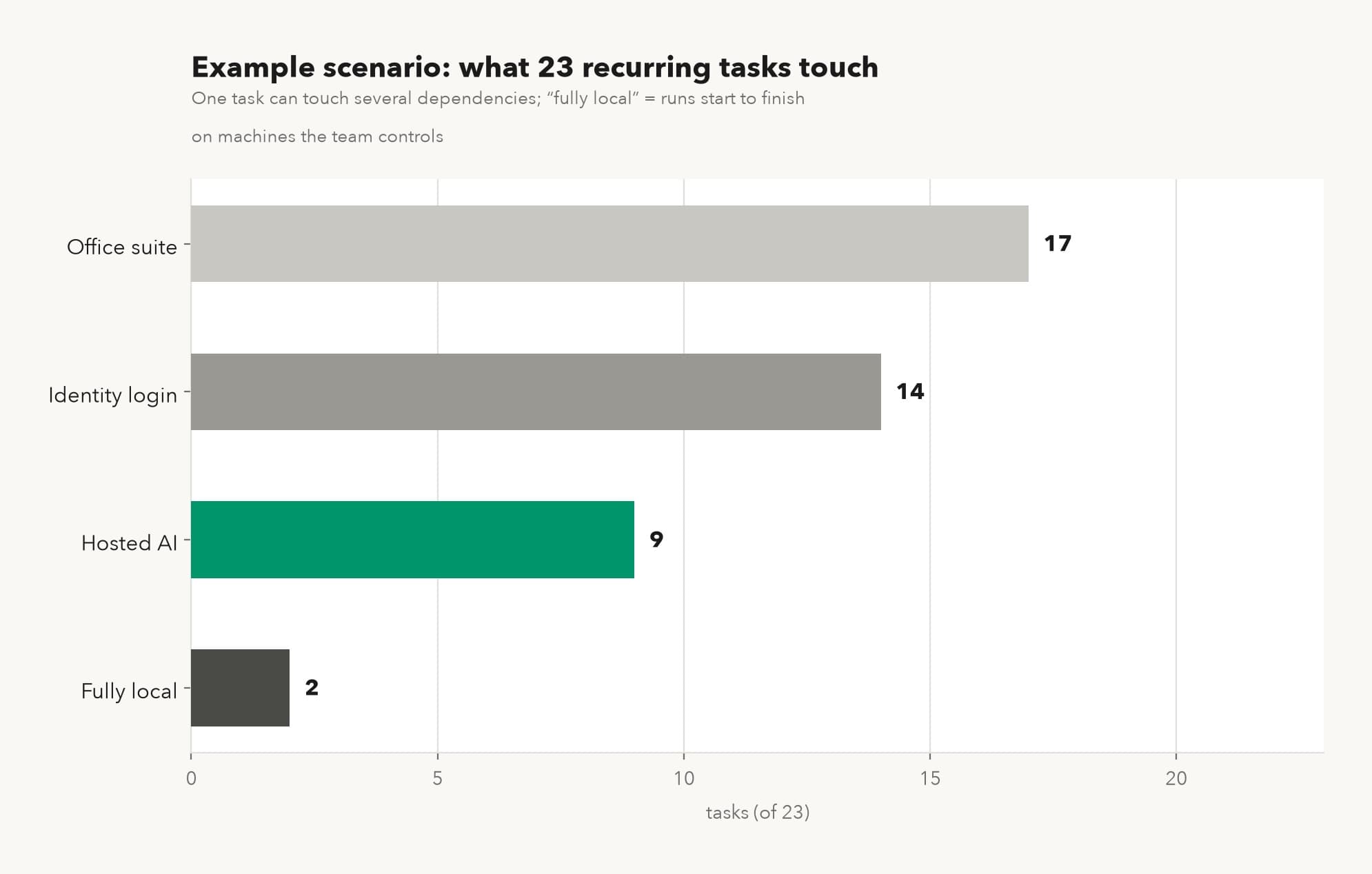
Figure 3. Example scenario: what the 23-task inventory touches (one task can touch several dependencies; "fully local" means the task runs start to finish on machines the team controls).
A worked example: twelve people, two changes
Consider that consultancy in September, after a summer with one outage headline too many. The method was unglamorous: a laptop with networking switched off, the list of 23 recurring tasks, and one afternoon of walking each task as far as it would go. No software was bought and nothing was scheduled. The point was only to replace "we think we could manage" with a list of where, exactly, each task stops. Seven of the 23 tasks carry same-day deadlines, and four of those seven touched a hosted AI service somewhere in their path. That line surprised exactly one person: the partner who had approved each AI adoption separately, over two years, and had never seen them on one page.
The baseline was thin. Of the seven deadline tasks, two ran offline cleanly (invoice entry, and contract review against local files). The weekly client report died within minutes; its draft lived in cloud documents, and the assistant that drafts it was, in the simulation, down with everything else. Three tools stopped at the sign-in screen, because the identity provider was on the simulated-outage list too, and one of the three was software the team had always described as local. Their estimate for a four-hour outage: about 21 person-hours of deadline work lost, roughly $1,365 (stopped tasks × people affected × hours, at a loaded $65 per person-hour; the rate is an assumption, adjust it to your payroll). Nobody enjoyed the afternoon. The partner later called it the cheapest consulting the firm had bought that year, which is the kind of thing partners say, but the list it produced was concrete: two files, one model, one login, in that order.
The afternoon also produced two findings that had nothing to do with software. Two tasks that should have stopped were attempted anyway, by an analyst being helpful, which turned into a one-line stop list pinned where everyone can see it. And the team's plan B for a chat outage, a phone bridge, turned out never to have carried an actual conversation; when they convened on it once, half the team had never joined it and two people had the wrong dial-in. A fallback that has never been used is a hypothesis, and September was a cheaper month to test it than November.
They made two changes to the architecture. Active client documents began syncing to an office machine every night, and the report workflow's drafting step moved to a local model. Neither change took a full week, and together they cost one desktop computer.
Then the real test arrived without an appointment. On November 12, five of the seven deadline tasks kept running through the outage. The estimated loss came to about 7 person-hours, roughly $455 per four hours instead of $1,365. The waiting work sat in a local queue instead of in people's heads. Meeting notes were the known exception: recorder and transcription both still fully cloud, logged as a gap since September and scheduled for next quarter. Client reports carry contract deadlines and meeting minutes do not, so the repairs followed the deadlines.
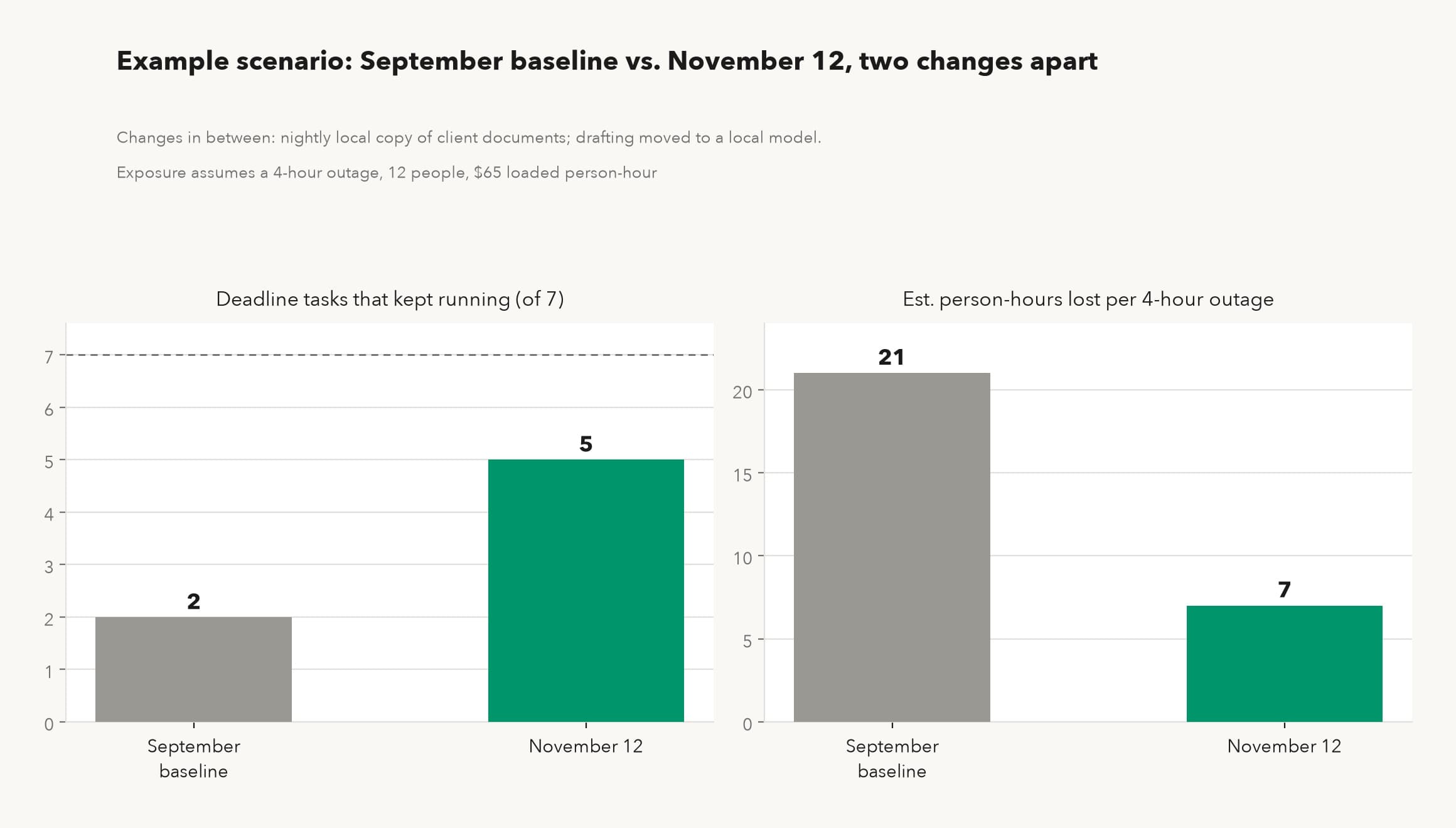
Figure 4. Example scenario: September baseline vs the real November 12 outage, two changes apart. Survival counts deadline tasks that completed offline; exposure assumes a four-hour outage at a $65 loaded person-hour.
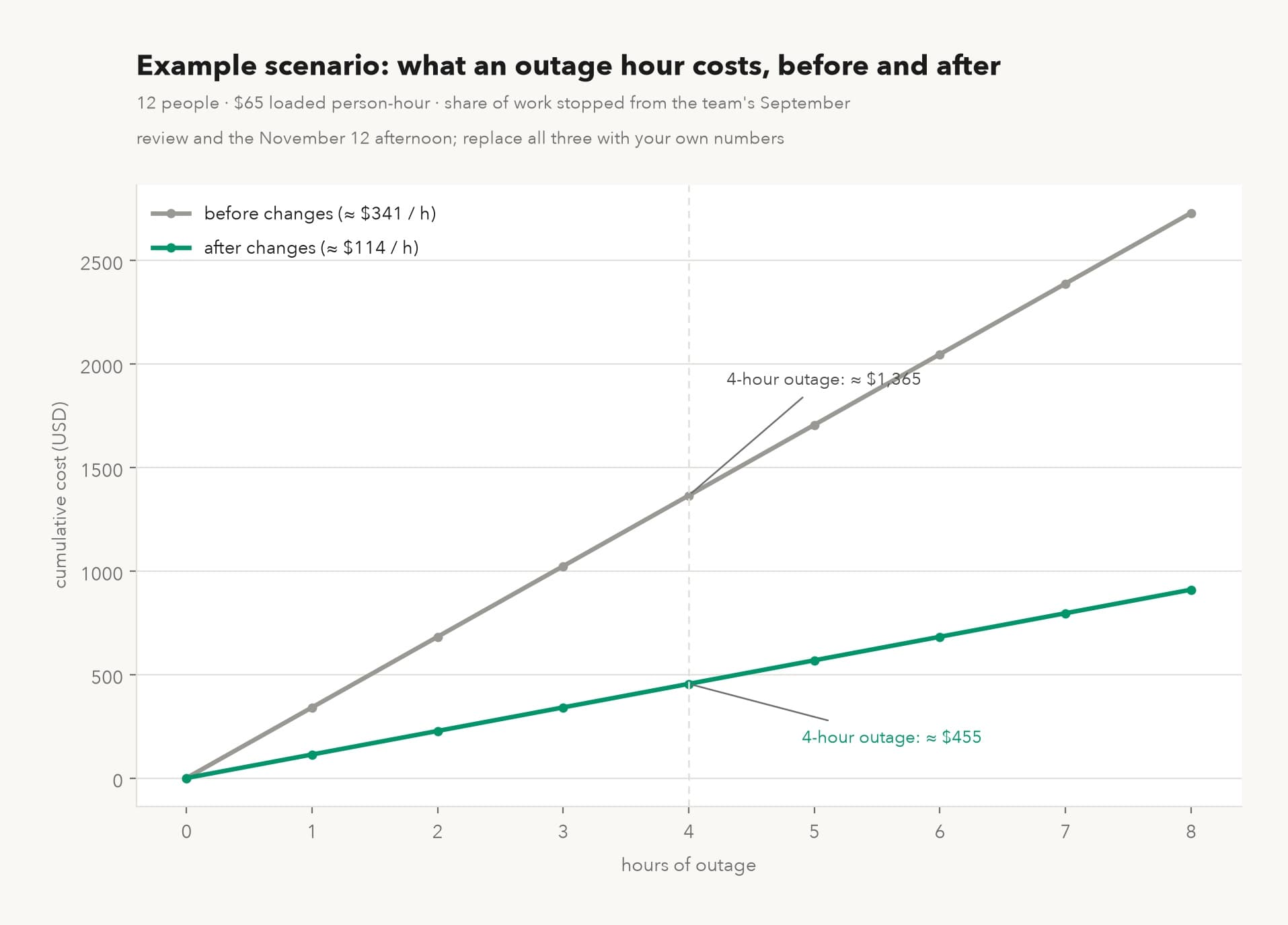
Figure 5. Example scenario: what an outage hour costs the same team before and after the two changes (12 people, $65 loaded person-hour, share of work stopped from their own September test and the November 12 afternoon; adjust all three to your own numbers).
Nothing in the example is exotic. The team bought one desktop and changed where two files and one model lived. The September afternoon's contribution was the order of events: it named which two files and which one model in September, at a cost of twelve lunches, instead of letting November 12 name them at $1,365 per four hours. The dated record matters beyond the team, too. A continuity answer that cites "tested in September, held on November 12, two known gaps" reads differently to a client, an auditor, or an insurer than one that cites intentions, and it costs nothing extra to keep, since the September notes already exist.
Architecture decided the result in advance
Replaying the same 23 tasks against three setups shows how much was settled before anyone picked a fix. An all-cloud setup keeps roughly 2 of the 23 moving through a suite outage, the two that never left local files. The hybrid the team actually reached keeps about 14: files copied nightly to a machine in the office, drafting on a local model, while mail, calendar, and the research assistant stay cloud and stop with it. A local-first setup, with a local avatar handling drafting and review, keeps about 19, giving up only the 4 tasks that need live external services (banking portals, live market data), which no architecture saves.
The numbers are specific to this team and the shape is not. The ceiling is set by how much of the work truly requires someone else's live service. The floor is set by how much of the work was left on the provider's side of the three questions without anyone deciding it should be.
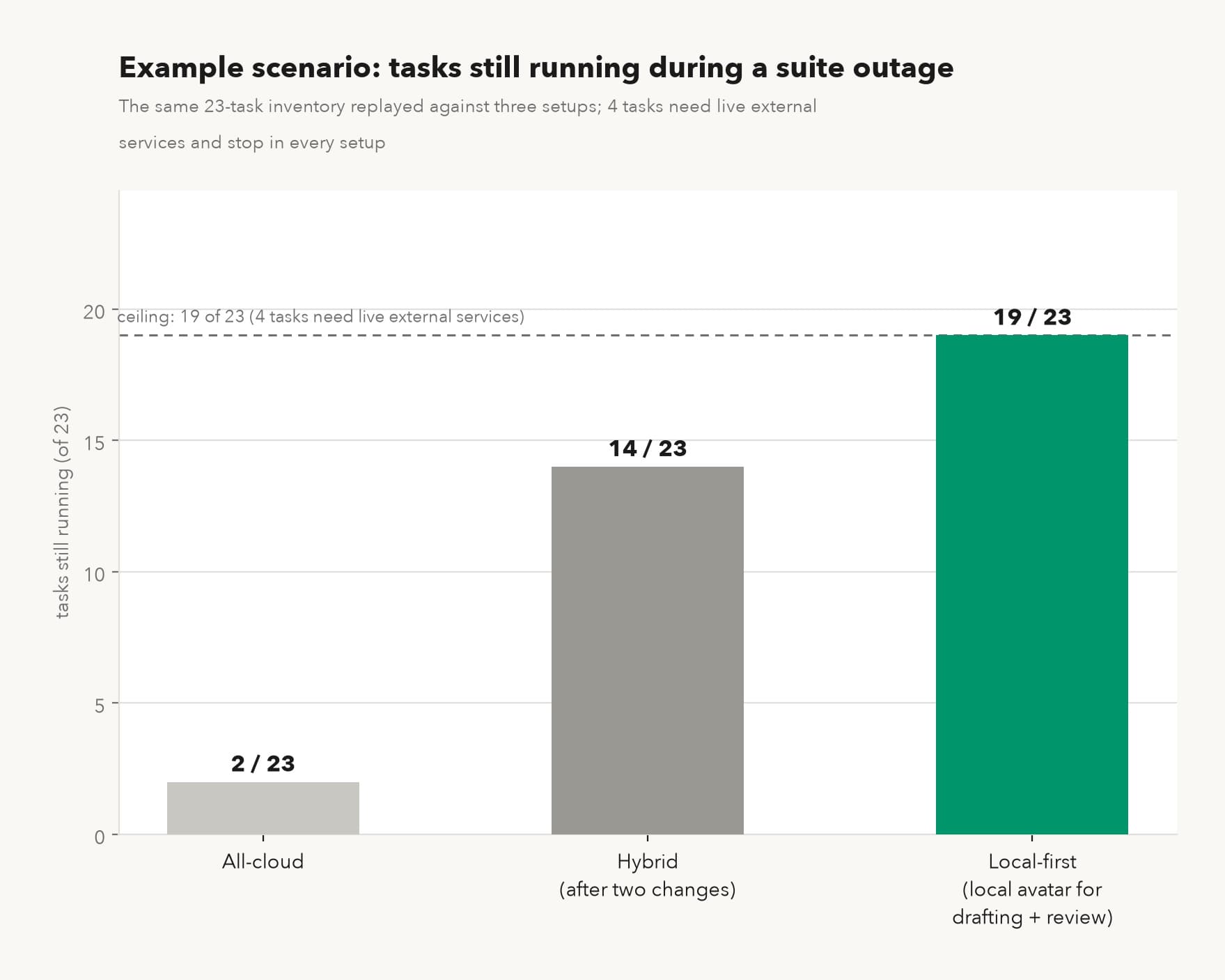
Figure 6. Example scenario: the same 23-task inventory replayed against three architectures. Tasks needing live external services (4 of 23 here) stop in every setup; the architectures differ in what else they take down with them.
The gap between 2 and 19 is not a statement about effort or diligence on outage day. It is the architecture, chosen earlier, mostly by default. Teams that want to move along that axis deliberately, rather than patch one gap per quarter, are describing the AI independence route, which starts from the same three questions and keeps going.
Working offline is a standard you can test
The pattern behind every fix in this story is the same: work survives an outage when the thing doing the work runs on equipment the team controls. Applied to AI, the pattern has a name and a test. A sovereign AI avatar is an AI assistant whose inference can run on hardware its owner controls and whose data and memory stay within the owner's boundary, so that a provider outage does not stop its work. Working offline is one of six criteria that define what a sovereign AI avatar is; it is the criterion that got tested on Wednesday, and the others cover whose compute runs the inference, who sets permissions, and who keeps the memory.
The test appeared in the table above, and it deserves to be run formally. Unplug the network and ask the assistant to do yesterday's most common task. If it answers, the workflow is yours. If it apologizes, the workflow belongs to whoever is having the incident. Most hosted assistants fail this test by design, which is a legitimate trade (frontier-scale models do not fit on a desk), but it should be a trade made deliberately, workflow by workflow, rather than inherited by default with the suite subscription.
Model dependence has loosened in a way that makes the local option more practical than it was even a year ago. Google shipped three Gemini 4 releases in the three days before the outage (Carbon to general availability November 10, a decisions API November 11, Hydrogen with an orchestrator that switches models mid-session November 12, per Google's announcements), and the direction of all three is that vendors themselves now treat models as interchangeable parts within a workflow. If the vendor's own tooling swaps models mid-task, a team can apply the same logic across the cloud boundary: multi-model routing that sends ordinary work to a local model and reaches for a frontier model when the task needs one. What has to persist through the swap is the workflow around the models: the task queue, the permissions, and the memory the agent accumulates. Outage-proofing moves that layer onto the owner's side of the line, and the broader case for owning it is the subject of sovereign AI, which extends well past outage days.
How KarmaBox puts a floor under outage days
Our own product, KarmaBox, is a platform and network for running your own AI avatars, and the local floor in this story is the job its local deployment exists to do.
The mapping to the three questions is direct. An avatar runs on a machine you deploy (an office box or a Mac), so the inference behind a deadline task happens on your side of the network cable; which deployment shapes fit which team sizes is a hardware decision, made once. The avatar's working files, task queue, and accumulated memory live inside your data boundary, which is what lets a drafting or review workflow keep moving while a provider is down. Assignment is a configuration choice: deadline-bearing and sensitive tasks can be pinned to a local avatar, tasks that benefit from frontier-scale cloud models can run on a cloud avatar, and moving a task between the two is a configuration change rather than a rebuild. Companies that need the same split with approvals and an audit trail run it through business deployments. A reasonable setup uses both halves: the three questions tell you which tasks earn a local floor, and the rest keep the economics of the cloud.
What a local floor protects, and what it doesn't
A local floor addresses availability risk: the hours when a service you depend on is unreachable. It does not address durability risk, whether your data still exists after an incident, which is a backup discipline with its own tests. It does not address exit risk, the scenario where a provider leaves permanently and you have weeks to evacuate; that is a different countdown with a different checklist, covered in what to do when an AI tool shuts down. And it does not address security risk, which can hide inside the same concentration without ever tripping an availability alarm. Days before this outage, attackers who had breached the AI infrastructure provider Fireworks turned out to have reached chat transcripts belonging to Notion's customers (TechCrunch, November 12, 2026). The same dependency that fails loudly can also fail silently, and where AI processing actually runs covers the silent side.
The floor has honest costs, and the arithmetic should include them. Hardware is capital. Someone has to administer the machine. A local machine is itself a single point of failure until it gets tested the way the cloud just was (switch it off some month and watch what stops). Electricity and the building are dependencies the cloud was partly bought to escape. For some teams the numbers will come out the other way: a few lost hours a year cost less than owning and running a floor, and accepting that risk with open eyes is a defensible conclusion. The expensive version is inheriting the answer without ever pricing it.
Frequently asked questions
Can AI assistants keep working during a cloud outage?
Only those whose inference runs on hardware the user controls. A hosted assistant inherits the availability of its cloud, as Copilot did on November 12, 2026. Local models on a capable desktop handle drafting, summarizing, and review workflows; frontier-scale reasoning still generally requires the cloud, which is why the question is worth asking per workflow rather than per vendor.
How do you tell whether an AI workflow would survive a cloud outage?
Ask three questions about it: where does the inference run, where do the files live, and where does the login go. If any answer is "the provider's side," the workflow stops with the provider. The direct test takes a minute: unplug the network and ask the assistant to do yesterday's most common task. An answer means the workflow is yours; an apology means it isn't. Run the test on the workflows with deadlines first, since those are the ones an outage turns into losses the same day.
How long was the Microsoft 365 outage of November 12, 2026?
From first reports around 17:55 UTC on November 12, the incident ran through at least 01:30 UTC on November 13 (seven and a half hours), with partial recovery underway and no full-restoration announcement at the time sources for this article were last reviewed. Microsoft's mid-incident assessment pointed to an overwhelmed process for establishing secure connections; the final report may revise that.
Does multi-region redundancy protect against cloud outages?
It protects against failures smaller than the provider: a data center, sometimes a region. The November 12 incident degraded service "across multiple regions" by Microsoft's own description, and the status page shared infrastructure with the services it monitored. Redundancy across providers, or across the cloud boundary onto local equipment, is a different and stronger property than redundancy inside one provider.
Do SLA service credits cover the cost of an outage?
No. A service credit refunds a slice of the subscription fee, typically capped at that month's bill, and pays nothing for the work that stopped. A 99.9 percent uptime promise also allows about 8.8 hours of downtime per year before any credit is owed (straight arithmetic on 8,760 hours, ignoring maintenance carve-outs). The credit compensates the subscription, and the lost afternoon stays lost.
About the author
Karma Box Team publishes practical guides on AI sovereignty, workspace control, and vendor evaluation. Factual claims in this article carry their institution and date in the sentence; quotes from individual commenters are marked as personal accounts; arithmetic states its assumptions beside the numbers. KarmaBox-related content is confined to its own section, and the limits of the local floor it sells are stated in the section that follows it. News and status updates were last checked on November 13, 2026, at 09:30 Beijing time (01:30 UTC), while the incident's recovery was still in progress.