KarmaBoxKarmaBox
Home
Product
AvatarKarmaBox
Solutions
R&DLegalCustomer ServiceMarketingFinanceCross-border E-commerceEducationSoonHealthcareSoonSME Solutions
Resources
DocsSetup guides & API referenceInsightsAI industry trends & analysisBlogProduct practice & how-tos
Manual中文Start Free
Cross-border E-commerce
Build the teamConnect your storesThe 8am briefThe spending gate
Back to SolutionsCross-border E-commerce

One person, three marketplaces. The avatars watch; anything that spends money waits for your nod.

Hopping between back endsOne page
·Amazon / Shopify / TikTok Shop

The team exists, but the avatars still can't reach your stores. All of that happens on one Connections page, and a connection only saves once it actually works. If it fails, it says so on the spot, instead of leaving one sitting there that looks connected and isn't.
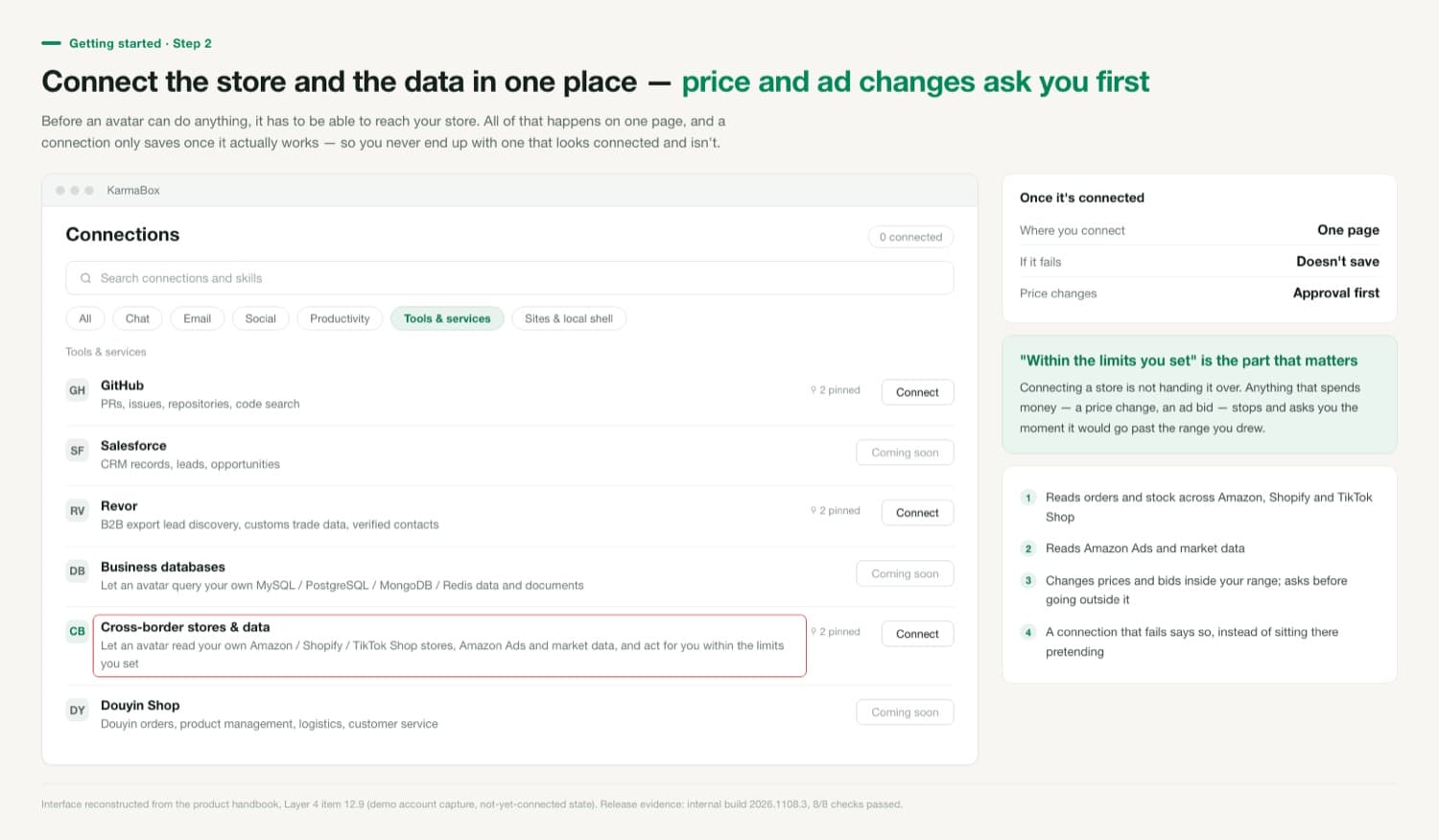
The Connections page filtered to Tools and services, listing GitHub, Revor, business databases, cross-border stores and data, and Douyin Shop, with the cross-border row highlighted
The highlighted row says it acts "within the limits you set" — the second half of that sentence is the point.

Connecting a store is not handing it over

Once connected, an avatar can read your orders, sales, stock, ads and market data. Reading is open; writing is tiered. Changes that spend money — a price, an ad bid — it makes directly inside the range you drew. The moment one would go outside that range, it stops and asks — before acting, not after.

8/8connection checks passed on internal build 2026.1108.3

Connect one marketplace first, not all three

In practice, go one at a time: connect one marketplace, run it for two weeks, check whether its judgement matches yours, then add the second. The reason is practical. Connect all three at once and when a rule turns out to be badly set, you can't easily tell whether the rule is wrong or one platform reports a metric differently. One at a time, a discrepancy points straight at its cause.

Where do my store credentials live?

Authorisation credentials stay on your own Karma Box. If you're running in local-only mode, model calls stay on your device as well and never leave that machine.

Can I give it read access only, with no ability to act at all?

Yes. Set the adjustable range to zero and it reads without writing — everything that would need an action becomes a card waiting on your decision. Plenty of people run it that way for the first month.

Start building your avatar — free

Other industry solutions

R&D

Hand it a bug, get back a mergeable fix.

Legal

Not a suggestion — an edit you can accept.

Customer Service

It has its own address.

Build a sovereign AI avatar that answers only to you

The machine is yours, the files are yours, and so is the memory — it lives in a file you can take with you. What it may and may not touch is your call. The KarmaBox web client needs no install.

Try Karma Web →
KarmaBox

Your Sovereign AI Avatar

Works for you, answers only to you. Nothing to install — build your first avatar in the browser.

Try Karma Web →

What it does here

Getting started

Build the team
Five roles join at once
Connect your stores
Saves only when it works; asks before pricing

Daily rhythm

The 8am brief
Reports; doesn't touch the store
The spending gate
Every role states what it won't do

Release evidence

Internal build 2026.1108.3, 8/8 checks passed. Interface documented in the product handbook, Layer 4 item 12.9; the one-click store connection entry point is item 12.5, verified by screenshot on internal build 2026.1109.8.

Karma BoxKarma Box

Your AI Army. Your Rules. Build, train, and command your personal AI workforce that learns, evolves, and works exclusively for you.

Product

  • Avatar
  • KarmaBox
  • Mobile Download

Solutions

  • Marketing
  • Finance
  • Education
  • Customer Service
  • Legal
  • Healthcare
  • R&D
  • SME Solutions

Resources

  • Documentation
  • Industry Insights
  • Blog

Company

  • Contact
  • Privacy
  • Terms

© 2026 Laiye Technology. All rights reserved.

Your AI Army. Your Rules.