
When a team hesitates to replace its AI model, the hesitation is rarely about capability. The newer model usually benchmarks better, costs less per task, or both. What holds people back is everything the current setup already knows: the correction someone made in March about how invoices are numbered, the client who must never be emailed before noon, the project glossary that took a quarter to settle. Nobody wants to teach all of that again, and nobody is quite sure whether they will have to.
AI memory portability is the ability to move an assistant's accumulated memory (the facts, corrections, preferences and project context it has been taught) to a different model or runtime without re-teaching it. Whether you have it is not something you learn from a feature page. It is decided by architecture: by where the memory physically lives. Memory kept in a file you hold makes a model switch a part swap. Memory kept anywhere else means some portion of what you taught stays behind, and the only open question is how much.
The model layer is not going to slow down while you decide. Within 48 hours this week, OpenAI shipped GPT-6.2 Astra and Sol (November 17), Google shipped Gemini 4 Neon, and Microsoft announced seven models at Ignite (November 18). Whether any particular release is worth adopting is a separate question, one that turns on the difference between an AI avatar and an AI model. The narrower and more practical question is what happens to your assistant's memory on the day you say yes. The short answer: it depends on where that memory lives, there are only four possible places, and you can check which one you are in this afternoon.
01What is actually inside an agent's memory
"Memory" sounds like one thing. In practice, an assistant that has worked with a team for a few months carries several distinct kinds of entries, and they behave differently when you try to move them.
| Type of entry | What it looks like | How it got there |
|---|---|---|
| Corrections | "Invoice numbers restart each fiscal year, don't renumber old ones" | Someone caught a mistake and said so |
| Preferences and house rules | "Quotes go out in the client's currency; summaries under 200 words" | Taught once, expected forever |
| Project and client context | "The Hamburg account uses the 2024 rate card, never the published one" | Accumulated across conversations |
| Billing and process facts | Cost assumptions, approval chains, who signs what | Entered during setup, refined later |
| Episodic notes | "We tried that library in June, it broke retries" | A record of dead ends |
Table 1. Five types of memory entries
Entries arrive through three channels, and the channel tells you something about the entry's quality. Some are taught deliberately, during setup or onboarding, and tend to be well phrased. Some are corrections made in the heat of a working day ("no, the other rate card"), and tend to be terse, context-dependent, and occasionally contradictory with each other. And some never make it into the system at all: they live in one colleague's head, applied by that colleague re-explaining the same constraint every few weeks. The third category is invisible right up until a migration, which is one reason migrations are clarifying.
The volume adds up faster than people expect. A team that makes three corrections per working day has roughly 390 entries after 26 weeks (five-day weeks, no decay assumed). Almost every one of those entries was paid for with a mistake: a wrong invoice, an annoyed client, an afternoon lost to a dead end. Teaching a house rule once so that nobody repeats it is the whole point of giving an assistant memory. Why that accumulated layer should belong to you rather than to a vendor account is a question of AI agent memory ownership; the concern here is mechanical. When the model changes, which of these entries make the trip?
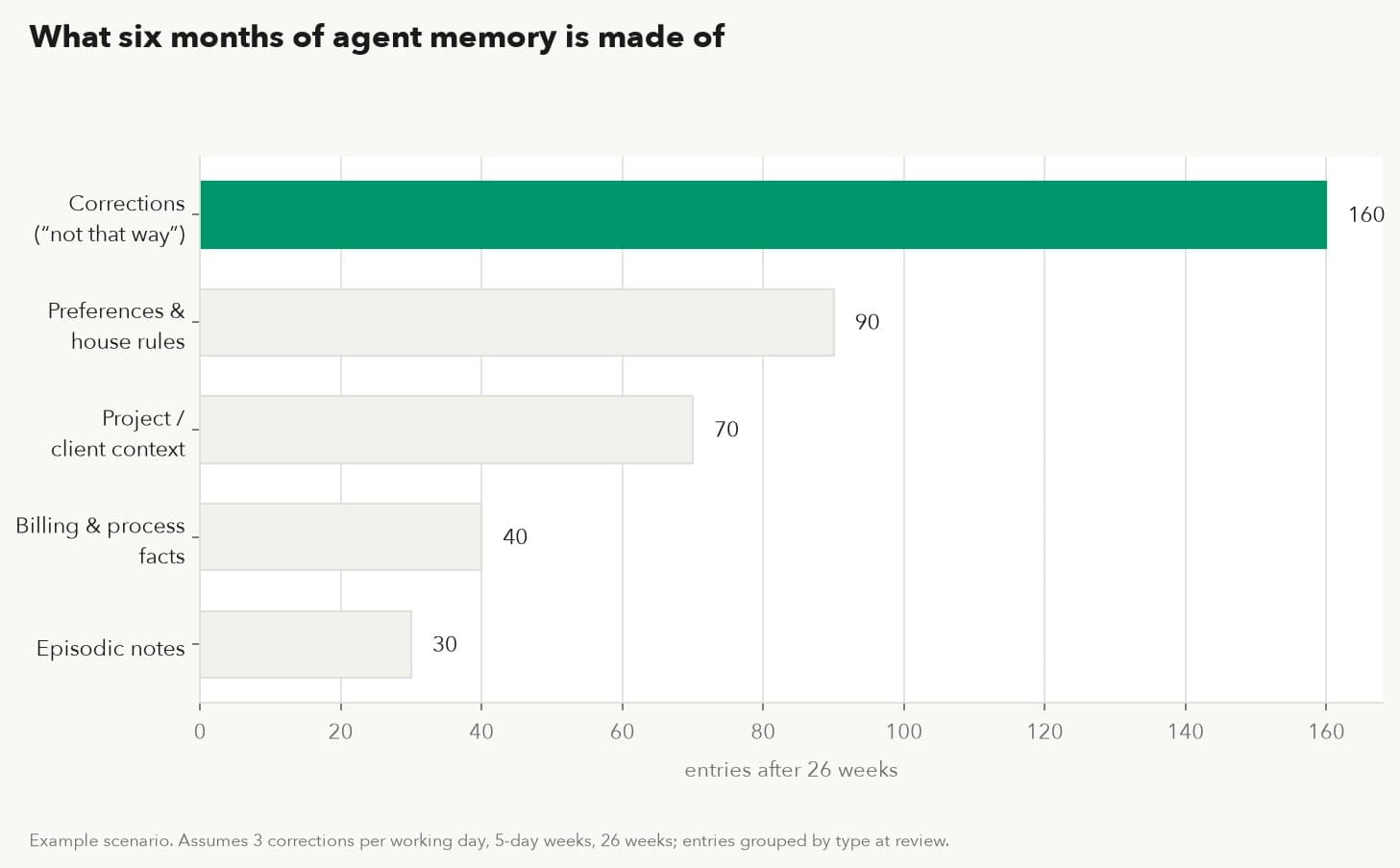
Figure 1. What six months of agent memory is made of: example scenario, assumes 3 corrections per working day, 5-day weeks, 26 weeks; entries grouped by type.
02The four places memory can live
Every assistant stores what it learns in one of four places. The place, more than the vendor and more than the model, decides what a switch will cost you.
Fine-tuned into model weights. Some teams encode behavior by fine-tuning: the model itself is trained on their examples until it answers their way. For style and output format this works, and for a while it feels like the deepest kind of memory. It is also the least portable thing in this whole landscape. Whatever lives in weights cannot be listed, inspected, exported or moved; there is no file to copy and no way to ask the model what it was taught. When the base model is deprecated, and base models are deprecated on the vendor's schedule, the tuning ends with it. A reasonable rule: fine-tune for how the assistant says things, never for what it knows about your business.
The context window and system prompt. Instructions pasted into a system prompt travel wherever you can paste text, so this layer looks portable, and the prompt file itself is. Teams that keep their system prompts versioned in a repository are already doing portability right for this layer. The catch is everything that never made it into the prompt: the tone the assistant settled into over a long session, the shorthand it picked up from your last twenty messages, the implicit "we already discussed this" that makes a long session productive. All of that is rebuilt from nothing every session, on the same model or any other. If a behavior matters, it has to be written down outside the conversation, or it was never really saved.
Vendor account memory. The major assistant products now keep account-level memory: things you told them persist across sessions and, notably, across model versions. Credit where due: if you use one vendor's app and stay inside it, a model update generally does not touch this layer, and the fear of "new model, total amnesia" is overstated for the same-vendor case. The limits show up at the edges. Move to a different vendor and there is no import ritual waiting; nobody ships a button that ingests a competitor's memory. Move to a different runtime, meaning your own orchestration calling the same vendor's API, and the app's memory feature typically is not there either. It belongs to the app surface, and your account's saved memory does not follow the API key. You can usually view and edit individual entries in a settings screen, which is more visibility than weights give you, and less than a file would. The memory is real; it is simply hosted, and the host sets the rules for where it can go.
A file you hold. The fourth place is the least glamorous: structured memory entries in a file on storage you control. A workable format is plain to the point of boring, with each entry carrying its content, the date it was taught, a status (active or superseded), the source (who taught it, or which conversation it came from), and optionally a note about which model it was tuned against. Plain text or something close to it beats a clever database here, because the file's whole job is to be readable in ten years by whatever you are running then. A file survives a model update because the model never owned it. It survives a vendor switch because it was never in the vendor's account. It survives a runtime switch because it rides along like any other document. Identity and permissions deserve the same separation, which is why AI agent identity is usually designed as its own layer rather than left inside any one platform; memory is the half of that argument that concerns what the agent knows rather than what it may do.
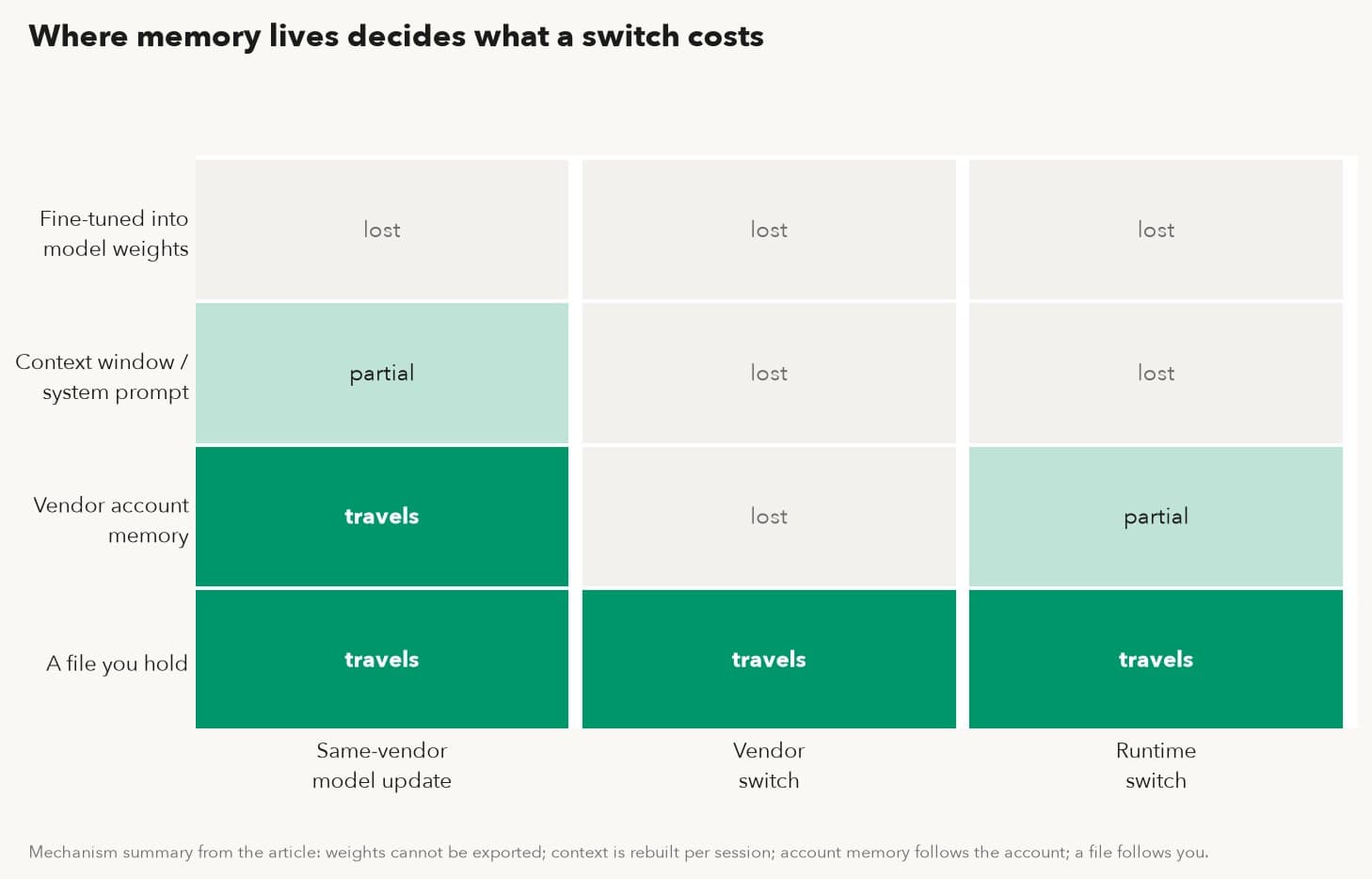
Figure 2. Where memory lives, against three kinds of switch. Mechanism per the article: weights cannot be exported, context is rebuilt per session, account memory follows the account, a file follows you.
One row of that matrix is green across the board, and that row is the whole argument for keeping memory in a file.
Locating your own setup on the matrix takes three questions, answerable in an afternoon without a single support ticket. Can you produce a file, today, containing what the assistant has been taught? If yes, you are on the bottom row. If the answer is "there is a settings screen where I can scroll through entries," you are on the account row, and the screen is worth an audit while you are there. If the honest answer is "the behavior is in a fine-tune" or "it just knows from the conversation," you are on one of the top two rows, and anything you care about up there should be written down this week, before any migration makes the point for you.
03What travels on a model switch, and what stays behind
Suppose your memory is in good shape: structured entries, exportable, yours. Even then, a model switch does not carry everything. Three things stay behind no matter how disciplined you were, and knowing them in advance turns a surprise into a checklist.
In-context habits stay behind. The way the old model "got" your team after months of daily use was partly real memory and partly a standing wave of recent context. The new model starts flat. Your memory file brings back the facts within a session; the familiarity takes a few days of normal use to re-form. This is the gap people most often misread as lost memory. It is lost rapport, and it comes back on its own, which is worth telling the team in advance so the first flat-sounding week does not get blamed on the migration.
Model-specific prompt tricks stay behind. Any phrasing you reverse-engineered to coax a behavior out of a particular model is a bet on that model's quirks. Some of it transfers. Some of it quietly inverts: an instruction that reined in one model's verbosity can read as permission to a different one. Prompt folklore should be treated as disposable, and any memory entry that encodes it should carry a note naming the model it was tuned against, so the next migration knows to re-test it rather than trust it.
Embedding indexes stay behind, and this one is mechanical, so it deserves the detail. Retrieval systems work by converting text into embeddings: long lists of numbers that place each passage somewhere in a geometric space, so that passages that sit near each other mean similar things. The coordinates only make sense inside the model that produced them. Swap the embedding model and the old coordinates are not wrong so much as meaningless, a street address from a different city's grid. Queries embedded by the new model land nowhere near documents indexed by the old one, and retrieval quality collapses without a single error message being raised anywhere. The fix is routine: re-run the indexing over the same documents with the new embedding model. The documents themselves travel fine; the index is a derived artifact, rebuilt at the price of compute and a little patience. Teams that skip this step experience it as "the new model is stupid," when nothing about the model is at fault. It is the one technical step in this whole subject that has no workaround, so it belongs on the checklist in bold ink.
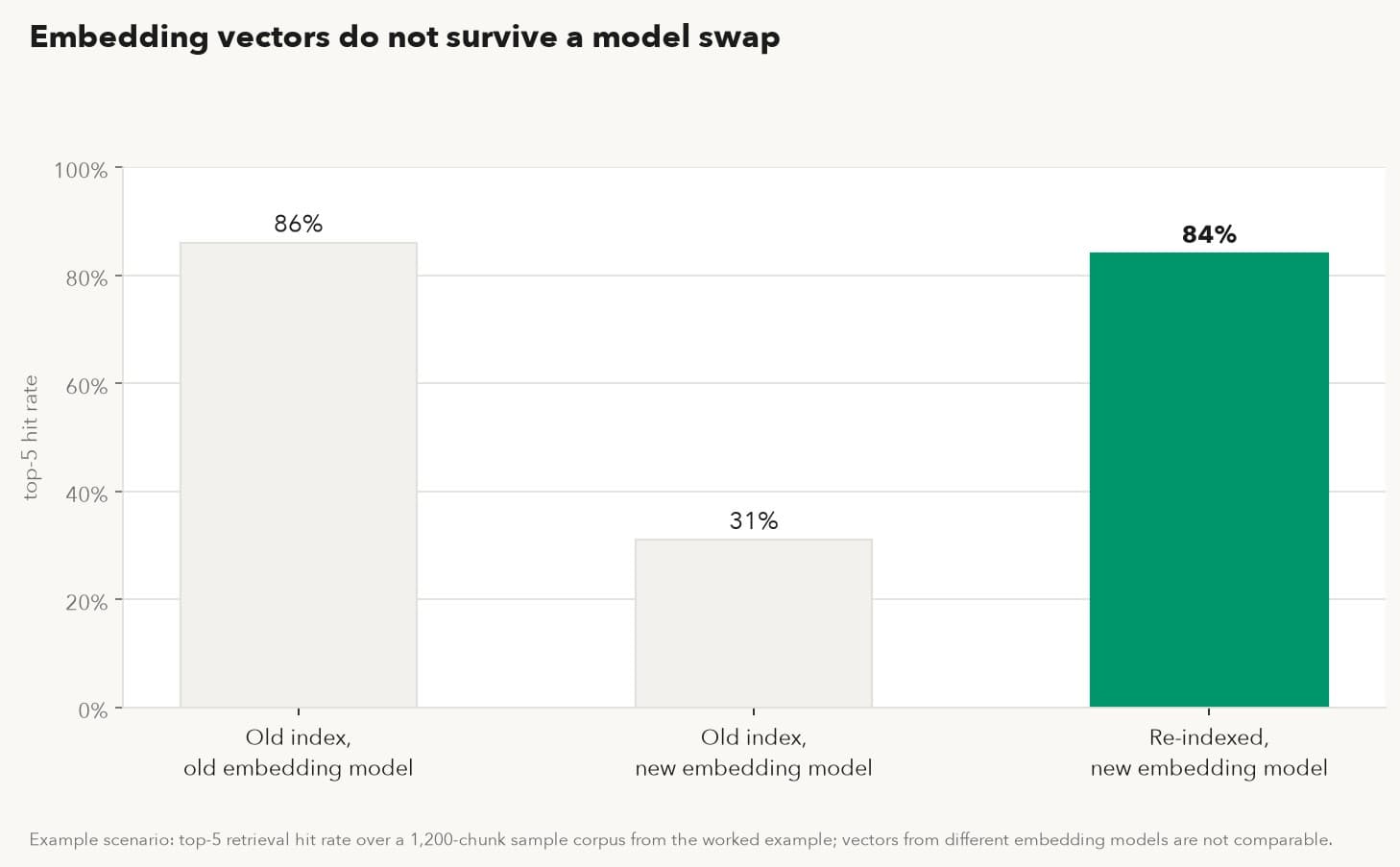
Figure 3. Embedding vectors do not survive a model swap: example scenario, top-5 retrieval hit rate over a 1,200-chunk sample corpus; mixed vectors fail quietly, re-indexing restores the baseline.
A fourth item deserves a line even though it is strictly out of scope: credentials, tool connections and permissions are not memory, and they never travel with it. Every runtime holds its own authorizations, which is the correct design, since an exported file that silently carried working credentials would be a breach kit. Expect to re-authorize tools at the destination as a separate step with its own owner, and budget it into the migration rather than discovering it at 5 p.m. on cutover day.
One more distinction saves a lot of confusion downstream. Most assistant products let you download your conversation history as a file, and that export is useful. It is also a log, which is different from memory. A log records that on four occasions someone discussed invoice numbering; it does not record which of those discussions ended in the rule that currently applies. Consider what a transcript of those four conversations actually contains: a wrong guess, a partial fix, an exception for one client, and the final rule, in chronological order, with nothing marking the last one as the survivor. Memory has state: active, superseded, wrong. State is exactly what a transcript lacks. An export of chat history is raw material for a memory file. It is the start of the work, and mistaking it for the finished product is how a team ends up confidently importing its own outdated instructions.
04The price of starting over
The alternative to migrating memory is re-teaching it, and re-teaching has a shape worth seeing before you choose it by default.
The arithmetic is plain. Those 390 entries from the half-year scenario, at a conservative two minutes each to re-encounter and re-explain, come to about 13 hours (no decay assumed, nothing forgotten in the meantime). Call it two working days of a senior person's time, spent telling an assistant things the team already paid to learn once. For a three-person shop the number is smaller and the sting is larger, because the person doing the re-teaching is also the person doing everything else.
Except that is the optimistic version, because re-teaching does not happen as a tidy 13-hour session. Entries come back the same way they arrived: one mistake at a time. The assistant renumbers the old invoices again, because the correction that prevented it is gone. The quote goes out in the wrong currency again. For a few weeks the team absorbs a second copy of errors it already paid for once, and each recurrence costs the mistake itself plus the cleanup plus the re-explaining. If even a third of those 390 entries come back through a repeated mistake averaging twenty minutes of total damage (the mistake, the catching, the fixing), the attrition version costs on the order of 40 hours spread across a month of mild chaos, which is why nobody who has done it once describes a memory-less migration as a two-day job.
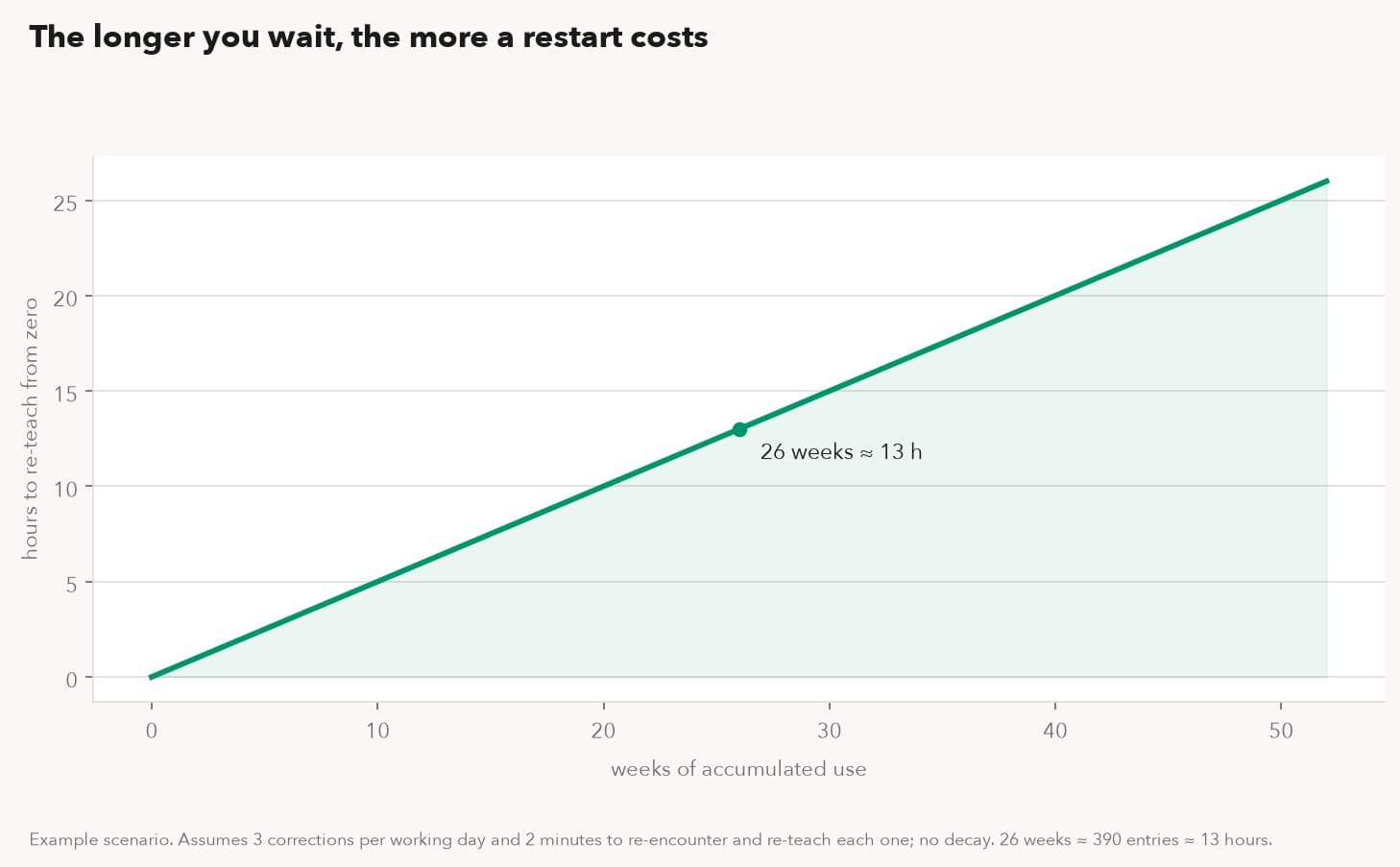
Figure 4. The longer you wait, the more a restart costs: example scenario, assumes 3 corrections per working day and 2 minutes to re-teach each one, no decay; 26 weeks ≈ 390 entries ≈ 13 hours.
This cost is also the quiet mechanism behind staying too long on a tool the team has outgrown. When switching means re-teaching six months of corrections, not switching starts to look rational. It keeps looking rational right up until the better model is two generations ahead and the gap is costing more per month than the migration would have cost once.
05Before you switch models, what should you export and verify?
A migration that protects memory is four steps. None of them is clever; all of them are skipped somewhere every week.
Take inventory first. Write down where memory currently lives in your setup: account-level memory in a vendor app, system prompts in a repository, a retrieval corpus and its index, chat logs, and the undocumented layer, meaning the rules that exist only in one colleague's head because the assistant "just knows." Put a number next to each. The inventory is usually the most sobering artifact of the whole exercise, and it is reusable: the same map decides who owns an AI agent's memory in a company on the day a person leaves and their agent stays.
Export what can be exported, into a format you can read. A workable memory file carries, for each entry, the content, the date it was taught, its status, and where it came from. Chat-log exports go through a distillation pass: sort by topic, keep the latest rule on each topic, mark what it superseded, and drop the dead ends unless the dead end itself is the lesson. For a couple hundred entries this is an afternoon, and it doubles as a review: expect to find rules that contradict each other and rules nobody remembers making. The test for each entry is blunt: if it cannot be stated as one sentence a new employee would understand without context, it is not memory yet; it is folklore.
Rebind, and keep the old binding alive. Point the assistant at the new model, import the memory file, and rebuild any embedding index with the new embedding model before judging retrieval. Keep the previous configuration runnable for a week or two. This is a configuration choice, and a cheap one: parallel bindings cost little, and they turn "the migration failed" from an emergency back into a comparison you can run both ways on a quiet afternoon.
Verify with a golden set. Before the switch, write down five to ten questions whose answers you can check (rates, codes, house rules, a calculation with one right answer) and record what the current setup answers. After the rebind, ask the new setup the same questions and compare against the record, answer by answer. Pass rates make loss visible in minutes instead of weeks. And a failure is not just a red mark; it points at a specific layer. A missed fact points to an entry that did not import. A wrong document points to a stale index. A right answer in the wrong format points to a prompt that did not carry. The golden set is small, but it is a diagnostic, and it is reusable at every future switch.
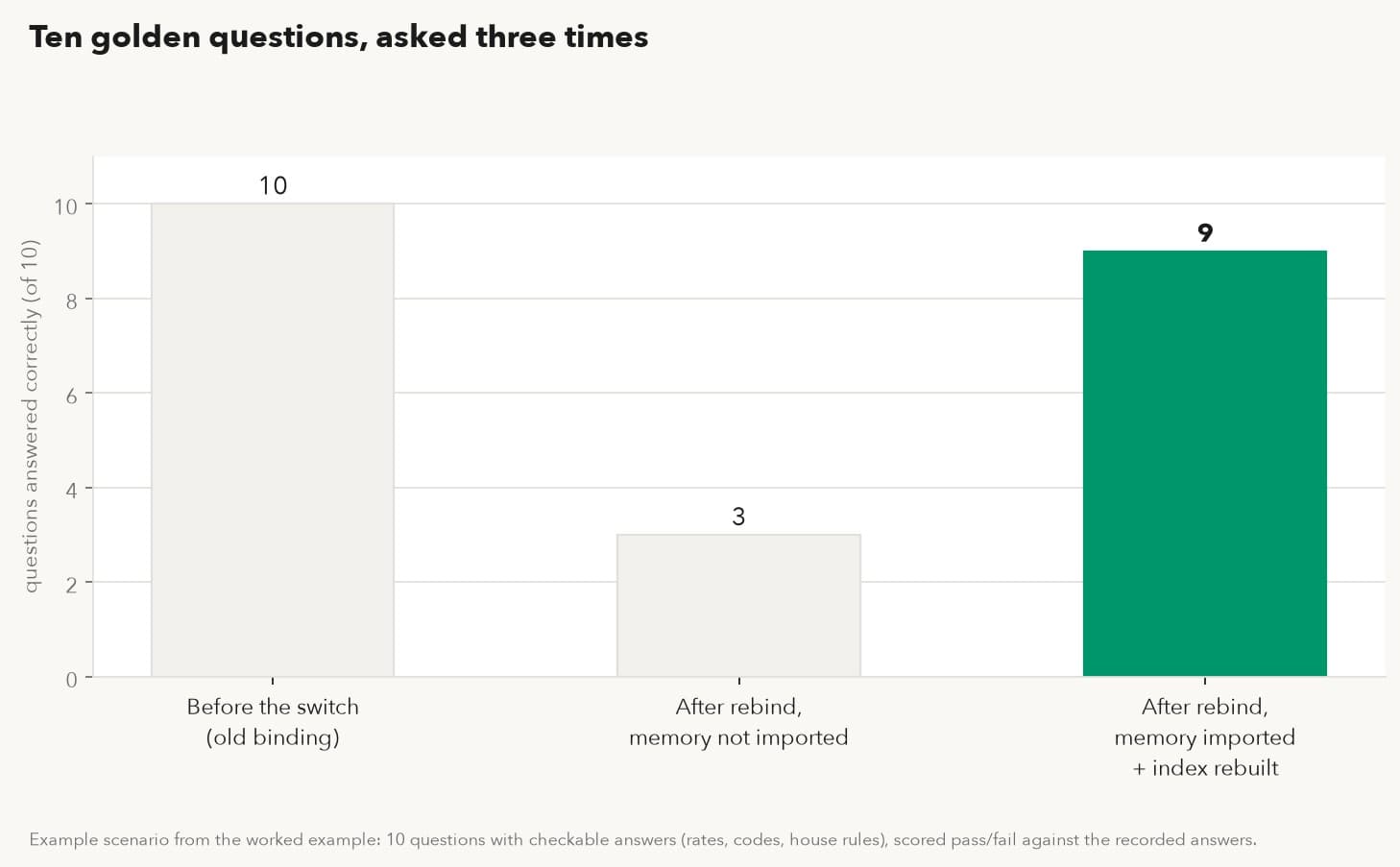
Figure 5. Ten questions, asked three times: example scenario, the same ten-question golden set scored at each stage of the migration. The middle bar is what skipping the import looks like.
Timing is part of the procedure, too. Run the rebind in a quiet week, never alongside a quarter close or a product launch, and tell the team which days are the comparison window so odd answers get reported instead of silently worked around. A migration observed by ten people finds problems in days that one administrator would find in a month.
06A worked example: a ten-person consultancy moves its assistant
Suppose a ten-person consultancy has run an assistant for 14 months: client preferences, rate cards, a 1,200-chunk retrieval corpus of past proposals, and a long tail of corrections. The partners want one of the newly released models, and nobody wants to re-live year one.
The inventory finds memory in four places: 258 account-memory entries, two system prompts already versioned in a repository, the retrieval corpus with its index, and chat logs going back to the start. The distillation pass takes one partner most of an afternoon; it merges duplicates, drops superseded rules, surfaces two contradictory instructions about rounding that nobody knew were both live, and produces a 212-entry memory file. The golden set is ten questions with checkable answers (three rate lookups, two house rules, three retrieval-dependent answers, two calculations), recorded before anything is touched.
After rebinding to the new model, the first golden-set run scores 6 of 10. Three failures trace to retrieval, the corpus was still indexed with the old embedding model, and re-indexing the 1,200 chunks fixes all three. One failure traces to a rate-card entry that was never in account memory, only in a chat log the distillation missed; it is re-taught once and added to the file. The second run scores 10 of 10. Total migration effort lands around a day and a half, most of it the distillation pass, against an estimated two-plus weeks of re-teaching by attrition. The old binding is retired after ten quiet days, and the 212-entry file, the golden set and the inventory all carry forward to whatever switch comes next.
07A week of three flagship releases
The week of November 17 compressed the argument into 48 hours: GPT-6.2 Astra and Sol from OpenAI, Gemini 4 Neon from Google, and MAI Code 2 leading seven models from Microsoft. No team evaluates all of them. The point is the cadence: flagship releases now arrive faster than most teams' quarterly planning, at a layer nobody controls from the outside. For a team whose memory is portable, each release is an option, exercised or ignored on its merits. For a team whose memory sits in one vendor's account or one model's weights, each release is a migration project it did not schedule, priced by an architecture decision made months earlier.
08How KarmaBox applies memory portability (product section)
Our own product, KarmaBox, is built on that premise: the avatar's memory lives in a file on a machine you own, and the model is the replaceable part.
The unit of work in Karma is the AI avatar, an assistant with its own memory, skills and permissions, defined outside any single model. The avatar's memory is a portable file in the sense the matrix above rewards: since the unified rebodying release (2026-10-24), the same avatar moves between cloud, a Mac, a KarmaBox device and a KarmaLith with its memory intact and no retraining. If a shop's device fails, the avatar picks up in the cloud and keeps its memory. The four-step migration above does not disappear, it becomes the supported path: moving the avatar is the export and the rebind in one motion, and what is left for you is the part only you can do, the golden set.
That design answers the four-places problem point by point. Memory is never fine-tuned into weights, so no model deprecation can strand it. It is not locked to one vendor's app surface, so trying a different model is not an account divorce. And where the file lives is your call: on a sovereign AI setup it sits on hardware in your office, next to the business objects, documents and knowledge bases that stay on your machine anyway. It is the same logic as data residency for AI workloads, applied to what the assistant has learned rather than what it has been given.
The same continuity covers more than the memory file. The avatar's knowledge bases and documents stay with it, and its skills and permission settings are defined at the avatar level rather than per model, so a model change does not reset what the avatar is allowed to do or what material it works from. What does deserve a routine is the backup: the memory file sits on your storage, so put it in whatever backup rotation your other business files already follow. A weekly copy to a drive you control costs a minute and turns the worst-case migration story into "restore the file, run the golden set."
The model side is deliberately boring. Cloud models are built into the platform; there is no key to apply for and nothing to configure before trying one. When a task needs a cloud model and that costs money, the avatar asks first and waits for your approval. Trying this week's release is therefore a decision you approve, and switching costs a confirmation rather than a setup afternoon. Sensitive work can stay on the local avatar; the cloud model is there for the tasks you choose to send out.
Whether the memory layer actually stays put is a checkable claim rather than a slogan. In our own offline test (2026-10-28 to 10-30, our own published figures), one device ran three days with the network cable pulled: 197 local inferences on the busiest day, zero business-data egress events, and the device page reading "nothing has left" throughout, with 886 conversations, 2 knowledge bases and 24 memory entries sitting on the device the whole time. Those 24 entries are the file at rest, on hardware the owner can point to. Working with the cable pulled is one of the six marks of a sovereign AI avatar, and memory that stays put is the part of it this subject needs.
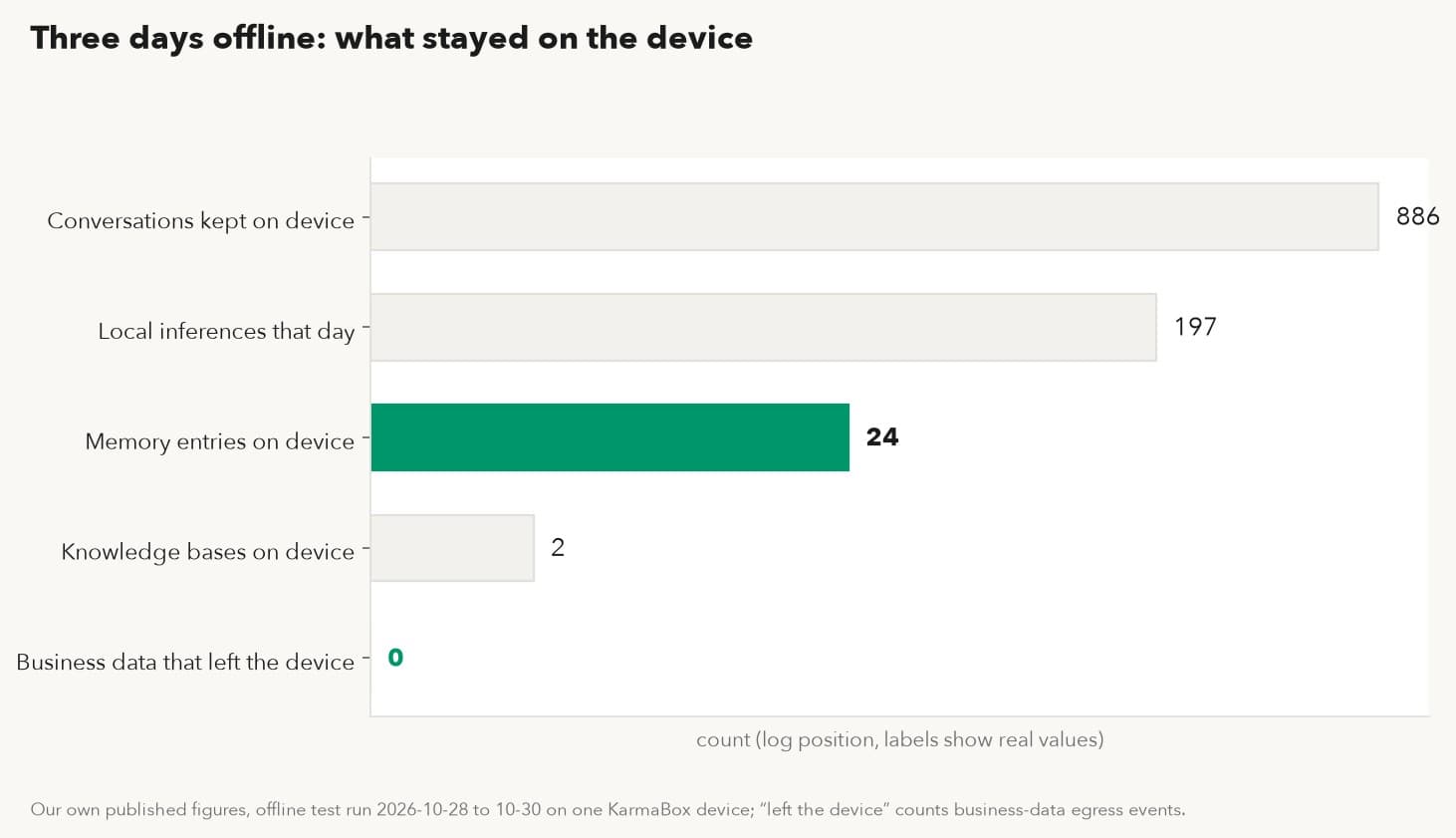
Figure 6. Three days offline: what stayed on the device. Our own published figures, 2026-10-28 to 10-30, device network cable removed.
| The problem above | What KarmaBox does | What you set up |
|---|---|---|
| Memory in a vendor account doesn't cross vendors | The avatar's memory is a file on your machine | Back the memory file up to your own storage on a schedule |
| Changing runtime or hardware means re-teaching | Unified rebodying moves the avatar across cloud / Mac / KarmaBox / KarmaLith, memory intact (2026-10-24) | After a move, run your golden set once |
| Trying a new model means keys and setup | Cloud models are built in; no keys to configure; paid calls ask for your approval first | Approve or decline the spend |
| "It's on your device" is just a claim | Offline test: 886 conversations, 2 knowledge bases, 24 memories on device; zero egress | Check the device page's "nothing has left" |
| No way to prove memory survived a move | Teach checkable facts once; verify with golden questions | Keep 5–10 questions with recorded answers |
Table 2. How KarmaBox turns memory portability into five concrete answers
Golden-set verification has an in-house example too. In a KarmaBox internal test (2026-11-15, test account), a sourcing avatar was taught a set of cost assumptions once: purchase price, freight, fulfillment fees, commission, duty, exchange rate. Asked later for the landed economics of a yoga mat, it returned a net profit of $12.55 per unit and a break-even ACoS of 41.84% in 28 seconds, matching a manual recalculation. That is a golden question by construction: one checkable number that silently depends on every taught assumption underneath it. After any rebodying or model change, the same question either returns $12.55 again or tells you precisely which assumption went missing.
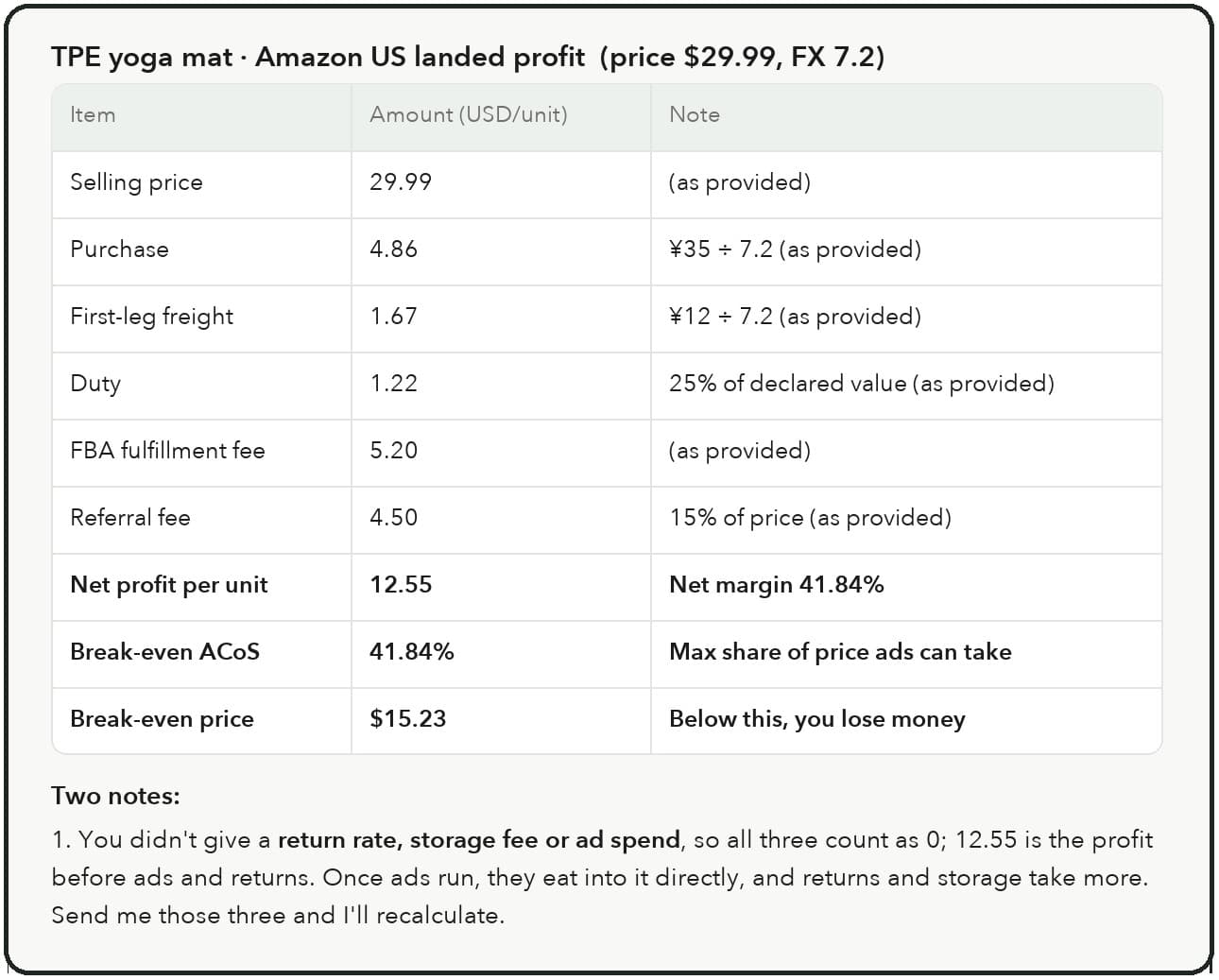
Figure 7. A cropped interface card (not a full page) from a full run recorded on November 15, 2026: one taught cost model, one checkable answer.
09What memory portability does not solve
A clean memory file does not close the capability gap between models. If the new model reasons worse about your domain, it will reason worse with perfect memory, and the golden set will pass while day-to-day quality drops. Portability protects what you taught; it says nothing about what the model can do with it.
It does not carry tone. Two models given the same memory file will still write differently, and a team attached to the old voice may need weeks to stop noticing the new one. It does not waive the embedding rebuild: re-indexing is compute you will spend on every embedding-model change, for as long as you run retrieval. And the file itself is upkeep. Entries go stale; the client who hated morning email changes jobs; the rate card gets replaced, and the memory saying otherwise is now a liability with a straight face. Someone has to prune on a schedule, or the memory file slowly becomes the same folklore pile it was supposed to replace.
Name the residual plainly: re-validation cost. Every switch, even a perfect one, costs a verification pass: golden set, a few days of watching, a re-index. Portability turns a migration from an unbounded project into a procedure, and the procedure still has a price. A reasonable cadence for the upkeep side is a quarterly prune: fifteen minutes with the memory file, retiring what no longer applies and dating what was checked. In a stretch that produced three flagship releases in 48 hours, the re-validation price recurs exactly as often as you choose to say yes, which is one more reason to keep the golden set short, written down, and next to the file it tests.
10Frequently asked questions
Does switching models mean my assistant forgets everything?
No, and the outcome depends entirely on where the memory lives. Account-level memory survives same-vendor model updates; it does not follow you to another vendor. Memory fine-tuned into weights is lost on any switch. Memory in a file you hold survives all of it.
My assistant's product has a memory feature. Isn't that enough?
It is enough as long as the vendor, the app and your account are all permanent parts of your plan. The feature is real, and it persists across that vendor's model versions. It is also neither an export format nor portable by default, so treat it as a convenience layer, and keep the canonical copy somewhere you control.
Do embeddings transfer to a new model?
No. Embedding vectors are coordinates in one specific model's space and mean nothing in another's. The documents transfer; the index must be rebuilt with the new embedding model, or retrieval quality collapses without an error message.
How many golden questions do I need?
Five to ten is usually enough to catch gross memory loss, provided each has exactly one checkable answer and the set covers different layers: a taught fact, a house rule, a retrieval-dependent answer, a numeric calculation. Record the answers before the switch, keep the set for the next switch, and retire any question whose true answer has changed in the meantime.
Does fine-tuning count as memory?
Functionally yes, and that is the problem. Whatever a fine-tune has learned cannot be listed, exported or migrated; it exists only as weights on the vendor's schedule. Fine-tune for style and format if you must, and keep facts and rules in explicit memory.
Before we commit to a new model, what should we get clear about memory?
Three things, in writing where possible: the export path (what exactly can leave, in what format), the status question (does the export distinguish active rules from superseded ones, or is it a transcript), and the rebuild bill (which derived artifacts, embedding indexes above all, must be regenerated and at what cost). A vendor with answers to all three is selling you a model. A vendor without them is selling you a place your memory goes to live.
11About the author
Karma Box Team publishes practical guides on AI sovereignty, workspace control and vendor evaluation. To keep this piece checkable: every dated claim carries its source in the sentence; the strongest case for vendor account memory (it does survive same-vendor model updates) is stated rather than skipped; example scenarios are labeled as such in their chart footnotes; and KarmaBox material is kept to its own section. What this piece does not do: rank the models released this week, or substitute for reading any specific vendor's export terms. News and product facts checked on 2026-11-19.